
 iPhone Data Recovery
 iOS System Recovery
 iOS Data Backup & Restore
 iOS Unlocker
 iPhone Password Manager
 Location Changer
 Android Data Recovery
 Broken Android Data Extraction
 Android Data Backup & Restore
 Android Unlocker
 FoneTrans for iOS
 iPhone Data Eraser
 iPhone Cleaner
 HEIC Converter
 HyperTrans
 WhatsApp Transfer for iOS
 Mac Sweep
 Data Retriever
 Mac Data Retriever
 Video Converter Ultimate
 Screen Recorder
 Phone Mirror
 Recover PC Data Now
Recover the lost/deleted data from computer, hard drive, flash drive, memory card, digital camera and more.
Learn NAS Data Recovery Easily with A Detailed Guide
 Updated by
Looking for an effective QNAP, WD, or Synology NAS data recovery solution? Losing access to files stored on a NAS (Network Attached Storage) can feel overwhelming, especially when the device contains your important work documents or personal memories. Many people use NAS drives for convenience, as they let multiple devices share storage over a network, which is why they’re so popular. However, like any other storage device, they’re not immune to failures.
Various issues can occur that put your precious data at risk, which is why knowing an effective recovery method is helpful. But before that, let us first look at what NAS data recovery involves. The following sections will provide sufficient information to help you understand it, so read through them and learn the proper process for restoring your NAS data afterward.

Guide List
Part 1. What Is NAS Data Recovery
NAS data recovery is the process of recovering deleted, lost, or inaccessible data from a Network Attached Storage device. Unlike a regular external drive, it often uses multiple drives in a RAID array, which stores your data across them for speed and safety. Brands like Synology, QNAP, etc., make these devices. Still, no matter how good they are, you can lose data in a snap if something goes wrong. That’s where data recovery comes in. You can try retrieving your files from either the RAID array or a single drive, depending on what failed. Recovery can involve software tools or professional services, and the best one will be discussed later.
Part 2. Common Causes of NAS Data Loss
NAS data loss can occur for many reasons, and knowing the cause helps you choose an appropriate recovery solution. Check out the most common ones below:
- • RAID controller failure: The controller manages the RAID array, but when it fails, the NAS may stop recognizing your drives even though the data is still there.
- • Multiple drive failure: RAID can protect against a single drive failure, but if two or more fail at once, the array can fail, making data inaccessible. RAID1 data recovery can help in this case, since RAID1 maintains a full copy on each drive, making recovery possible.
- • Accidental deletion: Someone on the network may have unintentionally deleted files or folders, and they weren’t saved in the Recycle Bin on a NAS.
- • Firmware corruption: A failed update or bug in the NAS firmware can make the device unbootable or unable to read its own drives.
- • Virus or malware: Suspicious software or data can cause issues or delete files stored on the NAS, especially if it’s from a connected computer.
- • Power surge: A sudden power surge may damage drives or NAS hardware, leading to data loss.
Part 3. NAS Data Recovery Methods
There are 2 ways to recover your NAS data. You can either rely on a professional service or use software for single-drive logical loss. Check the information below to determine which NAS or RAID data recovery option best suits your data loss situation.
Professional Lab for RAID Rebuild
A professional lab is the safest choice when your RAID array has failed due to multiple drive failures, controller issues, or firmware corruption. These labs have the tools to rebuild the RAID, extract your data, and handle complex multi-drive setups without risking further damage. So, you should not rebuild RAID yourself. Doing so without the right tools or knowledge can overwrite the data you are trying to save, making recovery impossible.
Part 4. Recover Drive Data with FoneLab Data Retriever
What if you experienced data loss on a regular drive rather than a NAS array? You may need to recover data from an external hard drive on Mac or Windows. Your lost or deleted data may also be on an internal drive, a flash drive, a memory card, or a digital camera. In this case, FoneLab Data Retriever will be the safest and most convenient recovery option.
FoneLab Data Retriever - recover the lost/deleted data from computer, hard drive, flash drive, memory card, digital camera and more.
- Recover photos, videos, documents and more data with ease.
- Preview data before recovery.
It is a data recovery program that scans a connected drive to find and recover lost and deleted files. With this program, you don't need to rely on a professional. Its beginner-friendly design and functions are enough to let you retrieve data on your own, even without prior knowledge. Numerous files and formats are supported, including docs, images, audio, and more.
Follow the stress-free steps below for drive data recovery with FoneLab Data Retriever:
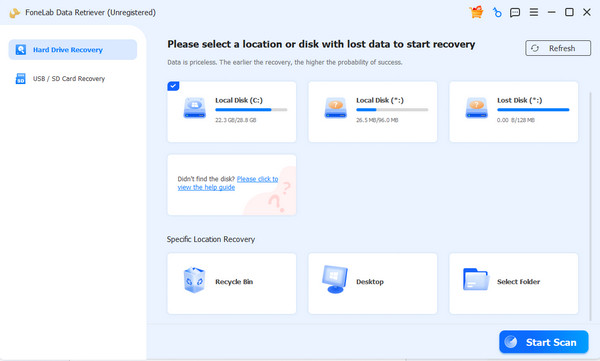
Step 1Click Free Download to get the FoneLab Data Retriever file immediately. When it’s ready, start the quick installation, and you’ll be able to launch the program in a few moments. When the interface appears, select the drive with your lost files and click Start Scan.
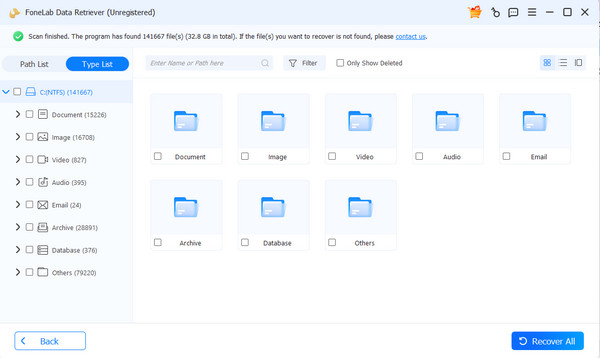
Step 2Folders will appear on the results interface. Open and explore them according to the data types you need. Feel free to use the search bar and filter feature to locate files more quickly, and once you select the items you want to retrieve, click Recover All.
Part 5. NAS Recovery Best Practices
When data loss occurs on a NAS drive, the first step is to stop using it immediately. Follow this step, as any new modification, sync, or background task can overwrite the data you are trying to save. It is also not recommended to rebuild the RAID yourself, since a failed rebuild will only cause further damage. For multi-drive failures, always consult an expert, as these cases require specialized tools and clean-room handling. These same habits also apply to hard drive data recovery, as they are best practices for protecting your data.
Part 6. FAQs about NAS Data Recovery
Can data be recovered from a NAS?
Yes, it can. Data can usually be recovered from a failed NAS, whether the problem is a damaged drive, broken RAID array, or corruption. Just use the safe methods above.
How much does NAS recovery cost?
There is no single price, since the recovery depends on the number of drives, the RAID level, and whether physical damage is involved. Professional lab pricing also varies.
Can I recover from a failed RAID 5?
It depends on how many drives failed. RAID 5 can survive one drive failure, so if only one drive is dead and the others are healthy, a professional lab can usually make recovery possible.
With the right approach, whether professional labs for RAID failures or single-drive software, you can handle NAS data loss safely. Also, don’t miss FoneLab Data Retriever for a simple yet useful data recovery process.


