
 iPhone Data Recovery
 iOS System Recovery
 iOS Data Backup & Restore
 iOS Unlocker
 iPhone Password Manager
 Location Changer
 Android Data Recovery
 Broken Android Data Extraction
 Android Data Backup & Restore
 Android Unlocker
 FoneTrans for iOS
 iPhone Data Eraser
 iPhone Cleaner
 HEIC Converter
 HyperTrans
 WhatsApp Transfer for iOS
 Mac Sweep
 Data Retriever
 Mac Data Retriever
 Video Converter Ultimate
 Screen Recorder
 Phone Mirror
 Recover PC Data Now
Recover the lost/deleted data from computer, hard drive, flash drive, memory card, digital camera and more.
Learn about Data Recovery Expert to Help with Data Loss
 Updated by
Seeking a professional data recovery service for your lost or deleted data? You may have heard about data recovery experts, but aren't sure what they actually do or when you need one. To put it simply, they are trained specialists who retrieve lost, deleted, or inaccessible files from damaged or failing storage devices. So, they’re a reliable choice when you need to recover data.
But before you immediately seek one of them, let’s first take a deeper look so you understand it better. The following sections will discuss in detail what exactly a data recovery expert does, how it helps with data loss, and when it’s time to call for their help. Aside from that, you will also learn an alternative recovery tool for simpler scenarios.


Guide List
Part 1. What Does a Data Recovery Expert Do
People rely on the best data recovery expert for one primary reason: to retrieve their files from a defective or failing storage device. As mentioned, these experts are trained to save data, whether lost, deleted, or inaccessible, from hard drives, SSDs, USB drives, and memory cards. Now, you may wonder: why not just use recovery software available on a computer?
That’s simply because, unlike regular tools, experts use specialized equipment and clean-room techniques to handle cases where the drive is physically damaged or can no longer be detected by your computer. Their work often involves diagnosing failures, replacing broken components, and extracting lost or deleted data. You must be ready for the time, effort, and cost on your part, since you will need to handle the booking, shipping, and payment for their service.
Part 2. Types of Data Loss
Another thing you must understand and consider before going to a data recovery specialist is the type of data loss your storage device has: physical or logical. Determine it below.
Logical Loss
Logical data loss happens when your files become inaccessible due to software-related issues, such as corruption, unwanted formatting, accidental deletion, and virus attacks. In these cases, the drive itself is still working fine, and the data is usually still there, but no longer accessible through the usual ways. The good news is that an expert isn’t necessary for this type of data loss, since, for instance, you can recover data from a corrupted hard drive with the help of DIY recovery software.
Physical Loss
Physical data loss, on the other hand, occurs when the storage device itself is damaged. It can happen if you drop it, hear strange clicking noises, spill water on it, or find that the drive simply isn't detected when you plug it into a computer or other devices. So, unlike the previous type of data loss, this usually means the hardware is failing, and software alone can’t fix the problem. That is where the experts come in.
Part 3. When to Hire a Professional
As we previously discussed, not all data loss situations require a professional data recovery service. But how do you know when it’s time? Well, mainly when your storage device is already defective or has physical damage. Some have already been mentioned, such as strange noises and water exposure, but other than that, hiring an expert is also necessary for RAID or NAS failures, since these systems are complex and a wrong step can make things worse; moreover, when you use DIY software, it can’t even detect your drive. That’s a sign that the problem is beyond DIY.
Part 4. DIY Expert: FoneLab Data Retriever
Now that you have a deeper understanding of how experts help with data loss, it’s time to introduce another expert in data recovery, but this time, a DIY one. Unlike physical damage, FoneLab Data Retriever, the best data recovery software, focuses on logical loss. It’s a useful DIY alternative to hiring a professional because, besides being much cheaper, it doesn’t require handling physical tasks, such as delivering your storage device to the service’s location.
FoneLab Data Retriever - recover the lost/deleted data from computer, hard drive, flash drive, memory card, digital camera and more.
- Recover photos, videos, documents and more data with ease.
- Preview data before recovery.
All it takes is a few clicks, and FoneLab Data Retriever will be ready on your computer. So, if you’re only struggling with logical issues, like accidental deletion, formatting, corruption, and virus attacks, this tool is the perfect solution. It scans your storage device to help you find and recover lost data and supports more than 1,000 file formats. Additionally, advanced knowledge is not required, thanks to the interface’s beginner-friendly design.
Follow the hassle-free steps below to use the DIY data recovery software, FoneLab Data Retriever:
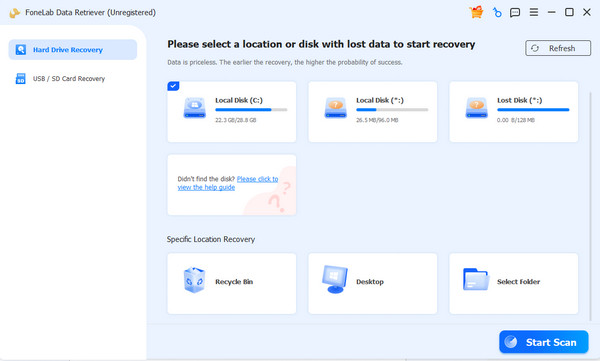
Step 1Begin with the Free Download button to get the FoneLab Data Retriever file into your Downloads folder. Once it’s completed and ready, open the file to initialize the installation. Next, you can start the tool and click your storage drive in the main interface. Then, choose Start Scan.
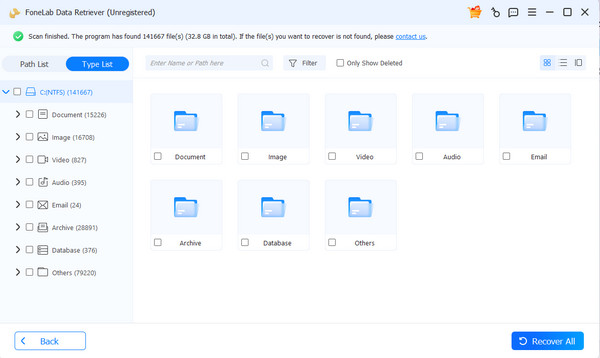
Step 2Next is the results interface, which contains folders for different data types. Open the relevant ones to find the files you need that were lost or deleted. Once found, mark the corresponding checkboxes, then click Recover All in the lower-right corner.
Part 5. How to Choose the Right Expert
Choosing how to recover deleted files from hard drive can be overwhelming, especially for beginners. What makes this more challenging is that when you decide to consult an expert, many options will be available, and you might get confused about which professional to choose. Not all services are equal, so it's helpful to check a few things before you commit.
First is their success rate, especially for the type of device you have. Do the reviews indicate a high success rate for their service? You must also make sure their pricing is transparent, with no hidden fees. Aside from that, you will know their lab is legitimate if it has a clean-room certification, since this shows they can handle physical damage safely. Additionally, confirm if they offer a free evaluation, so you can understand the problem and the cost before deciding.
Part 6. FAQs about Data Recovery Expert
How much does a data recovery expert cost?
Professional data recovery services typically cost between $300 and $3,000, depending on your storage device type, the type of data loss, and the complexity of the recovery.
Can data be recovered after formatting?
Yes, it can. Formatting is considered a logical loss, so using DIY software like FoneLab Data Retriever should suffice. But remember that you have to act quickly to increase your chances of recovering your data.
What is the success rate?
The success rate of data recovery experts depends on the provider and your data loss situation. Some professional labs report 96% success rates across all storage devices, while others report around 90%. Just note that logical issues generally have higher recovery rates.
With this guide, you can now understand what a data recovery specialist does and can choose the right solution for your data loss situation. Whichever you choose, using DIY software like FoneLab Data Retriever first is highly recommended for several reasons.


