
 iPhone Data Recovery
 iOS System Recovery
 iOS Data Backup & Restore
 iOS Unlocker
 iPhone Password Manager
 Location Changer
 Android Data Recovery
 Broken Android Data Extraction
 Android Data Backup & Restore
 Android Unlocker
 FoneTrans for iOS
 iPhone Data Eraser
 iPhone Cleaner
 HEIC Converter
 HyperTrans
 WhatsApp Transfer for iOS
 Mac Sweep
 Data Retriever
 Mac Data Retriever
 Video Converter Ultimate
 Screen Recorder
 Phone Mirror
 Recover PC Data Now
Recover the lost/deleted data from computer, hard drive, flash drive, memory card, digital camera and more.
Top 5 Best Data Recovery Software with A Detailed Guide
 Updated by
 Greetings! Can someone recommend the best data recovery software? An important document I did for school was accidentally deleted when I cleaned my folders earlier. I didn't even realize it until after I cleared my Recycle Bin as well, so using a data recovery tool is now the only option to retrieve it. I hope you can help me with this issue.
Have you ever lost an important document or file you urgently need to recover? You are not alone—unfortunately, data loss is a common problem worldwide. Hence, developers created built-in solutions, like Trash or Recycle Bin, but as in the scenario above, these may be unhelpful in certain circumstances. Luckily, dedicated software or programs are also available. The question is, which is the best one? Let the following parts guide you to the answer.


Guide List
Part 1. FoneLab Data Retriever
Our top recommendation is FoneLab Data Retriever. Among the deleted computer data recovery programs we tested, this software ranks first in overall performance. It offers both powerful features and efficiency to recover your files with ease. After all, its intuitive interface is designed for both beginners and experienced users.
Therefore, whether you're restoring lost or deleted files from your computer disk, hard drive, memory card, digital camera, etc., you can expect a smooth recovery process. Meanwhile, FoneLab Data Retriever supports various file types, including documents, emails, and media files, and you can recover them from different scenarios, like accidental deletion.
FoneLab Data Retriever - recover the lost/deleted data from computer, hard drive, flash drive, memory card, digital camera and more.
- Recover photos, videos, documents and more data with ease.
- Preview data before recovery.
View the user-friendly instructions below as an example to use the best data recovery software, FoneLab Data Retriever:
Step 1To save FoneLab Data Retriever's installer, select Free Download. Once the file is in your Downloads folder, launch it to begin the installation. When you see the Start option, click it to open the interface, then select the disk that formerly stored your lost data.
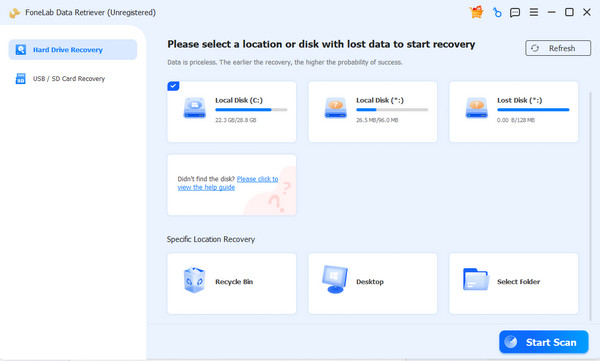
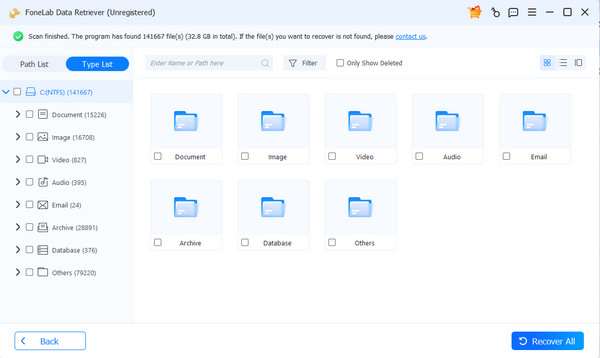
Step 2Afterward, choose Start Scan to let the program read and display your deleted data. Simply open the data type folders to find the items you will recover, and once found, mark them until you're satisfied. Finally, opt for the Recover All tab in the lower right corner.
Part 2. Disk Drill
Disk Drill is also among the most relevant data recovery software you may encounter. It is known for recovering file types, such as deleted photos, Office documents, videos, archives, and more, even after you have emptied the Recycle Bin. Its process works the same whether you're restoring data from your computer, external hard drive, USB stick, or other devices.
Follow the directions below to learn about Disk Drill:
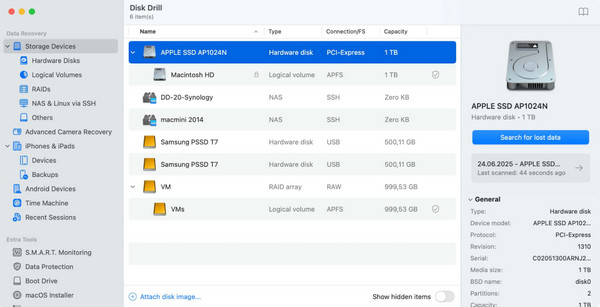
Step 1Acquire and install Disk Drill from its website, then launch the software. Next, select the drive where your deleted document was stored.
Step 2Click the Search for lost data button to scan the drive, then preview the found files when they appear. Lastly, select your lost document to recover it with the Recover All button.
Part 3. EaseUS Data Recovery Wizard
Meanwhile, like the prior software, EaseUS Data Recovery Wizard is capable of restoring a wide range of data types, including videos, emails, pictures, and more, from your computer's local storage, USB, SD card, etc. As its name suggests, you can trust its user-friendly design to make the procedure hassle-free, especially with the free preview and file filter functions for searching and selecting the deleted files correctly. Just note that it can only restore up to 2GB.
Follow the guidance below to utilize one of the best data recovery programs, EaseUS Data Recovery Wizard:
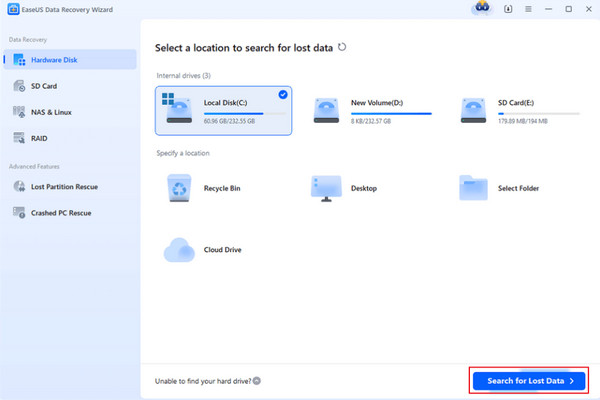
Step 1Install EaseUS Data Recovery Wizard, and after launching, choose the drive that originally contained your deleted document or file and let the software scan it thoroughly.
Step 2Once the scan finishes, take advantage of the free preview and file filter features to locate your lost document. Then, select it and click the Recover option.
Part 4. R-Studio
Another capable software for data recovery is R-Studio. It supports approximately a thousand file formats with a high success rate, and you can retrieve them in various data loss scenarios. For instance, a computer crash, accidental human error, partition loss, and more. However, the tool's biggest drawback is its complex interface, which is not ideal for beginners or casual users.
Follow the procedure below to use one of the best data recovery services, R-Studio:
Step 1Install and open R-Studio, then navigate through its more technical interface to select the drive where your deleted document was stored. Be prepared for an older-style layout.
Step 2Initiate the scan on your selected drive and wait for the process to complete—this can be slow. Then, locate your lost file from the displayed results and click Recover on the upper left.
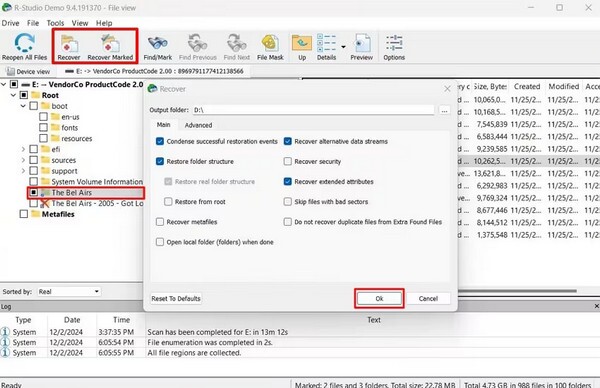
Aside from R-Studio's interface, which feels outdated, you may also find its SSD cards' scanning process a disadvantage due to its slow performance. Additionally, you will need a technician license to access some of its advanced features, like the portable/USB version.
Part 5. Stellar Data Recovery
Stellar Data Recovery is also capable of retrieving deleted data in different file formats, which include photo, video, archive formats, document, email, and audio files. They can be restored from various recoverable scenarios, like an encrypted and corrupted drive, an unbootable system, or a crashed Windows. The storage drives it supports include hard drive, PC/laptop, SSD, external drive, USB, and SD card.
Follow the task below to discover one of the best data recovery tools, Stellar Data Recovery:
Step 1Launch Stellar Data Recovery and choose the type of file you're looking for, such as documents, before selecting the drive that originally stored your deleted or lost data.
Step 2Next, run the scanning process and wait for the results. You can preview each file to find your deleted file, then select it. When ready, click Recover.
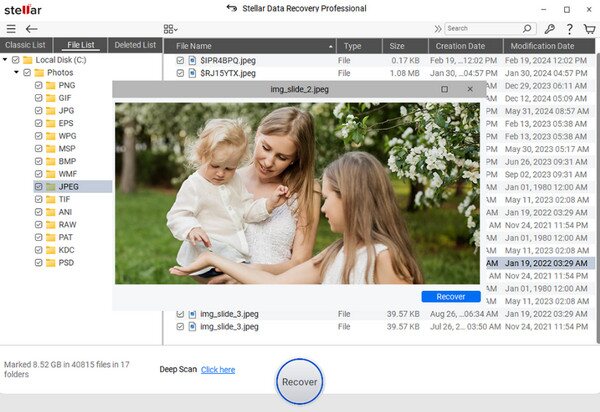
Beyond Stellar Data Recovery's helpful functions, it's also useful to know its disadvantages upfront.. This way, you'll be aware that some reviews mention inconsistent recovery results and a slow Deep Scan. The tool's free version is also limited to 1GB of data recovery, which may not be sufficient if you need to restore multiple files.
Part 6. Comparison of The Best Data Recovery Software
| Software | Ease of Use | Recovery Success Rate | Best For |
| FoneLab Data Retriever | Very easy, intuitive interface | 98-99% in most scenarios | Users wanting the best overall performance and efficiency |
| Disk Drill | Slick, modern UI | Effective for HDDs; limited for SSDs | Users wanting a modern UI |
| EaseUS Data Recovery Wizard | Clean, guided wizard process | 98-99% in most scenarios | General users needing BitLocker |
| R-Studio | Technical, cluttered, outdated interface; steep learning curve | 71-99% depending on scenario | IT pros needing RAID/network recovery |
| Stellar Data Recovery | Simple, user-friendly | Inconsistent as per reviews | Users with corrupted/RAW drives or unbootable systems |
Part 7. FAQs about Best Data Recovery Software
Can I retrieve files after emptying the Recycle Bin using any software?
Yes, you can. Most data recovery software, including FoneLab Data Retriever, can recover files even after you've emptied the Recycle Bin.
Which software is best for beginners?
FoneLab Data Retriever and EaseUS Data Recovery Wizard are both beginner-friendly with intuitive, step-by-step interfaces.
For your precious files, choosing the right recovery software, like FoneLab Data Retriever, depends on your technical comfort level and how much data you need to get back for free.