
 iPhone Data Recovery
 iOS System Recovery
 iOS Data Backup & Restore
 iOS Unlocker
 iPhone Password Manager
 Location Changer
 Android Data Recovery
 Broken Android Data Extraction
 Android Data Backup & Restore
 Android Unlocker
 FoneTrans for iOS
 iPhone Data Eraser
 iPhone Cleaner
 HEIC Converter
 HyperTrans
 WhatsApp Transfer for iOS
 Mac Sweep
 Data Retriever
 Mac Data Retriever
 Video Converter Ultimate
 Screen Recorder
 Phone Mirror
- Part 1. What is Recuva?
- Part 2. Real-World Performance Test: How Well Does Recuva Actually Recover Data?
- Part 3. The Core Drawbacks: Why You Might Need an Alternative
- Part 4. The Best Modern Alternative: FoneLab Data Retriever
- Part 5. Recuva vs. Competitors: Comprehensive Comparison Table
- Part 6. FAQs about Recuva
 Recover PC Data Now
Recover the lost/deleted data from computer, hard drive, flash drive, memory card, digital camera and more.
Learn Recuva Data Recovery and Its Leading Alternative
 Updated by
 Is Recuva effective? Whether it is effective or not, please educate me about this specific recovery tool. I’m interested to know if it’s safe, its features, price, performance, pros, and cons. I recently lost a lot of data because of an unwanted format, and it is only now that I realize I also lost some important photos and documents. I hope someone can help me with the recovery. Thank you!
Have you ever lost or accidentally deleted an important file? If so, this recovery program is among the tools you may encounter. It is a well-known name in the data recovery space, so many users turn to it when they face data loss. However, like with other tools, questions about its safety, cost, and true effectiveness are common. This article aims to address these questions to help you gain a deeper understanding of the tool. The best alternative will also be introduced later.

Guide List
- Part 1. What is Recuva?
- Part 2. Real-World Performance Test: How Well Does Recuva Actually Recover Data?
- Part 3. The Core Drawbacks: Why You Might Need an Alternative
- Part 4. The Best Modern Alternative: FoneLab Data Retriever
- Part 5. Recuva vs. Competitors: Comprehensive Comparison Table
- Part 6. FAQs about Recuva
Part 1. What is Recuva?
So, once and for all, what is Recuva? Basically, it is a popular data recovery tool for Windows, developed by Piriform. Its main purpose is to help users retrieve deleted files from hard drives, USB drives, memory cards, and other storage devices.
Key Features
The program offers various features, including:
- • Two Scan Modes: A Quick Scan for recent deletions and a Deep Scan for more thorough recovery, searching drives sector by sector to find lost files.
- • File Preview: Users can preview images and documents before recovery, helping to ensure the right files are restored.
- • Wide Compatibility: Supports NTFS, FAT, and exFAT file systems and works with Windows versions from Windows 7 to Windows 11.
- • Various File Type Recovery: Restores lost or deleted pictures, music, videos, documents, emails, and more.
Safety
This recovery tool is generally considered safe when you download it from the official website. It has a good reputation, trusted by numerous users worldwide. However, like other software, you should avoid downloading from unofficial sources to prevent malware risks.
Pricing
The program offers 2 versions:
- • Recuva Free: The free version has the essential features, allowing file recovery without many restrictions. It is ideal for casual users who only need basic data restoration.
- • Recuva Professional: Priced at $24.95/year, this version offers additional features, such as automatic updates, premium customer support, and virtual hard disk support.
Part 2. Real-World Performance Test: How Well Does Recuva Actually Recover Data?
When put to the test, Recuva's performance largely depends on the situation. For simple recovery tasks, such as retrieving recently deleted images and documents, the program works quickly and effectively most of the time. However, its performance drops significantly when dealing with formatted drives or older deletions. The Deep Scan also takes a very long time, yet still fails to recover many corrupted files. In conclusion, the program handles basic recovery well but struggles significantly with more complex data loss scenarios.
Part 3. The Core Drawbacks: Why You Might Need an Alternative
Despite its popularity, Recuva recovery has multiple limitations that may leave users frustrated. First, as mentioned, the recovery success rate drops significantly when dealing with formatted, corrupted, or overwritten drives. Second, the Deep Scan is extremely slow, which is inconvenient when you're in a hurry. Third, it lacks support for modern file systems and storage, making it less effective for deleted computer data recovery on newer devices. These reasons explain why many users start looking for a more reliable alternative.
Part 4. The Best Modern Alternative: FoneLab Data Retriever
As for an alternative, the best modern option we can recommend is FoneLab Data Retriever. Unlike Recuva, which is limited to Windows, this program works on both Windows and Mac, making it much more flexible. It is designed to recover a wide range of lost or deleted data—including pictures, documents, videos, and emails—from various storage devices such as hard drives, flash drives, memory cards, and digital cameras.
FoneLab Data Retriever also offers other helpful features. Like Recuva, it offers both Quick Scan and Deep Scan, so you only need to run the mode you require. Aside from that, its preview and filter functions are available, allowing you to find and recover deleted file on PC or other drives correctly and easily. Best of all, this recovery tool is safe to use, as it does not store or modify user data during the recovery process.
FoneLab Data Retriever - recover the lost/deleted data from computer, hard drive, flash drive, memory card, digital camera and more.
- Recover photos, videos, documents and more data with ease.
- Preview data before recovery.
Perceive the hassle-free instructions below as a pattern to learn the leading Recuva data recovery software alternative, FoneLab Data Retriever:
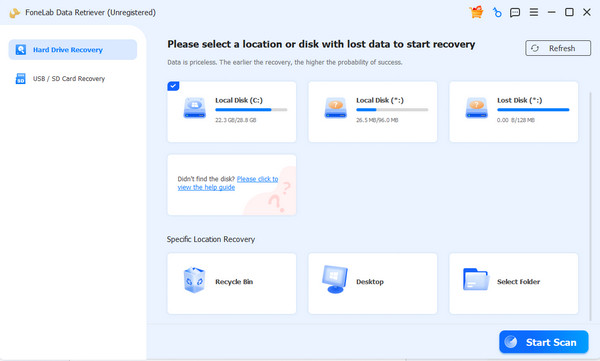
Step 1Install FoneLab Data Retriever with the help of its installer file after you click Free Download. Once the program’s primary interface is displayed, select the storage drive that formerly stored the file you hope to recover. After that, proceed by clicking Start Scan.
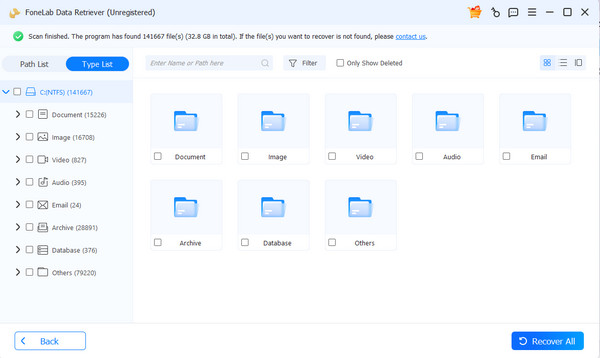
Step 2When the scanning process is complete, the interface will display your lost or deleted files organized by data type. Open and explore them to locate your files. Then, select the checkboxes for the files you need. Finally, select Recover All.
Part 5. Recuva vs. Competitors: Comprehensive Comparison Table
Here is a side-by-side comparison to help you decide which software better suits your needs.
| Feature | Recuva | FoneLab Data Retriever |
| Platform Support | Windows only | Windows and Mac |
| Recovery Success Rate | Good for recent deletions, poor for complex cases | High, even on formatted drives |
| Preview Feature | Slow Deep Scan | Fast Deep Scan |
| Scanning Speed | Yes, but limited | Yes, supports multiple file types |
| Update Frequency | Rarely updated | Regularly updated |
| Ease of Use | Decent, but dated interface | Simple and intuitive interface |
| Data Security | Safe, but no data modification guarantee | Safe and does not modify original files |
Part 6. FAQs about Recuva
Can Recuva recover files from my formatted drive?
It can attempt to, but success rates are inconsistent. While the Deep Scan may find lost files, many are often corrupted or incomplete, even after you recover them.
Does the program support permanently erased files?
Yes, it may be able to, but only if new files have not overwritten the data. The sooner you run the scan and recover the files after deletion, the better your chances.
As you have seen, Recuva data recovery works well for basic, simple file recovery but falls short in complex scenarios with slow speeds and limited platform support. For more reliable and modern data recovery, FoneLab Data Retriever is the stronger choice, offering better performance and successful results.