
 iPhone Data Recovery
 iOS System Recovery
 iOS Data Backup & Restore
 iOS Unlocker
 iPhone Password Manager
 Location Changer
 Android Data Recovery
 Broken Android Data Extraction
 Android Data Backup & Restore
 Android Unlocker
 FoneTrans for iOS
 iPhone Data Eraser
 iPhone Cleaner
 HEIC Converter
 HyperTrans
 WhatsApp Transfer for iOS
 Mac Sweep
 Data Retriever
 Mac Data Retriever
 Video Converter Ultimate
 Screen Recorder
 Phone Mirror
 Recover PC Data Now
Recover the lost/deleted data from computer, hard drive, flash drive, memory card, digital camera and more.
Learn About ACE Data Recovery with a Functional Guide
 Updated by
Heard about ACE Data Recovery after losing data? You probably wonder whether it is a recovery service you can trust or just another name among the many in the data recovery field. Well, to get things straight, it is a professional recovery service that specializes in retrieving lost files from hard drives, SSDs, RAID systems, flash drives, and other storage devices.
To learn more, we encourage you to keep reading as we discuss what this service is, how it works, and its advantages and disadvantages. This way, you will have a better understanding of the service before deciding whether to rely on their help. But whatever your decision, an alternative tool is covered below, so feel free to check it out as well.

Guide List
Part 1. What Is ACE Data Recovery
As mentioned, ACE Data Recovery specializes in retrieving lost files from failing storage devices. But before you get the wrong idea, this recovery solution is not a tool you can install yourself. Instead, it is a service based in the US, where you can send in your damaged device, and their technicians will attempt to extract your data in a lab environment. It is an effective, professional approach to data recovery that offers a free evaluation. However, like other businesses, it has a "No Data, No Charge" policy, so payment is required to recover data.
Part 2. How ACE Data Recovery Works
Since this data recovery service doesn’t require you to run any software yourself, all you need to do is handle the physical part, such as shipping the drive. Meanwhile, they will handle the primary recovery process, including all the technical work. So, you don’t have to worry about such complications, provided that you pay for their data recovery service.
Follow the method below to learn how ACE Data Recovery works:
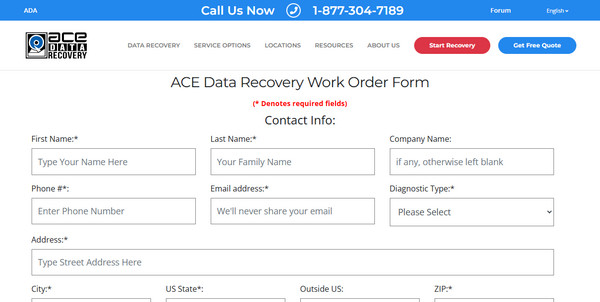
Step 1Head to the service’s website and fill out their work order form. When ready, ship your drive to ACE's lab, where technicians perform a free diagnostic evaluation within 24–48 business hours. Later, they will send you a full report with an all-inclusive price quote.
Step 2Once you approve the quote, the technicians will complete the recovery typically within 5–8 additional business days in a clean-room environment. When done, they will return the recovered data to you on a free external drive or USB flash drive, along with your original device.
Part 3. ACE Data Recovery Pros and Cons
ACE Data Recovery has been a reliable data recovery solution, but before choosing it, it's helpful to understand its strengths and weaknesses. This way, you can decide which option best suits your situation.
Pros
- • High success rate - ACE claims a 98% success rate, and customer reviews frequently mention recovering 100% or nearly all data from failed drives.
- • Clean-room lab - They have a specialized lab containing professional equipment for data recovery, making it more advantageous for complex cases.
- • Free evaluation - They will assess and explain what's wrong and what the cost will be before you commit.
Cons
- • Expensive - The service often costs hundreds to thousands of dollars, depending on the storage device and the extent of the damage, though the quality is good and the results are consistent.
- • Slow - The drive must be shipped, evaluated for 24-48 business hours, and then worked on, usually for 5-8 more business days, which can take anywhere from days to weeks.
- • Requires shipping - In addition to the service payment, you will need to pay the shipping fee. Not to mention the hassle of processing the shipment.
Part 4. When to Use ACE vs DIY Software
The time, effort, and cost to rely on ACE Data Recovery for your flash drive, memory card, or hard drive data recovery can be overwhelming, so considering DIY software is completely understandable. The appropriate choice depends only on what happened to your data. If your drive has physical damage, such as strange clicking noises, not spinning, or not being detected at all, ACE Data Recovery is the safer option. If the data loss is caused by accidental deletion, formatting, corruption, or similar issues, DIY recovery software like the following tool is sufficient.
Part 5. Recover Deleted Files Yourself with FoneLab Data Retriever
If your situation involves software-related data loss rather than a physical failure, FoneLab Data Retriever is a practical tool for recovering your files. It’s much cheaper, and you don’t need to ship your drive anywhere. The process can be done in the comfort of your own home, since the program only requires a quick installation and will then help you scan and recover files.
FoneLab Data Retriever - recover the lost/deleted data from computer, hard drive, flash drive, memory card, digital camera and more.
- Recover photos, videos, documents and more data with ease.
- Preview data before recovery.
Whether you want to restore files you lost due to deletion, update failure, formatting, virus attack, corruption, etc., FoneLab Data Retriever can help. Besides, many file types and formats are supported, including pictures, videos, documents, and more. And don’t worry about it being DIY; the program’s design and functionality are user-friendly and perfect for beginners. It even offers additional helpful features, such as a preview and search filters, to make recovery easier.
Follow the procedure below to retrieve your files with the ACE Data Recovery alternative, FoneLab Data Retriever:
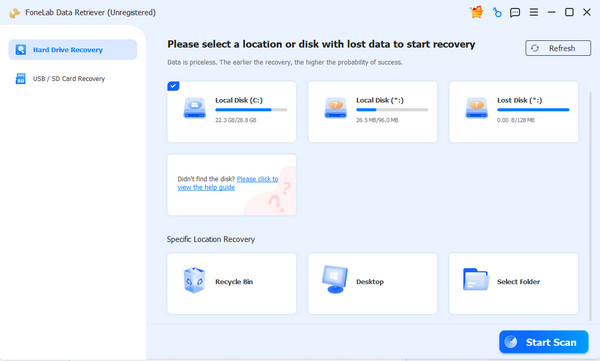
Step 1Get the FoneLab Data Retriever file through the Free Download button, and when it shows up in your Downloads, open it. You will be prompted to install it, so follow along until you can launch the program. Next, select your drive in the main interface and click Start Scan.
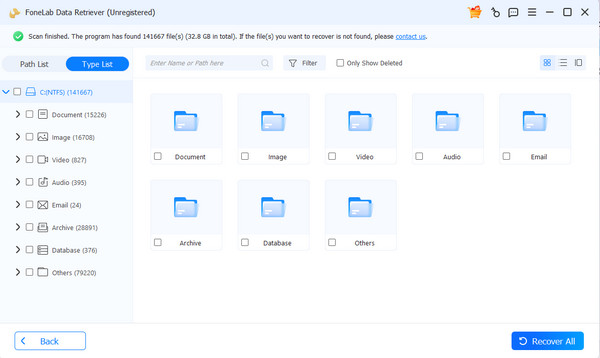
Step 2Once your lost files are scanned, open the folders for the relevant data type, as they contain the files you’re looking for. Browse accordingly, and when you find the files to recover, select their checkboxes. Finally, choose Recover All when you’re satisfied.
Part 6. FAQs about ACE Data Recovery
How much does ACE cost?
ACE doesn't list fixed prices because the cost depends on your drive's capacity and the complexity of the recovery. However, diagnostics are free for standard single hard drives, and there's a $99 fee if the drive has been opened previously.
How long does ACE take?
To summarize, the diagnostic evaluation usually takes 24-48 business hours. After you approve the quote, the recovery itself typically takes another 5-8 business days, though some sources say it’s only 2-5 business days.
Can I recover data myself?
Yes, you can. As long as the problem is logical, such as unintentional deletion, formatting, or corruption, rather than physical damage, DIY software like FoneLab Data Retriever can scan and recover your files without shipping the drive anywhere.
ACE Data Recovery is an excellent choice for physically damaged drives. However, if you’re only dealing with simple data loss cases and have limited means, FoneLab Data Retriever will be more than enough, since its high success rate has been proven many times.


