
 iPhone Data Recovery
 iOS System Recovery
 iOS Data Backup & Restore
 iOS Unlocker
 iPhone Password Manager
 Location Changer
 Android Data Recovery
 Broken Android Data Extraction
 Android Data Backup & Restore
 Android Unlocker
 FoneTrans for iOS
 iPhone Data Eraser
 iPhone Cleaner
 HEIC Converter
 HyperTrans
 WhatsApp Transfer for iOS
 Mac Sweep
 Data Retriever
 Mac Data Retriever
 Video Converter Ultimate
 Screen Recorder
 Phone Mirror
- Part 1. Why Can't You Find Your Screen Time Password
- Part 2. Reset Screen Time Password Using Apple ID
- Part 3. Remove Screen Time Password with FoneLab iFoneWiz
- Part 4. Remove Screen Time Passcode by Erasing Using iCloud
- Part 5. Remove Screen Time Passcode by Restoring Device with iTunes/Finder/Apple Devices
- Part 6. Comparison of Techniques to Handle Screen Time Password
- Part 7. FAQs about How to Find Screen Time Password
- Unlock Apple ID
- Bypass iCloud Activation Lock
- Doulci iCloud Unlocking Tool
- Factory Unlock iPhone
- Bypass iPhone Passcode
- Reset iPhone Passcode
- Unlock Apple ID
- Unlock iPhone 8/8Plus
- iCloud Lock Removal
- iCloud Unlock Deluxe
- iPhone Lock Screen
- Unlock iPad
- Unlock iPhone SE
- Unlock Tmobile iPhone
- Remove Apple ID Password
Helpful Guide on How to Find Out Screen Time Password
 Updated by
 How to find out Screen Time passcode?” Like other users, you may be among the many who seek a trusted answer about finding your Screen Time passcode that may have been forgotten. But before proceeding with that matter, the more important question is: is such an action possible? Unfortunately, the short answer is no-at least not through straightforward or official means.
Hence, this article is here to help you understand exactly why that is the case. Afterward, we will provide the appropriate methods to handle your Screen Time passcode correctly, whether through passcode reset or removal. Both official Apple solutions and a renowned program are provided, and you must only choose which one would be best for your device.

Guide List
- Part 1. Why Can't You Find Your Screen Time Password
- Part 2. Reset Screen Time Password Using Apple ID
- Part 3. Remove Screen Time Password with FoneLab iFoneWiz
- Part 4. Remove Screen Time Passcode by Erasing Using iCloud
- Part 5. Remove Screen Time Passcode by Restoring Device with iTunes/Finder/Apple Devices
- Part 6. Comparison of Techniques to Handle Screen Time Password
- Part 7. FAQs about How to Find Screen Time Password
Part 1. Why Can't You Find Your Screen Time Password
Many people assume that a forgotten Screen Time passcode works just like any other forgotten password. They think it will be available in the Passwords app or section in Settings for users to find when forgotten. However, that is not how Screen Time was designed to work. Apple built Screen Time with a focus on security and parental control. Thus, they intentionally left out easy recovery options that could be accessed by someone other than the user who set the passcode.
Another reason is that Screen Time passcodes are stored locally on your device securely. They are not saved on Apple’s servers with your Apple ID information, which is why even Apple cannot look up your passcode or send it to you. As a result, there is no official function to find or reveal a Screen Time passcode. You cannot view it in a specialized menu, as they designed it to be completely hidden from everyone. Don’t be worried, though, as there are still other ways to handle your Screen Time. They will be discussed in the following parts, so please proceed.
Part 2. Reset Screen Time Password Using Apple ID
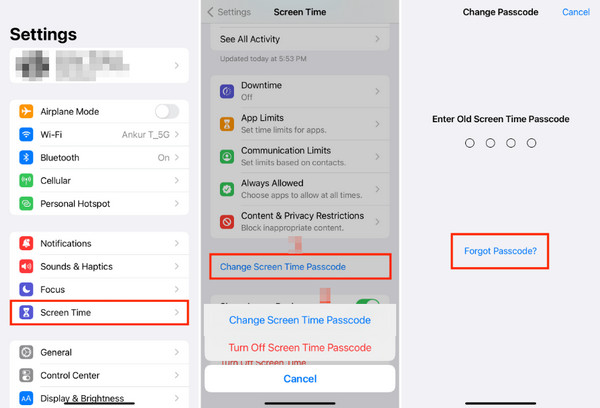
Even if there is no way to know how to get Screen Time passcode, the feature can still become functional if you reset Screen Time passcode using your Apple ID. Like the other locks on your device, it offers a Forgot Passcode option that allows you to use your account credentials instead to verify your identity as the owner and reset the feature’s passcode. However, this will only work if an Apple ID is linked or activated for your Screen Time.
Follow the operation below to reset the Screen Time passcode using Apple ID:
Step 1In the Screen Time section of your Settings app, tap Change Screen Time Passcode.
Step 2Once it asks for your passcode, select Forgot Passcode? below and provide your Apple ID credentials for authentication. Later, it will let you set a new passcode for the feature.
Part 3. Remove Screen Time Password with FoneLab iFoneWiz
Unfortunately, not everyone is lucky enough to have the Forgot Passcode option, but no worries. If you are among them, FoneLab iFoneWiz has your back, as it has the ability to bypass Screen Time passcode, allowing you to regain access to the feature, even if you don’t remember the passcode. It is also the safest bet for many since it doesn’t require a device reset, like the initial method.
Yes, that’s right! FoneLab iFoneWiz can handle your Screen Time passcode concern without data loss. Aside from that, it also works with almost, if not all, iOS and iPadOS device models and versions, leaving no problems regarding compatibility. That’s not all. The other features, including Remove Apple ID, Unlock iOS Device, and more, can be helpful for other concerns.

iFoneWiz Helps you unlock iPhone screen, Removes Apple ID or its password, Remove screen time or restriction passcode in seconds.
- Helps you unlock iPhone screen.
- Removes Apple ID or its password.
- Remove screen time or restriction passcode in seconds.
Discern the easy task below as a model to remove your Screen Time passcode with FoneLab iFoneWiz:
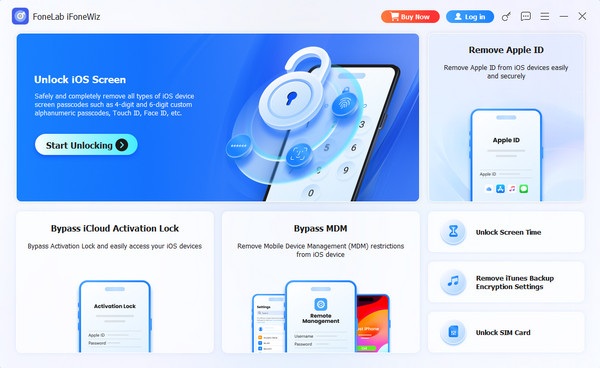
Step 1Utilize the Free Download button to get the FoneLab iFoneWiz installer into the Downloads section. You can then launch the file from there afterward to install and set up the program. Once the Start button is shown, hit and on the interface, pick Unlock Screen Time.
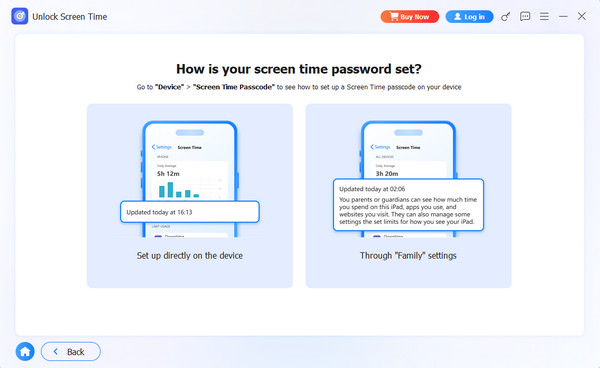
Step 2Following that, you are required to establish a connection with your device via a Lightning cable. Then, depending on your situation, choose between Set up directly on the device and Through “Family” settings on the 'How is your screen time password set?' screen. Once chosen, act under the prompts and directions until your passcode is removed.
Part 4. Remove Screen Time Passcode by Erasing Using iCloud
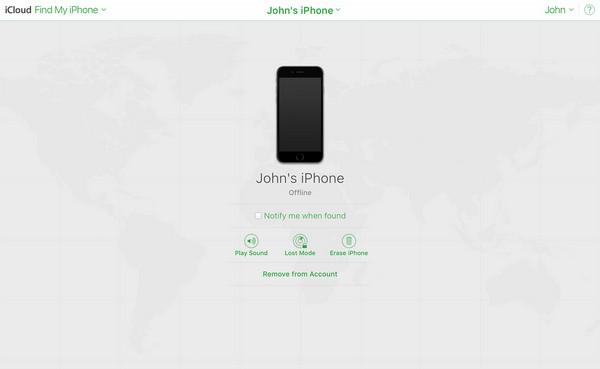
Meanwhile, you can also remove your Screen Time passcode by erasing your device, if you are willing, using iCloud, particularly, its Find My page. As you know, Find My offers management options you can manage remotely, and among these is Erase (Device). The logic is simple. Erasing the device also deletes your Screen Time modifications, including the passcode.
Follow the navigation below to remove the Screen Time passcode by erasing the device using iCloud:
Step 1Start on the iCloud site by logging in with your Apple credentials. Next, opt for Find My.
Step 2The following page will provide the All Devices tab at the top, so hit it and select your Apple device. When the remote options appear, click the Erase (Device) tab.
Part 5. Remove Screen Time Passcode by Restoring Device with iTunes/Finder/Apple Devices
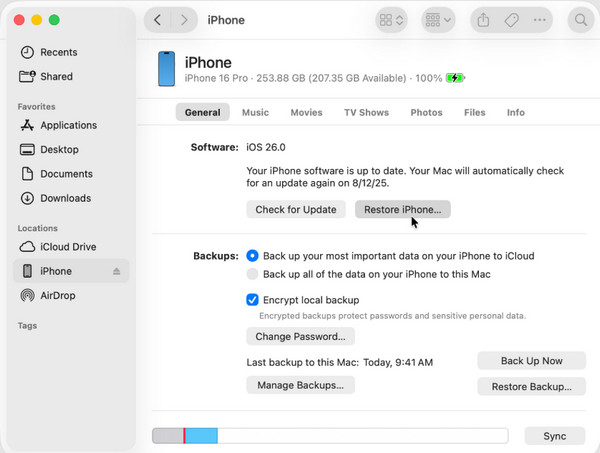
Another way to handle your forgotten Screen Time passcode is to remove it by restoring your device with iTunes, Finder, or Apple Devices, whichever is available on your desktop. The program’s Restore option lets you restore or return the iPhone or iPad to its default settings, which means everything on the device will be removed, such as the Screen Time passcode.
Follow the process below to remove your Screen Time passcode by restoring your device with iTunes, Finder, or Apple Devices:
Step 1Initialize the Apple program on the desktop before linking your device via a USB cable.
Step 2Once recognized, your device’s name or symbol will be on the interface. Select it and opt for Restore (Device) on the upper part of the following display.
Part 6. Comparison of Techniques to Handle Screen Time Password
| Techniques | Apple ID | FoneLab iFoneWiz | iCloud | iTunes, Finder, Apple Devices |
| Keeps your personal data | Yes | Yes | No | No |
| Official by Apple | Yes | No | Yes | Yes |
| Ease of Use | Very Easy | Easy | Easy | Moderate |
| Success Rate | Only works if the Apple ID is signed in | High | High | High |
| Requires computer | No | Yes | Not necessarily (it works on any browser) | Yes |
| Work on the latest iOS | Yes | Yes | Yes | Yes |
Part 7. FAQs about How to Find Screen Time Password
How to find out Screen Time passcode as a kid?
As mentioned, finding the Screen Time passcode is not possible as an adult managing your own device; hence, more so as a kid. The only ways would be the recommendations above, but if you try to make adjustments to the feature, it would be best to ask for your parents’ guidance.
Does Apple customer support help me recover a Screen Time passcode?
Unfortunately, no. Apple Support cannot recover or reset a forgotten Screen Time passcode, as it is stored only on your device, and Apple has no access to it. They can only guide you through the similar processes above.
Handle your Screen Time passcode safely with the help of the most trusted methods in this article. We especially suggest FoneLab iFoneWiz, as its function is not one-dimensional and can also handle other iOS locks.



