
 iPhone Data Recovery
 iOS System Recovery
 iOS Data Backup & Restore
 iOS Unlocker
 iPhone Password Manager
 Location Changer
 Android Data Recovery
 Broken Android Data Extraction
 Android Data Backup & Restore
 Android Unlocker
 FoneTrans for iOS
 iPhone Data Eraser
 iPhone Cleaner
 HEIC Converter
 HyperTrans
 WhatsApp Transfer for iOS
 Mac Sweep
 Data Retriever
 Mac Data Retriever
 Video Converter Ultimate
 Screen Recorder
 Phone Mirror
- Part 1. Why Does School Block Spotify
- Part 2. Use Mobile Data or a Hotspot to Unblock Spotify
- Part 3. Use a VPN to Unblock Spotify
- Part 4. Use a Web Proxy to Unblock Spotify
- Part 5. Use The Spotify Web Player to Unblock Spotify
- Part 6. Change Your DNS Settings to Unblock Spotify
- Part 7. Download Music at Home for Offline Listening to Unblock Spotify
- Part 8. Try FoneLab iFoneWiz if Spotify Is Blocked on Your School-Issued iPhone/iPad
- Part 9. Comparison Table of Methods to Unblock Spotify
- Part 10. FAQs about Spotify Unblocked for School
- Unlock Apple ID
- Bypass iCloud Activation Lock
- Doulci iCloud Unlocking Tool
- Factory Unlock iPhone
- Bypass iPhone Passcode
- Reset iPhone Passcode
- Unlock Apple ID
- Unlock iPhone 8/8Plus
- iCloud Lock Removal
- iCloud Unlock Deluxe
- iPhone Lock Screen
- Unlock iPad
- Unlock iPhone SE
- Unlock Tmobile iPhone
- Remove Apple ID Password
Access Spotify Unblocked in School With 7 Easy Ways
 Updated by
 Spotify is a famous streaming platform that offers thousands or even millions of songs around the globe. You can access songs, podcasts, and other audio content. The platform does not offer videos.
However, Spotify is commonly blocked by schools for various reasons that may affect students' focus on their studies. Do you want to know how to access Spotify unblocked for school? This article offers the 7 most recommended methods to do so. Please continue browsing to see the full details of each method.

Guide List
- Part 1. Why Does School Block Spotify
- Part 2. Use Mobile Data or a Hotspot to Unblock Spotify
- Part 3. Use a VPN to Unblock Spotify
- Part 4. Use a Web Proxy to Unblock Spotify
- Part 5. Use The Spotify Web Player to Unblock Spotify
- Part 6. Change Your DNS Settings to Unblock Spotify
- Part 7. Download Music at Home for Offline Listening to Unblock Spotify
- Part 8. Try FoneLab iFoneWiz if Spotify Is Blocked on Your School-Issued iPhone/iPad
- Part 9. Comparison Table of Methods to Unblock Spotify
- Part 10. FAQs about Spotify Unblocked for School
Part 1. Why Does School Block Spotify
There are many reasons why schools want to block Spotify on their network. It helps reduce student distractions. Schools also do it to save internet bandwidth. which helps keep the internet more stable.
Additionally, blocking Spotify will limit the content the students can access since some content is not suitable for students, like explicit lyrics, mature themes, and more.
Part 2. Use Mobile Data or a Hotspot to Unblock Spotify
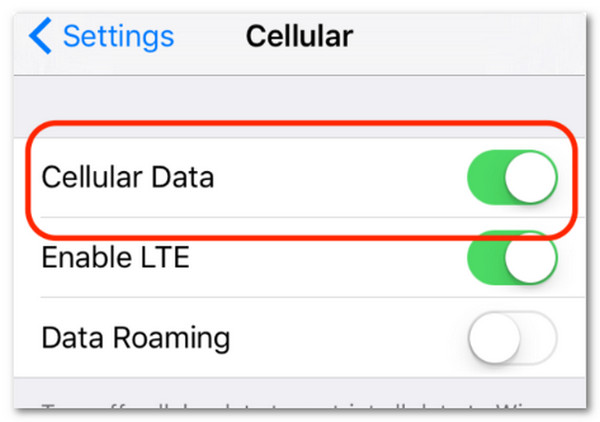
Schools restrict the content from Spotify on their network. In this case, every device connected to the school's Wi-Fi, including your iPad and iPhone, will not have access to the mentioned platform. If so, you can connect to a mobile data or hotspot to access the platform. See how below.
Tap the Settings app to open it. Then, tap the Cellular or Mobile Data button. Later, turn on the Cellular Data slider at the top. Ensure that the Spotify app is enabled.
Part 3. Use a VPN to Unblock Spotify
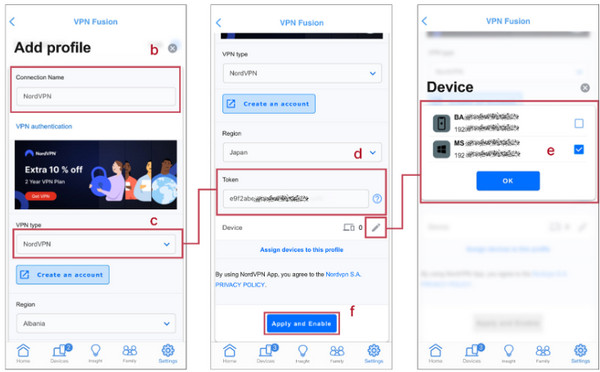
A Virtual Private Network or VPN may be used to create a secure virtual tunnel between your internet and devices, including an iPhone and iPad. It helps you access the content, features, websites, and apps that are restricted from the network. NordVPN is one of the most famous paid VPN services. See how to use it below.
Download and open NordVPN. Then, log in or create an account. After that, tap the Quick Connect button. Later, wait until the Connected message is shown. You can now start using Spotify without limitations.
Part 4. Use a Web Proxy to Unblock Spotify
A web proxy is another way to access blocked websites, including Spotify. However, this method is less reliable than a VPN. The method allows you to send a request through its own network. Another good thing about it is that it shows the result inside its proxy page.
However, the application of Spotify cannot be unblocked by the web proxy. Also, some schools have already blocked many proxies. Users may also experience broken audio and slow streaming issues. CroxyProxy is one of them. See how to use it below.
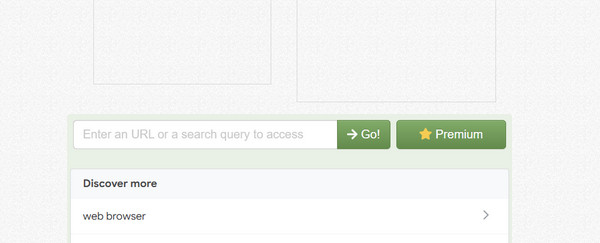
Search for the website of CroxyProxy. Then, enter the URL of Spotify in the empty box. Later, select the Go button to unblock the website.
Part 5. Use The Spotify Web Player to Unblock Spotify
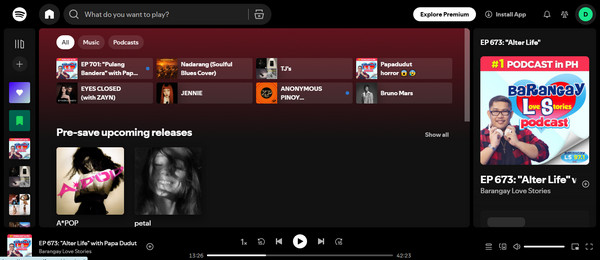
Spotify Web Player is your browser-based version of the mentioned platform. If the app is blocked on your iPhone or iPad, you can access this web player to play your favorite music, podcasts, and more content. However, some features are not available with the Spotify web player.
Part 6. Change Your DNS Settings to Unblock Spotify
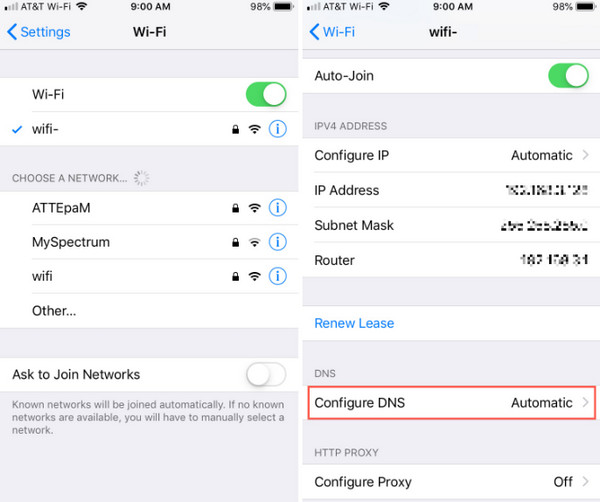
Changing the settings of your DNS on iPhone and iPad can help you unblock Spotify. It routes your internet lookups through a different DNS provider. However, it does not bypass strong network filters either. It might not unblock Spotify if that happens.
Tap the Settings app to access it. Tap the Wi-Fi button and select the Info button next to the network. Later, swipe down on the screen and tap the Configure DNS button. Select the Manual button. Enter your preferred DNS server afterward.
Part 7. Download Music at Home for Offline Listening to Unblock Spotify
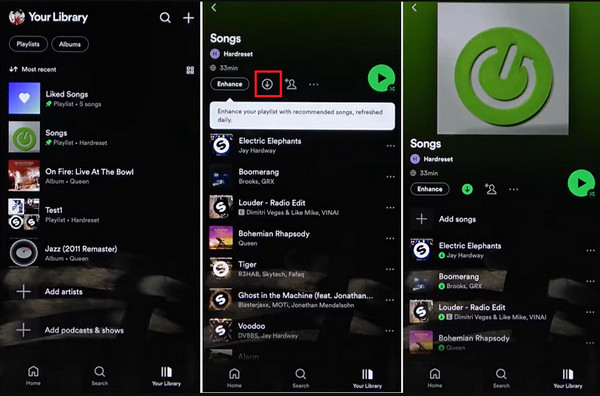
Besides that, you can download your music from Spotify at home. This works if your home Wi-Fi network does not restrict Spotify. See how to do that with the steps below.
Open Spotify and find the music, album, or podcast you want to download. Later, tap the Download button. Turn on the Offline Mode feature afterward from the Settings button if required.
Part 8. Try FoneLab iFoneWiz if Spotify Is Blocked on Your School-Issued iPhone/iPad
FoneLab iFoneWiz is destined to turn off restrictions on iPhone and iPad. It can help you with the blocked Spotify. It can remove MDM from iPhone and iPad. It can also remove Screen Time, which is the feature that restricts Spotify on the mentioned devices. Please refer to the steps below to know how to use the tool.

iFoneWiz Helps you unlock iPhone screen, Removes Apple ID or its password, Remove screen time or restriction passcode in seconds.
- Helps you unlock iPhone screen.
- Removes Apple ID or its password.
- Remove screen time or restriction passcode in seconds.
Step 1Please click the Free Download button of FoneLab iFoneWiz. Then, wait for the downloading process to be complete. Set up, install, and open it afterward.
Step 2Plug the iPhone or iPad into your computer with a USB cable. Select the Bypass MDM feature and follow the on-screen steps. Click the Continue and Next button.
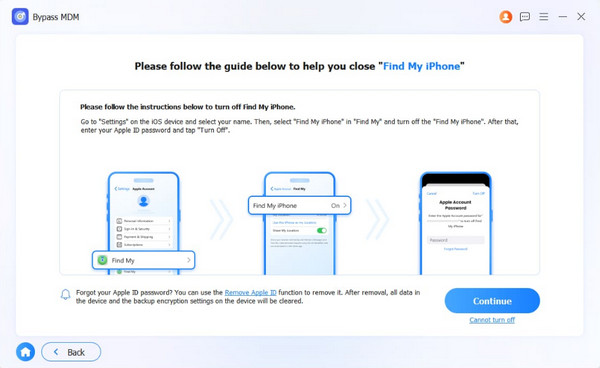
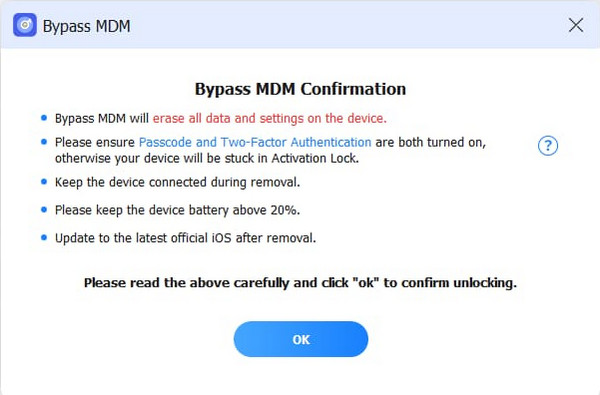
Step 3Click the OK button. Select the Confirm Again button to start the bypass process. Finally, click the Finish button when the process is done.
Part 9. Comparison Table of Methods to Unblock Spotify
| Method | Security | Speed | Required Skills |
| Use Mobile Data or a Hotspot | High | Moderate | Moderate |
| VPN | Low | Slow | Professional |
| Web Proxy | Moderate | Slow | Professional |
| The Spotify Web Player | High | Slow | Moderate |
| Change Your DNS Settings | Moderate | Slow | Professional |
| Download Music at Home for Offline Listening | High | Fast | Moderate |
| FoneLab iFoneWiz | High | Fast | Beginner |
Part 10. FAQs about Spotify Unblocked for School
Can my 12-year-old have Spotify?
Yes. A 12-year-old girl or boy can have a Spotify account. However, parents are advised to monitor the content of their child’s Spotify because there is mature and violent content that might not be suited to their age.
What music do 11-year-olds listen to?
They can listen to different genres on Spotify. It includes electro-pop, mainstream pop, and more. However, it still depends on the content of the music.
The Spotify unblocked for school can be accessed in different ways. The 7 easiest are in this post, including FoneLab iFoneWiz. This third-party tool can remove the restrictions that lead to Spotify being blocked. It includes Screen Time and MDM. Please get the software on your computer and explore it more!



