
 iPhone Data Recovery
 iOS System Recovery
 iOS Data Backup & Restore
 iOS Unlocker
 iPhone Password Manager
 Location Changer
 Android Data Recovery
 Broken Android Data Extraction
 Android Data Backup & Restore
 Android Unlocker
 FoneTrans for iOS
 iPhone Data Eraser
 iPhone Cleaner
 HEIC Converter
 HyperTrans
 WhatsApp Transfer for iOS
 Mac Sweep
 Data Retriever
 Mac Data Retriever
 Video Converter Ultimate
 Screen Recorder
 Phone Mirror
- Unlock Apple ID
- Bypass iCloud Activation Lock
- Doulci iCloud Unlocking Tool
- Factory Unlock iPhone
- Bypass iPhone Passcode
- Reset iPhone Passcode
- Unlock Apple ID
- Unlock iPhone 8/8Plus
- iCloud Lock Removal
- iCloud Unlock Deluxe
- iPhone Lock Screen
- Unlock iPad
- Unlock iPhone SE
- Unlock Tmobile iPhone
- Remove Apple ID Password
What is OvO Game Unblocked and How to Access It Without Limitations
 Updated by
 There are countless enjoyable games online that can be accessed by teenagers and kids. OvO game is one of them. It is a parkour platformer game that can be played by dashing, sliding, and jumping your character. However, the OvO game is commonly blocked by organizations, including work and school.
In this article, you will know where to play the OvO game unblocked. Additionally, the tips to play the game professionally and easily will be discovered. Please continue browsing this post to see all the mentioned details.


Guide List
Part 1. Where to Play OvO Unblocked
The OvO game is accessible to all websites. However, there is an iPhone, iPad, and Mac that cannot access it. It is due to the restrictions made with the mentioned devices. The good thing is that some websites can bypass the network restrictions on some Apple devices. Scroll below to see the websites that are commonly accessible to your Apple devices.
- • Coolmath Games
- • Poki
- • CrazyGames
- • Unblocked Games 66
- • Classroom 6x
Part 2. Tips to Play OvO Unblocked
The OvO game can be played with beginner skills. But having a good technique is better for getting a good score and gameplay. Below are some of the tips to use the OvO game professional-like.
1. Learn The Basic Controls
You need to memorize the controls to play the OvO game. In this case, you will be confident in the game. You do not need to look at your keyboard or screen to play it. It includes the Arrow keys, screen, and more. It will help a lot with your gameplay because you can focus more on the obstacles that can be encountered in your game.
2. Be Familiar with Wall Jump Timing
At each level, you will encounter wall jumps. You need to be professional in this skill because it is one of the primary actions your character will encounter. First, you need to jump toward a wall, jump again while touching it, and push away from the wall for climbing. You need to know the rhythm of the game until you get it. Then, you need to adjust and adapt to every change in the game speed.
3. Use Concrete Momentum
Speed is the primary thing you should consider in playing the OvO game. You need to use a combination of actions fast. It includes the Jump + Slide + Jump combination. Avoid stopping in the middle of the game if not needed.
4. Dodge Spikes Using Slide
There are obstacles that can be encountered while playing the game. You can slide your character to dodge the spikes or other obstacles that can be encountered during the game. You can also land after a long jump or pass the low ceiling.
5. Look for a Possible Shortcut
The OvO game is also all about techniques. Some users do not know that it supports hidden shortcuts. To do this, you can do a long jump across gaps. Also, use a wall jump to skip the available platform. Finally, some of the obstacles can be avoided by jumping your character earlier.
6. Pause Before Moving
Before the level start on your game, you need to pause for a second. In this case, you will spot the spike locations, possible shortcuts, and moving platforms, which can be a big help for playing the game. Planning is important if you plan to achieve your goal in the game.
Part 3. Bypassing Restrictions on iPhone or iPad with FoneLab iOS Unlocker
You need to learn how to set screen time on iPhone, including an MDM profile, to restrict some websites from accessing OvO. A forgotten restriction passcode on your iPhone or iPad is the reason why some games online are blocked, including OvO. FoneLab iOS Unlocker can help you turn off restrictions on iPhone and iPad. It includes the Screen Time and MDM profiles, which are the most common features that can restrict websites from the mentioned devices.

FoneLab Helps you unlock iPhone screen, Removes Apple ID or its password, Remove screen time or restriction passcode in seconds.
- Helps you unlock iPhone screen.
- Removes Apple ID or its password.
- Remove screen time or restriction passcode in seconds.
Bypassing the Screen Time feature will not delete all of the content and settings on your iPhone or iPad. But bypassing the MDM profile will delete them. Please use the steps below to bypass the Screen Time feature and MDM profile on your iPhone or iPad using the tool.
Step 1Please open your computer and search for the website of FoneLab iOS Unlocker. After that, please click the Free Download from the first interface to start the downloading process for the tool. Later, please set up the tool by clicking it. Install and open the tool afterward to start the process.
Step 2The primary tools of the tool will appear on the screen. Please select the Bypass MDM or Unlock Screen Time feature from the screen. Then, you will be required to plug your iPhone or iPad into the computer. The plugging process must be successful before proceeding to the next steps.
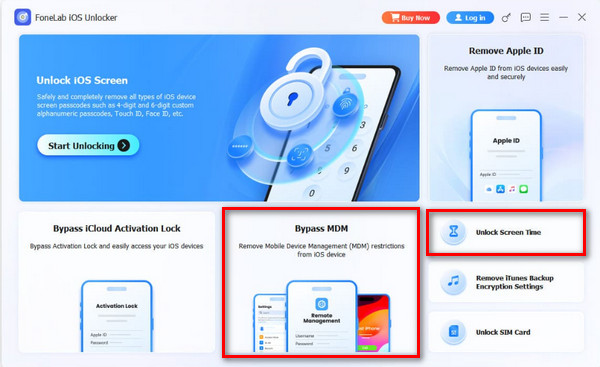
Step 3Please select the iPad or iPhone at the bottom left of the screen. Then, please click the Start Now button at the bottom left. Please perform the on-screen instructions to proceed with the process. Later, click the Continue button. Click the Unlock button at the bottom center of the main interface afterward.
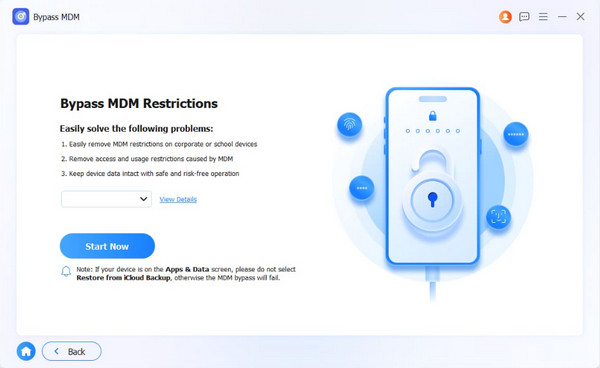
Step 4The bypass process will start immediately. Please wait for the procedure to be finished. Then, click the Finish button on the left side. Unplug the iPhone or iPad from the computer afterward to secure its data.
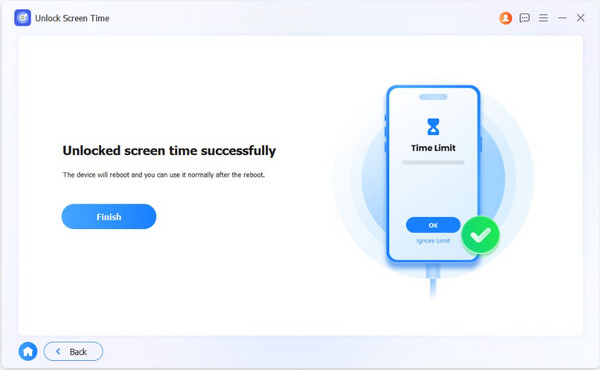
Note: The buttons that are presented above depend on the feature you chose. Don’t worry. The process is almost the same because of the tool’s interface.
Part 4. FAQs about OvO Game Unblocked
Is OvO a difficult game to play?
The OvO game is not difficult. Most people find it easy to play. However, there are individuals who have trouble with timing, speed, and focus. In this case, they cannot complete the game easily. They find it difficult to manage, which is also caused by unfamiliar controls.
What does "unblocked" mean in gaming?
Besides OvO, you can also see the Unblocked name from different online games. It means that the game is not blocked with the specific browser. Also, the website that offers the game might not be blocked by the security features of Apple devices.
This article teaches you how to set up parental controls on iPad, including tips on how to use it smoothly. Besides, FoneLab iOS Unlocker is also here to help you bypass the MDM profile and Screen Time passcode. In this case, the websites that contain the OvO game that are blocked will be accessed. Download the tool to explore more of the features it contains.



