
 iPhone Data Recovery
 iOS System Recovery
 iOS Data Backup & Restore
 iOS Unlocker
 iPhone Password Manager
 Location Changer
 Android Data Recovery
 Broken Android Data Extraction
 Android Data Backup & Restore
 Android Unlocker
 FoneTrans for iOS
 iPhone Data Eraser
 iPhone Cleaner
 HEIC Converter
 HyperTrans
 WhatsApp Transfer for iOS
 Mac Sweep
 Data Retriever
 Mac Data Retriever
 Video Converter Ultimate
 Screen Recorder
 Phone Mirror
- Part 1. Understanding 1v1 LOL and Why It’s Often Blocked
- Part 2. How to Play 1v1 LOL Unblocked Safely Using Official Browser Mirrors
- Part 3. How to Play 1v1 LOL Unblocked Using Privacy-Friendly VPNs
- Part 4. How to Play 1v1 LOL Unblocked by Switching to Guest Mode or Personal Profiles on Chromebooks
- Part 5. Comparison of Methods to Play 1v1 LOL Unblocked
- Part 6. Remove MDM Restrictions Safely from An Apple Device
- Part 7. FAQs about 1v1 LOL Unblocked
- Unlock Apple ID
- Bypass iCloud Activation Lock
- Doulci iCloud Unlocking Tool
- Factory Unlock iPhone
- Bypass iPhone Passcode
- Reset iPhone Passcode
- Unlock Apple ID
- Unlock iPhone 8/8Plus
- iCloud Lock Removal
- iCloud Unlock Deluxe
- iPhone Lock Screen
- Unlock iPad
- Unlock iPhone SE
- Unlock Tmobile iPhone
- Remove Apple ID Password
1v1 LOL Unblocked: Proven Strategies to Play The Game
 Updated by
 Bypass every 1v1LOL unblocked restriction and enjoy the game anytime, anywhere. Whether you're at school, work, or a location with strict network filters, getting quick access to this popular game isn't always easy. Hence, in this article, it would be a pleasure to walk you through the guaranteed techniques for playing 1v1 LOL’s unblocked version, covering everything from browser mirrors to the most professional tools. Browse them to access the game.


Guide List
- Part 1. Understanding 1v1 LOL and Why It’s Often Blocked
- Part 2. How to Play 1v1 LOL Unblocked Safely Using Official Browser Mirrors
- Part 3. How to Play 1v1 LOL Unblocked Using Privacy-Friendly VPNs
- Part 4. How to Play 1v1 LOL Unblocked by Switching to Guest Mode or Personal Profiles on Chromebooks
- Part 5. Comparison of Methods to Play 1v1 LOL Unblocked
- Part 6. Remove MDM Restrictions Safely from An Apple Device
- Part 7. FAQs about 1v1 LOL Unblocked
Part 1. Understanding 1v1 LOL and Why It’s Often Blocked
1v1.LOL is a battle royale-style game where you battle another player one-on-one. The goal is to outbuild and outshoot your opponent using structures like ramps and walls, similar to Fortnite. It runs directly in a web browser, and because of its easy access, schools and offices tend to block it to ensure people keep their focus on their work or studies. As a result, the game is frequently blocked, making it unavailable on managed networks.
Part 2. How to Play 1v1 LOL Unblocked Safely Using Official Browser Mirrors
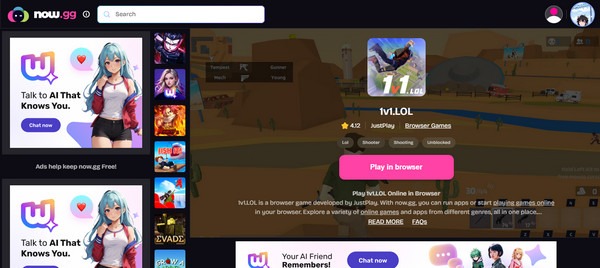
The easiest way to play the unblocked version of 1v1 LOL is by using official browser mirrors. If it’s your first time hearing about them, they are trusted gaming websites that host the game on their own platforms. So, instead of relying on your desired game’s official platform, you can use a browser mirror like now.gg to play 1v1 LOL without the restrictions imposed by the original site. Just note that the smoothness of your gameplay will depend heavily on your internet connection, since it is a gaming website accessed via a web browser.
Follow the simple directions below to play the unblocked 1v1.LOL using an official browser mirror, now.gg:
Step 1First, open the now.gg website using your trusted browser and search for 1v1 LOL.
Step 2When it appears in the results, select the game, and the following page will launch it immediately. Finally, hit Play in browser to enjoy playing 1v1 LOL.
Part 3. How to Play 1v1 LOL Unblocked Using Privacy-Friendly VPNs
Meanwhile, a privacy-friendly VPN is the way to go if you want more direct access to 1v1 LOL’s official source. If you can’t access the game because of the location’s restriction, a trusted VPN will mask your IP address and let you set your location to a place or country that allows access to 1v1 LOL. The way it works is simple, and once you successfully set your device’s location, accessing the game will no longer be a problem.
Observe the stress-free directions below to enjoy 1v1LOLunblocked using a privacy-friendly VPN:
Step 1Find a privacy-friendly VPN you can access or acquire, and set it up to change your device or computer location to somewhere that allows access to the 1v1 LOL.
Step 2Once your desired location is set, open the game again on its official platform to play it on your device.
Part 4. How to Play 1v1 LOL Unblocked by Switching to Guest Mode or Personal Profiles on Chromebooks
What if you use a Chromebook given by your school for educational purposes? The chances of them restricting access to or use of various platforms, games, features, etc. are high, ensuring you will only use the device for school. But if you want to bypass this restriction and enjoy playing 1v1 LOL’s unblocked version during your free time, the practical solution to try is to switch to guest mode or a personal profile. That’s because the restrictions will no longer apply to the profile, allowing you to access the game you want.
Stick to the simplified task below to play LOL 1v1 unblocked by switching to guest mode or a personal profile on Chromebook:
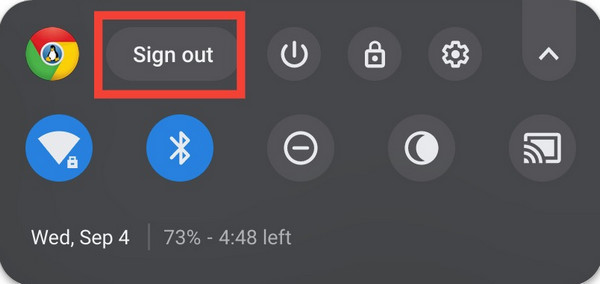
Step 1On your Chromebook’s bottom left section, select the Windows symbol and click Windows (Version) from the options. Next, opt for the Sign out selection.
Step 2Once signed out, pick Browse as Guest or create a personal profile and follow the succeeding prompts. When done, you can finally play 1v1 LOL on its official platform.
Part 5. Comparison of Methods to Play 1v1 LOL Unblocked
| Methods | Official Browser Mirror (now.gg) | Privacy-Friendly VPN | Guest Mode or Personal Profile on Chromebooks |
| Speed / Performance | Good | Variable | Excellent |
| Ease of Use | Very Easy | Moderate | Easy |
| Safety Level | High | High | Very High |
| Best For | Instant play on almost any device with a browser. | Bypassing more advanced network filters and ensuring privacy on public Wi-Fi. | Getting around school-managed Chromebook restrictions. |
Part 6. Remove MDM Restrictions Safely from An Apple Device
Do you use an Apple device? If so, aside from games, you may also face other restrictions due to its security features, such as MDM (Mobile Device Management). Hence, we also prepared FoneLab iOS Unlocker, as it will help you bypass these restrictions on your Apple device. If you’re unaware, the organization that provided the iPhone, iPad, etc. can easily block or restrict you from optimizing device use to ensure you use it only for their purpose.

FoneLab Helps you unlock iPhone screen, Removes Apple ID or its password, Remove screen time or restriction passcode in seconds.
- Helps you unlock iPhone screen.
- Removes Apple ID or its password.
- Remove screen time or restriction passcode in seconds.
Thankfully, FoneLab iOS Unlocker has also made it easy to turn off restrictions on iPhone, iPod Touch, or iPad with its user-friendly design and functions. Despite being a first-time user of an unlocking program, you won’t have to experience difficulty because this tool’s MDM-removal function offers a straightforward procedure and smooth performance.
Take in the easy steps below as a sample of removing MDM restrictions from an Apple device with FoneLab iOS Unlocker:
Step 1Acquire and install FoneLab iOS Unlocker by clicking its official site’s Free Download button. Its installer will be in the computer’s Downloads; thus, perform the initial setup from there, and when the Start selection shows up, tick it to launch the unlocker.
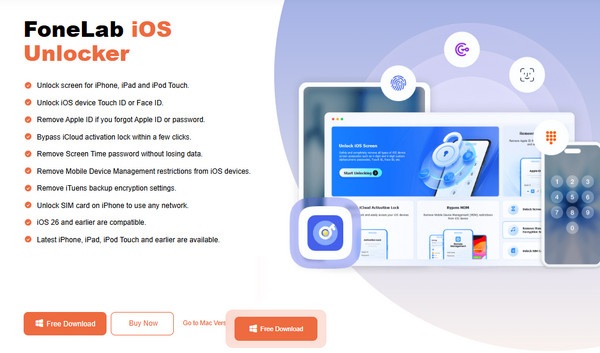
Step 2Quickly select Bypass MDM once you see the feature on the initial interface, then link your Apple device with a Lightning cable. Once detected, select Start Now, then turn off Stolen Device Protection or Find My if prompted. When more instructions appear, simply use them until the program successfully removes the MDM restrictions on your device.
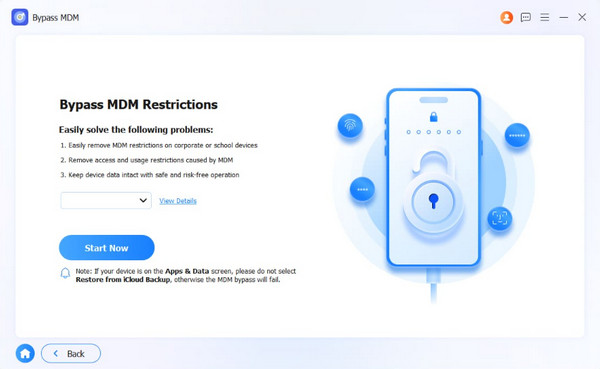
You can also unlock iPhone without passcode if you have forgotten it with the help of FoneLab iOS Unlocker. As you can see, it offers various features you can use for future concerns.
Part 7. FAQs about 1v1 LOL Unblocked
Why is 1v1 LOL not blocked on other devices?
It must be because the other devices aren’t managed by schools, workplaces, or organizations, which are usually the ones putting restrictions on specific devices.
Will I get in trouble for playing 1v1 LOL at school?
It depends on your school policies. Many institutions block gaming sites to maintain productivity. If caught, you might face minor consequences, such as a warning or temporary restrictions.
That is all for the guaranteed strategies to play the popular game, 1v1 LOL’s unblocked version. Stick to our guidelines, and you will enjoy a delightful gaming experience. Besides, FoneLab iOS Unlocker is added to help you further if you face any restrictions later.



