
 iPhone Data Recovery
 iOS System Recovery
 iOS Data Backup & Restore
 iOS Unlocker
 iPhone Password Manager
 Location Changer
 Android Data Recovery
 Broken Android Data Extraction
 Android Data Backup & Restore
 Android Unlocker
 FoneTrans for iOS
 iPhone Data Eraser
 iPhone Cleaner
 HEIC Converter
 HyperTrans
 WhatsApp Transfer for iOS
 Mac Sweep
 Data Retriever
 Mac Data Retriever
 Video Converter Ultimate
 Screen Recorder
 Phone Mirror
- Unlock Apple ID
- Bypass iCloud Activation Lock
- Doulci iCloud Unlocking Tool
- Factory Unlock iPhone
- Bypass iPhone Passcode
- Reset iPhone Passcode
- Unlock Apple ID
- Unlock iPhone 8/8Plus
- iCloud Lock Removal
- iCloud Unlock Deluxe
- iPhone Lock Screen
- Unlock iPad
- Unlock iPhone SE
- Unlock Tmobile iPhone
- Remove Apple ID Password
What is Escape Road Unblocked: How to Access It Quickly
 Updated by
 Good day! Can you help me access the Escape Road 2 unblocked version? I was trying to access it in our school, but it is not available. I do not know how it happened. Can you help me with this and remove the restrictions? Thank you in advance!
Commonly, the shared iPhone or iPad of the school is monitored or managed by an MDM profile. This profile is known for remotely controlling the operations available on the mentioned devices, including restricting access to different websites. Please browse this post to understand what Escape Road is, why the school blocks it, and the tool that can remove an MDM profile.


Guide List
Part 1. What is Escape Road and Why School Block It
Escape Road is a web browser game commonly played by kids. Teenagers also play it, but not as much as kids do. It is a mobile game in which players own a pre-customized car that is managed using keyboard keys or a mouse. The setting of the game revolves around the player’s car being chased by a police patrol car.
The player needs to escape the mentioned car before they beat their recorded time, unlike Crossy Road Unblocked 76. The mentioned game will only jump from the streets, trying not to be hit by the fast cars crossing the road.
However, schools ban Escape Road for different reasons. See the list as you start scrolling below.
1. Prevent Distractions
Escape Road is easy to operate. It is one of the reasons why it is addictive. In this case, students might not be aware of how many times they use it in a day while at school. So, blocking the websites that offer it will lessen the distractions.
2. Lesser Network Load
Since Escape Road is popular, like Crossy Road unblocked games, there might be many students who use it. Blocking it will help lessen the network load. In this case, the internet will be faster for other school-related websites or programs.
3. Safety
Some websites that offer Escape Road contain pop-up ads, unsafe downloads, and more. This issue can lead to security risks. This way, the student’s data and information are protected from malware and viruses.
Part 2. Where to Play Escape Road Unblocked
Escape Road can be played in different web browsers. The accessibility of the mentioned game depends on the website that your school has restricted from the MDM profile. You can check the websites that are not commonly blocked by the school where Escape Road is available.
- GameDistribution
- CrazyGames
- PlayHop
- EnyGames
- GamePix
- AntGames
- Poki
- NarGames
- Yoplay
- Lagged
Part 3. Bypassing School Restrictions with FoneLab iOS Unlocker

FoneLab Helps you unlock iPhone screen, Removes Apple ID or its password, Remove screen time or restriction passcode in seconds.
- Helps you unlock iPhone screen.
- Removes Apple ID or its password.
- Remove screen time or restriction passcode in seconds.
School restrictions on your school iPad and iPhone are inevitable. In this section, we will help you remove the MDM profile on your iPhone and iPad that prevents access to Escape Road. The best third-party tool, which is FoneLab iOS Unlocker, will be discussed. Please scroll below to know the complete details about the tool.
1. FoneLab iOS Unlocker Features
FoneLab iOS Unlocker is a program designed to help users remove and bypass security restrictions on iPhone and iPad. Please see the supported security features below.
- Unlock iOS Screen - It can unlock iPhone passcode, Touch ID, Face ID, and more screen lock types.
- Bypass iCloud Activation Lock - Apple ID is not needed because it bypasses the iCloud Activation Lock.
- Bypass MDM - The MDM profile can be bypassed without data loss.
- Unlock Screen Time - It removes the features and app limits by bypassing the Screen Time restrictions.
- Remove iTunes Backup Encryption Settings - If the iTunes backup encryption settings are unknown, the tool will help you remove them. This way, you can access and restore the backup.
- Unlock SIM Card - SIM-locked iPhone and iPad can be unlocked. SIM cards that are not supported by the carrier can be used.
- Remove Apple ID - It can remove the Apple ID account from your iPhone and iPad if you forget the password.
These features have their own procedures for removing the security features or accounts from your iPhone or iPad. Downloading the tool will help you know more about these features.
2. Remove MDM via FoneLab iOS Unlocker
You can simply remove MDM from iPhone if you know the account credentials. However, schools do not allow the process to happen. FoneLab iOS Unlocker is a third-party tool that can remove the MDM profile on your iPhone or iPad without the account credentials. The tool's method is simple, which is beneficial for novices. The best thing about it is that it removes the said security feature without data loss.
The process does not require an internet connection to operate. Please follow the steps below to learn how the tool works to remove the MDM profile from your iPhone or iPad.
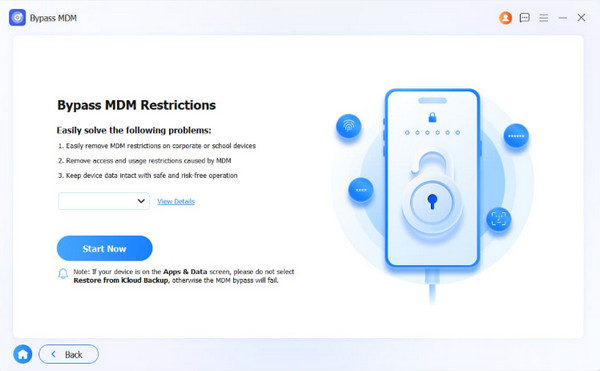
Step 1Go to the main website of FoneLab iOS Unlocker. After that, please select the Free Download button on the screen. Later, set up, install, and open the tool to start the process. Please click the Bypass MDM feature from the list. Plug the iPhone or iPad into the computer afterward using a USB cable. Click the Start Now option at the bottom.
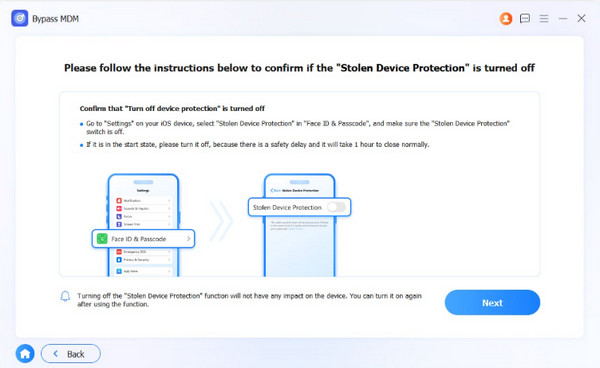
Step 2Then, ensure that you follow the on-screen instructions to turn off Find My and confirm that the Stolen Device Protection is disabled before the procedure. Then, click the Next button to proceed with the process.
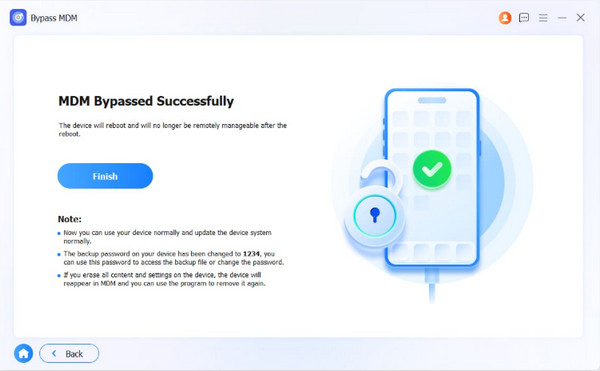
Step 3Click the OK button on the screen and click the Confirm Again button from the same spot to confirm the process. Finally, the bypass process for the iPhone or iPad MDM profile will be started. Click the Finish option at the bottom to end and complete the process.
Part 4. FAQs about Escape Road Unblocked
How to find games that aren't blocked?
There are no specific methods to find the list of games blocked on your iPhone or iPad. You will only know the websites are blocked when you try to visit them. It depends on the MDM profile's restriction settings on the mentioned devices.
How do I unblock gaming websites?
Removing the MDM is the top way to unblock websites on your iPhone or iPad. On the other hand, you can use a VPN to access these websites. However, VPNs are not recommended because they are illegal in some countries.
The Escape Road unblocked websites are accessible when the MDM profile is removed from your iPhone or iPad. FoneLab iOS Unlocker is here to help you do the procedure without the correct credentials. The tool can also be used for bypassing Screen Time restrictions, iTunes backup encryption settings, and more. Download the tool to discover more of its features!



