
 iPhone Data Recovery
 iOS System Recovery
 iOS Data Backup & Restore
 iOS Unlocker
 iPhone Password Manager
 Location Changer
 Android Data Recovery
 Broken Android Data Extraction
 Android Data Backup & Restore
 Android Unlocker
 FoneTrans for iOS
 iPhone Data Eraser
 iPhone Cleaner
 HEIC Converter
 HyperTrans
 WhatsApp Transfer for iOS
 Mac Sweep
 Data Retriever
 Mac Data Retriever
 Video Converter Ultimate
 Screen Recorder
 Phone Mirror
- Unlock Apple ID
- Bypass iCloud Activation Lock
- Doulci iCloud Unlocking Tool
- Factory Unlock iPhone
- Bypass iPhone Passcode
- Reset iPhone Passcode
- Unlock Apple ID
- Unlock iPhone 8/8Plus
- iCloud Lock Removal
- iCloud Unlock Deluxe
- iPhone Lock Screen
- Unlock iPad
- Unlock iPhone SE
- Unlock Tmobile iPhone
- Remove Apple ID Password
EaseUS MobiUnlock: Comprehensive Review of The Tool
 Updated by
 Good day! My iPhone has been locked out due to a forgotten passcode. I searched on the internet and found EaseUS MobiUnlock. I do not know if it is legit or how to use it. Can you enlighten me about the tool? Thank you!
EaseUS MobiUnlock is indeed a great tool for unlocking your iPhone or iPad when the passcode is accidentally forgotten. But there are more things you need to know about the tool. Kindly scroll below to know them, including the best alternative.


Guide List
Part 1. What Is EaseUS MobiUnlock
EaseUS MobiUnlock is a third-party tool that can unlock your iPad, iPhone, and Android phones. The tool is suitable for different users, including professionals and beginners. Also, it has a simple interface that allows for a quick unlocking process. It does not rely on an internet connection, but a USB cable is required.
Part 2. EaseUS MobiUnlock Features and What You Get
EaseUS MobiUnlock contains multiple features, all of which are listed below for your reference.
- Unlock Screen Passcode: The iPhone or iPad can be unlocked when the passcode is forgotten.
- Unlock Apple ID: The Apple ID account can be removed without the credentials.
- Bypass Activation Lock: The iCloud Activation Lock can be bypassed.
- iOS Password Manager: It can manage your iPhone passwords from different accounts.
- Unlock Screen Time Passcode: The Screen Time passcode can be bypassed without credentials.
- Remove iTunes Backup Encryption: The passcode of your iTunes backup can be removed.
Part 3. Free Methods from Apple to Unlock iPhone/iPad
Besides EaseUS MobiUnlock, Apple offers its own legitimate methods to unlock an iPhone or iPad when the passcode is forgotten. You can use the Forgot Passcode or recovery mode for the process. Please see the methods below for their full details.
1. Use The Forgot Passcode Option
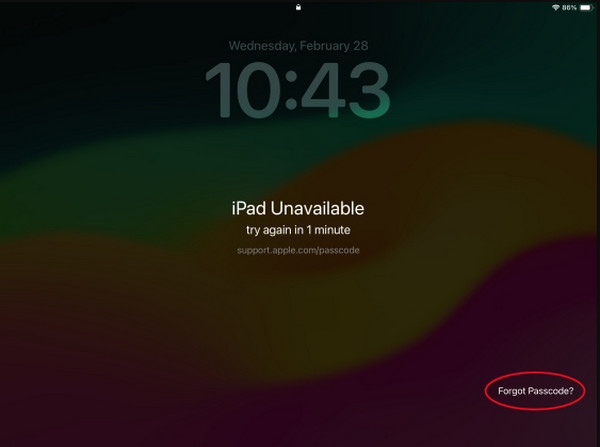
When the iPhone or iPad is locked out, you cannot use other features that they support. Luckily, the Forgot Passcode option is available during the lockout issue. It is a feature that helps you reset your iPhone and iPad or use the recently changed passcode within 72 hours without data loss. If you want to know the process of this feature, you can refer to the steps below for a better result.
Turn on your iPhone or iPad. Then, ensure that the Forgot Passcode button is accessible at the bottom right. Then, there will be 2 options that will be prompted. Follow their steps below.
- Enter Previous Passcode: Tap the button and enter the previous passcode within 72 hours. Then, please enter the new passcode you prefer for your iPhone and iPad.
- Reset iPhone/iPad: Tap the button and enter the associated Apple ID on your iPhone or iPad. Later, the iPhone or iPad will start to undergo a factory reset. Set it up again afterward.
2. Use Recovery Mode
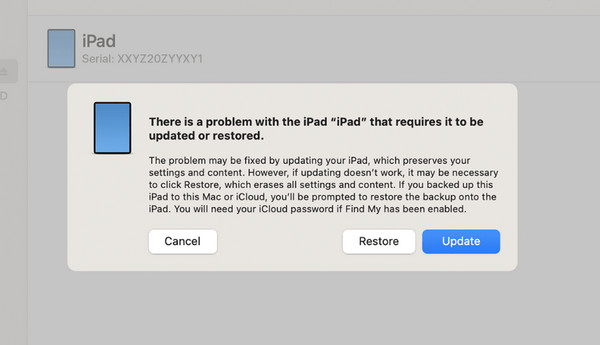
Recovery mode is an advanced technique for unlocking your iPhone and iPad when locked out. It uses a computer and built-in tools. You can use Finder, iTunes, and Apple Devices. These tools will help you restore an iPhone or iPad to factory settings to unlock it. However, you can only use this method if your iPhone or iPad had been trusted by the computer before it was locked out. See the steps below to know how to use the method easily.
Step 1Put the iPad or iPhone in recovery mode. If the Apple device has no Home button, press and immediately release Volume Up and Volume Down. Long-press the Power button afterward. If the Home button is not available, press and hold the Power and Volume Down or Home button.
Step 2Open iTunes, Finder, or Apple Devices. Then, plug the iPhone or iPad into the computer. Click the Restore button to start restoring.
Part 4. Best Alternative to EaseUS MobiUnlock - FoneLab iFoneWiz
FoneLab iFoneWiz is used to turn off restrictions on iPhone and iPad. Most of the models and versions of the mentioned Apple devices are supported. This tool can unlock iPhone passcode, PIN, Touch ID, and Face ID that have been accidentally forgotten.
A USB connection is also required for this tool because it does not use an internet connection to operate when unlocking your iPhone or iPad. The iCloud Activation Lock, SIM lock, MDM, and Screen Time can also be bypassed using the program. Use the steps below for the best results.

iFoneWiz Helps you unlock iPhone screen, Removes Apple ID or its password, Remove screen time or restriction passcode in seconds.
- Helps you unlock iPhone screen.
- Removes Apple ID or its password.
- Remove screen time or restriction passcode in seconds.
Step 1Please click the Free Download button to download the mentioned tool. Then locate the downloaded file and install it. After installation, the tool will open automatically.
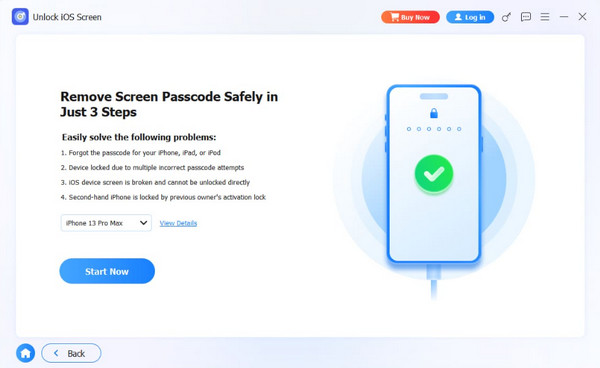
Step 2The features supported by the tool will appear. Please choose the Unlock iOS Screen feature at the top left. Then, plug an iPhone or iPad into the computer to let the computer have access to it. Next, please follow the on-screen steps to put your iPhone or iPad into recovery mode. Click the Start Now option at the bottom left to start the process.
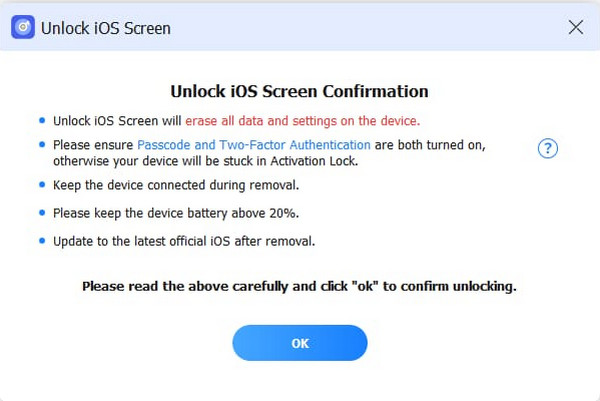
Step 3Please click the OK button under the information for the unlocking process. Then, please choose the Confirm Again button at the bottom. This way, the unlocking process for your iPhone or iPad screen lock will start. Wait for the process to be completed and click the Finish button to end the process.
Part 5. Comparison Table of Methods to Unlock iPhone/iPad
| Method | Required Connection | Apple ID Required | Other Features |
| EaseUS MobiUnlock | USB Connection | Yes. It might be needed for iCloud Activation Lock. | Apple ID Removal, Screen Time Bypass, and more. |
| Forgot Passcode Option | None | Yes. It is required if you want to reset your iPhone or iPad. | None |
| Recovery Mode | USB Connection | Yes. For iCloud Activation Lock. | Update iOS and iPadOS Versions |
| FoneLab iFoneWiz | USB Connection | No | Bypass iCloud Activation Lock, Screen Time, MDM, and more. |
Part 6. FAQs about EaseUS MobiUnlock
Is EaseUS MobiUnlock safe?
Yes. EaseUS MobiUnlock is safe for unlocking your iPhone without the passcode. However, it is not safe for your data because it will delete all of them, including its settings. They will be restored to their original or default settings.
How long does EaseUS MobiUnlock take to unlock?
By default, the EaseUS MobiUnlock unlocking process for your iPhone usually takes a few minutes to an hour. However, it still depends on the skills of the user.
In conclusion, EaseUS MobiUnlock for Android and iPhone is a tool that may bypass the screen lock when the passcode is forgotten. We have also provided its best alternatives, including FoneLab iFoneWiz. This alternative can also be used to bypass Screen Time, MDM, and iCloud Activation Lock. Download the tool if you want to know more about it!



