
 iPhone Data Recovery
 iOS System Recovery
 iOS Data Backup & Restore
 iOS Unlocker
 iPhone Password Manager
 Location Changer
 Android Data Recovery
 Broken Android Data Extraction
 Android Data Backup & Restore
 Android Unlocker
 FoneTrans for iOS
 iPhone Data Eraser
 iPhone Cleaner
 HEIC Converter
 HyperTrans
 WhatsApp Transfer for iOS
 Mac Sweep
 Data Retriever
 Mac Data Retriever
 Video Converter Ultimate
 Screen Recorder
 Phone Mirror
- Part 1. What Does YouTube Unblocked Mean
- Part 2. Unblock YouTube with VPN
- Part 3. Use Free Extensions to Unblock YouTube
- Part 4. Use Mobile Hotspot to Unblock YouTube
- Part 5. Use Proxy Sites to Unblock YouTube for School
- Part 6. Comparison of Methods to Unblock YouTube
- Part 7. Watch YouTube on Restricted School iPad/iPhone
- Part 8. FAQs about YouTube Unblocked
- Unlock Apple ID
- Bypass iCloud Activation Lock
- Doulci iCloud Unlocking Tool
- Factory Unlock iPhone
- Bypass iPhone Passcode
- Reset iPhone Passcode
- Unlock Apple ID
- Unlock iPhone 8/8Plus
- iCloud Lock Removal
- iCloud Unlock Deluxe
- iPhone Lock Screen
- Unlock iPad
- Unlock iPhone SE
- Unlock Tmobile iPhone
- Remove Apple ID Password
Access YouTube Unblocked Using Efficient Techniques
 Updated by
 Are you looking for unblocked YouTube sites, methods, or bypass solutions? If so, you have come to the right place, as the content of this article discusses all the necessary information you should know about YouTube's unblocked version. Whether you're a student trying to watch an educational video on a school computer or an employee on a break at a workplace with restricted internet, a blocked YouTube can easily disrupt what you need to do.
Hence, in this guide, we will show you the main solution you can rely on, YouTube Unblocked. Whether or not it's your first time hearing about it, the following parts will walk you through simple, effective techniques to access YouTube even when it's blocked on your network. We will explain each technique, so pick the one that best fits your situation.

Guide List
- Part 1. What Does YouTube Unblocked Mean
- Part 2. Unblock YouTube with VPN
- Part 3. Use Free Extensions to Unblock YouTube
- Part 4. Use Mobile Hotspot to Unblock YouTube
- Part 5. Use Proxy Sites to Unblock YouTube for School
- Part 6. Comparison of Methods to Unblock YouTube
- Part 7. Watch YouTube on Restricted School iPad/iPhone
- Part 8. FAQs about YouTube Unblocked
Part 1. What Does YouTube Unblocked Mean
When we say YouTube unblocked, it means being able to watch YouTube videos on a network where it is restricted, such as your school or workplace. Perhaps you're trying to open YouTube's official site or app, but it can't be accessed. You can try an unblocked version instead, as it will let you enjoy watching your favorite content, even if it is blocked or restricted by the network you're using.
Meanwhile, YouTube will still be the same with all the same videos or content, and the restriction has only been removed. To clarify, though, there is no special unblocked version of YouTube that you need to download or install. Instead, it refers to different methods that let you access the normal YouTube site from a restricted network. They will be discussed in the following sections, so review them carefully and choose which solution fits you best.
Part 2. Unblock YouTube with VPN
A VPN, or Virtual Private Network, is among the reliable ways to unblock YouTube. It works by creating a secure and private link between your device and the internet, hiding your real location to make it look like you're browsing from somewhere else. You can set your desired location where YouTube is not blocked, and afterward, accessing the app or site will be easy.
Follow the steps below to watch on Youtube unblocked website with a VPN:
Step 1Find a VPN app on your device's App Store, then go through the initial setup.
Step 2Once ready, you will be asked to choose your desired location, so set it to a place where YouTube is not blocked. Then, you can finally open the platform and watch with ease.
Part 3. Use Free Extensions to Unblock YouTube
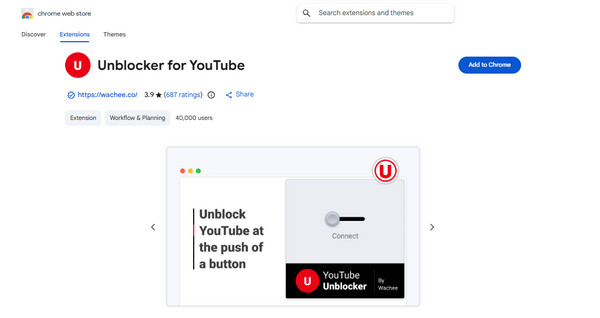
You can also add an extension like Unblocker for YouTube to your Chrome browser to access the platform's official site. Most, if not all, extensions are free and easy to install, which is why many people prefer them, besides the fact that they don't require adjusting anything in your computer's system settings. All you need to do is add the extension to your browsing program from the Chrome Web Store and enable it, and you'll be able to use YouTube afterward.
Follow the steps below to grasp how to watch YouTube unblocked using free extensions like Unblocker for YouTube:
Step 1Start by going to the Chrome Web Store and searching for Unblocker for YouTube.
Step 2Once displayed, hit Add to Chrome and set it up. When done, ensure you turn it on before accessing the YouTube site and watching without restrictions.
Part 4. Use Mobile Hotspot to Unblock YouTube
As mentioned, YouTube may be blocked from your workplace or school network where your device is connected. But if you use a mobile hotspot instead, accessing the site or app won't be a problem, especially if it's your private network. You may connect to someone's or another device you own that uses mobile data or is linked to a WiFi network that doesn't block YouTube.
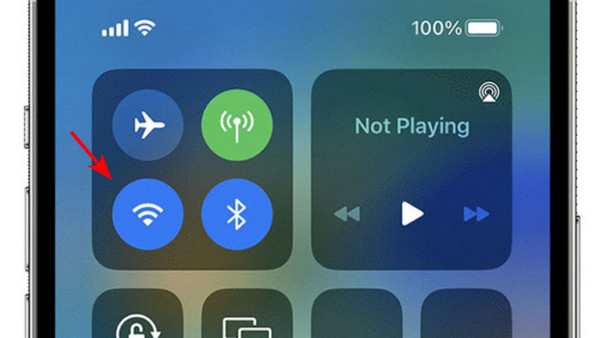
Its process is hassle-free, as it's as simple as connecting to WiFi. Simply ensure the mobile hotspot device is active, then turn on the WiFi on your device. When the hotspot's name appears, tap it and enter the designated password if needed. Once connected, start watching YouTube.
Part 5. Use Proxy Sites to Unblock YouTube for School
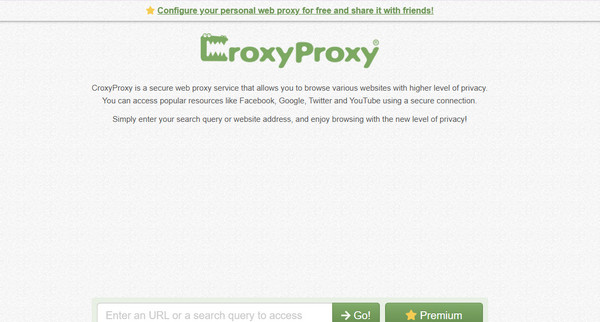
Meanwhile, proxy sites like CroxyProxy are also available to help you access YouTube for school, work, etc. Like the previous solution, it doesn't require an installation, as you only need to navigate the process on its official site. By opening YouTube from the proxy site, you won't have to worry about restrictions since it will act as a middleman, bypassing these restrictions. Just note the downside that it can be slow and show multiple ads while you're enjoying the content.
Follow the operation below to use unblocked YouTube for school on proxy sites, like CroxyProxy:
Step 1On your browser, open the CroxyProxy webpage and scroll down to see the text field.
Step 2Enter YouTube's URL there and click Go! to access the platform and watch.
Part 6. Comparison of Methods to Unblock YouTube
| Evaluation Item | VPN | Extension (Unblocker for YouTube) | Mobile Hotspot | Proxy Site (CroxyProxy) |
| Ease of Use | Moderate | Easy | Very Easy | Easy |
| Setup Time | A few minutes (download + install) | Less than 1 minute | Less than 1 minute | None (just open in browser) |
| Speed | Fast to very fast | Fast | Depends on cellular signal | Often slow and laggy |
| Best For | Heavy, private, and fast streaming | Quick, casual unblocking on Chrome | Short sessions when Wi-Fi is blocked | Occasional access when other methods fail |
Part 7. Watch YouTube on Restricted School iPad/iPhone
You may wonder how your school restricts such platforms on your device. Well, the primary reason is MDM or Mobile Device Management. They might have set up this specific feature on your device before handing it to you to ensure you won't be able to access platforms that may cause distractions, like YouTube. In this case, FoneLab iOS Unlocker can help.
This program can remove MDM from iPad, even without the passcode your school has set, allowing you to navigate the device more freely afterward. You simply have to follow the steps on the program's intuitive interface; thus, expertise isn't required. Other than that, it could also help you unlock iPhone without passcode, remove an Apple ID, and more if needed later.
FoneLab Helps you unlock iPhone screen, Removes Apple ID or its password, Remove screen time or restriction passcode in seconds.
- Helps you unlock iPhone screen.
- Removes Apple ID or its password.
- Remove screen time or restriction passcode in seconds.
Discern the guide below as a model to watch YouTube on a restricted school iPad or iPhone:
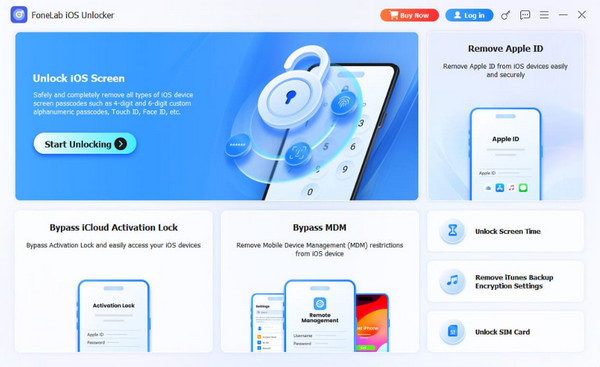
Step 1Save FoneLab iOS Unlocker's installer, and once it's ready in your Downloads folder, open it to prompt the initial setup. Follow through the requirements and options by picking your preferences. Afterward, run the tool using the Start tab and tick Bypass MDM on the interface.
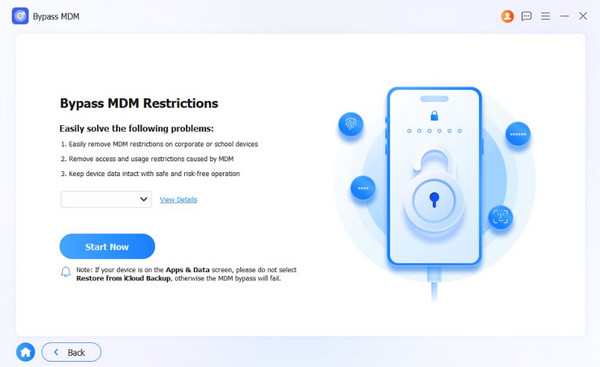
Step 2Once you access the feature, link your iPad or iPhone with a Lightning cable and click Start Now. You may be asked to disable Stolen Device Protection or Find My, so turn it off, then navigate the prompts and instructions that follow to remove the MDM profile from your device.
Part 8. FAQs about YouTube Unblocked
Is it illegal to unblock YouTube at school or work?
Generally, no. It is likely against the workplace's or school's policies, but it's not illegal. However, you could still face consequences if caught.
How can I open unblocked YouTube Music?
The methods above can also apply to accessing YouTube Music's unblocked version. Simply perform the same procedures, but this time, replace YouTube's site with YouTube Music.
After browsing the options, choose the one that fits your needs and carefully perform them for the best result. Besides, if the unblocked solutions fail, you still have FoneLab iOS Unlocker to bypass the MDM restrictions for you. Install it anytime.