
 iPhone Data Recovery
 iOS System Recovery
 iOS Data Backup & Restore
 iOS Unlocker
 iPhone Password Manager
 Location Changer
 Android Data Recovery
 Broken Android Data Extraction
 Android Data Backup & Restore
 Android Unlocker
 FoneTrans for iOS
 iPhone Data Eraser
 iPhone Cleaner
 HEIC Converter
 HyperTrans
 WhatsApp Transfer for iOS
 Mac Sweep
 Data Retriever
 Mac Data Retriever
 Video Converter Ultimate
 Screen Recorder
 Phone Mirror
- Part 1. Why Is TikTok Blocked at School?
- Part 2. How to Unblock TikTok at School Using a Reliable VPN
- Part 3. How to Unblock TikTok at School by Exploring Web Proxies
- Part 4. How to Unblock TikTok at School Using Mobile Hotspot / Personal Data
- Part 5. How to Unblock TikTok at School by Changing DNS Settings
- Part 6. How to Access TikTok When TikTok is Blocked via MDM on a Restricted iPhone/iPad
- Part 7. FAQs about TikTok Unblocked
- Unlock Apple ID
- Bypass iCloud Activation Lock
- Doulci iCloud Unlocking Tool
- Factory Unlock iPhone
- Bypass iPhone Passcode
- Reset iPhone Passcode
- Unlock Apple ID
- Unlock iPhone 8/8Plus
- iCloud Lock Removal
- iCloud Unlock Deluxe
- iPhone Lock Screen
- Unlock iPad
- Unlock iPhone SE
- Unlock Tmobile iPhone
- Remove Apple ID Password
Learn TikTok Unblocked with A Useful and Easy Guide
 Updated by
 TikTok unblocked is the solution many students and young people look for when they find the app or site restricted at school or on certain networks. As you may know, this social media platform is among the most popular places to go to during free time; thus, seeing it blocked while looking for a platform to browse while you're enjoying your short break in between classes can be disheartening, especially when you only want to relax and watch your favorite creators.
The good news is that accessing TikTok on a restricted network doesn't have to be complicated. As mentioned, the unblocked version of TikTok is the solution, and you must only find the perfect option to access it. This guide is designed to help you understand the most helpful options, so browse and learn each part accordingly to enjoy watching TikTok afterward.

Guide List
- Part 1. Why Is TikTok Blocked at School?
- Part 2. How to Unblock TikTok at School Using a Reliable VPN
- Part 3. How to Unblock TikTok at School by Exploring Web Proxies
- Part 4. How to Unblock TikTok at School Using Mobile Hotspot / Personal Data
- Part 5. How to Unblock TikTok at School by Changing DNS Settings
- Part 6. How to Access TikTok When TikTok is Blocked via MDM on a Restricted iPhone/iPad
- Part 7. FAQs about TikTok Unblocked
Part 1. Why Is TikTok Blocked at School?
Before learning how to unblock TikTok at school with the solutions below, let's first understand why it is blocked. First, schools want students to focus on learning. This platform is full of short, fun, and distracting videos, making it easy for students to spend hours watching clips instead of doing schoolwork. So, blocking the app helps keep their attention on lessons.
TikTok also uses a lot of data, as videos load continuously. If many students watch TikTok at the same time, the school's Wi-Fi slows down for everyone, which likely causes disruptions for everyone when doing online tasks. Another thing is that schools must protect student safety. As you may know, TikTok collects user information, shows some age-inappropriate content, and even allows users to chat with strangers. So, blocking the app or site can help prevent these issues, at least within the school environment.
Part 2. How to Unblock TikTok at School Using a Reliable VPN
VPN is a popular solution when experiencing restrictions or difficulty accessing specific platforms. That's because when you use a VPN or Virtual Private Network, your online activity gets hidden, and your real location is masked. As a result, it will look like you are somewhere else doing something else, not using TikTok, and bypassing your school's WiFi network restrictions.
Adhere to the guide below to access the TikTok unblocked website using a reliable VPN:
Step 1Find and install a reliable VPN first on your App Store, then run the app and set it up.
Step 2Once the app is ready, you can immediately set it to a location that doesn't block TikTok. The social media platform will finally be accessed afterward.
Part 3. How to Unblock TikTok at School by Exploring Web Proxies
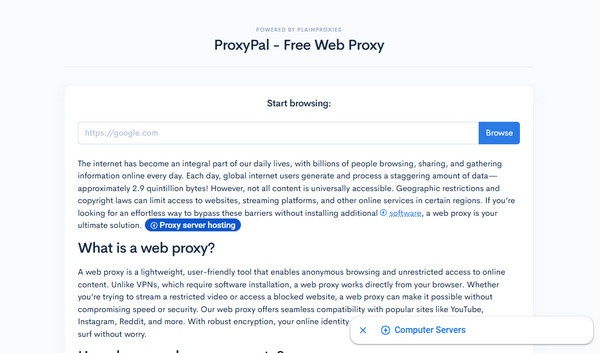
A web proxy is another effective technique to unblock TikTok at your school. Several sites are available, so if you explore enough, a reliable one, like ProxyPal, will suffice. It is among the most relevant proxy sites on the web these days, so visit it anytime. After all, the way it works is straightforward. All you must do is access the TikTok page through its website, and it will handle the school's restrictions for you. However, expect it to be slower than other methods.
Imitate the task below to open an unblocked TikTok website by exploring web proxies like ProxyPal:
Step 1Enter the ProxyPal website on a browser, and you will quickly see the URL text field.
Step 2From there, input the TikTok link and hit Browse to start using its unblocked version.
Part 4. How to Unblock TikTok at School Using Mobile Hotspot / Personal Data
If your school's WiFi network is the primary reason you can't access TikTok, a quick and simple solution is to use a different internet network instead. You can use your personal data or connect to a mobile hotspot where TikTok isn't blocked. Just make sure you have available data because, unlike the school WiFi, this option is not free. You will need an internet subscription.
Follow the procedure below to access TikTok at school using a mobile hotspot or personal data:
For mobile hotspot: Turn your WiFi on, and when the name of the mobile hotspot appears, select it. You may need to enter the passcode, so input it to connect and use TikTok afterward.
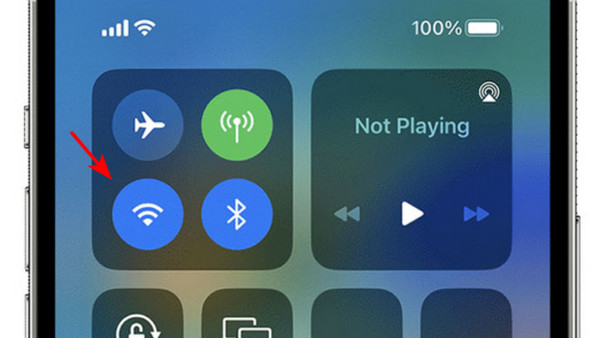
For personal data: On the Control Center, turn the mobile data feature on and turn off the WiFi. If you have available data, you can immediately start browsing TikTok without restrictions.
Part 5. How to Unblock TikTok at School by Changing DNS Settings
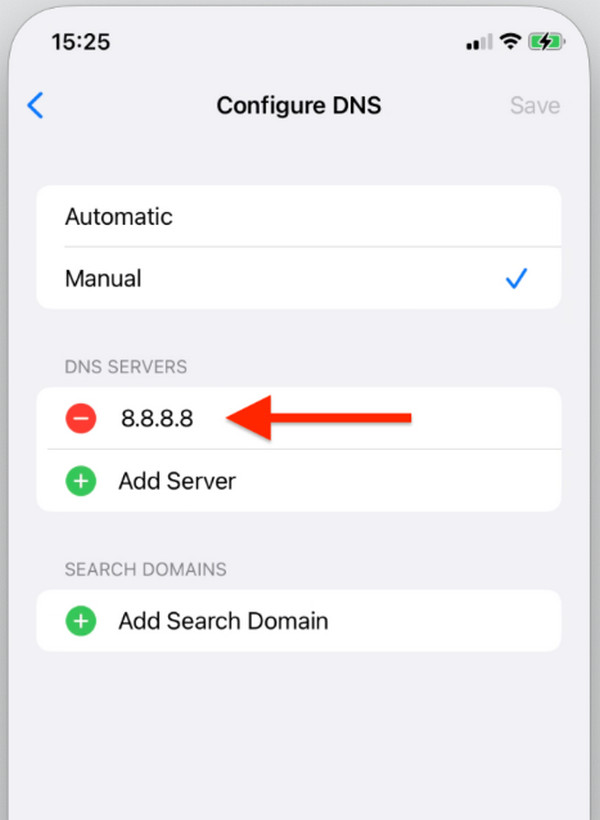
Meanwhile, schools sometimes block TikTok by using DNS, setting it up to refuse to look up TikTok's address. So, changing your Domain Name System to unblock the social media platform can help, as it will bypass DNS-based filtering, which schools use to prevent students from accessing TikTok. This process can be done directly on your device, but it is a little complex.
Follow the instructions below to unblock TikTok at school by changing DNS settings:
Step 1On Settings, enter the WiFi section and tap the i symbol beside your school network.
Step 2Next, choose Configure DNS and tap Manual. The existing servers will then appear, so change them into 1.1.1.1 and 1.0.0.1 in the designated field. Afterward, start enjoying TikTok.
Part 6. How to Access TikTok When TikTok is Blocked via MDM on a Restricted iPhone/iPad
Other than the WiFi network, schools also use MDM to block or restrict various activities on the device. So, if your iPhone or iPad is given by the school, all you must do is handle or remove their MDM profile in your Settings. The only problem you may face is the profile's passcode, but no worries. With FoneLab iOS Unlocker, it won't be a problem to turn off restrictions on iPhone.
This specialized tool can remove the MDM your school has set on your iPhone or iPad, even if you don't provide the passcode. You also don't need to worry about technicalities, as its function and interface are designed for all users, including beginners. Besides, you also won't want to miss the other features, which can help you unlock iPhone without passcode, and more later.
FoneLab Helps you unlock iPhone screen, Removes Apple ID or its password, Remove screen time or restriction passcode in seconds.
- Helps you unlock iPhone screen.
- Removes Apple ID or its password.
- Remove screen time or restriction passcode in seconds.
Follow the steps below to access TikTok when it's blocked via MDM on a restricted iPhone or iPad:
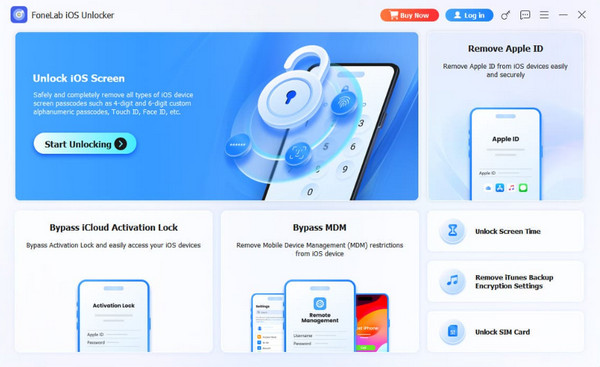
Step 1Start by downloading the FoneLab iOS Unlocker file. It will serve as the program's installer, so run it once it's saved in your Downloads folder to begin the initial setup. Once done, hit the pop-up Start tab to run the tool. Then, choose Bypass MDM on the key interface.
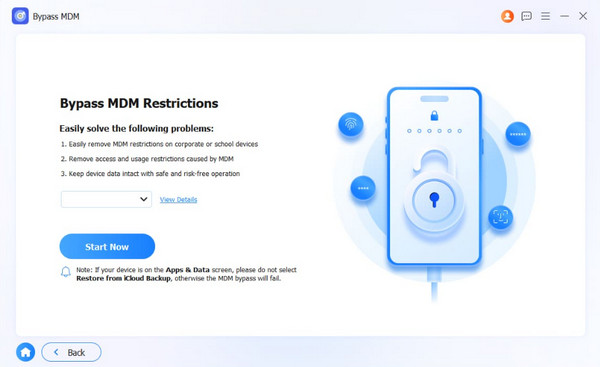
Step 2The initial direction you will see is to attach your iPhone or iPad. Hence, do it using a Lightning cable. Once linked, hit Start Now on the screen and deactivate Stolen Device Protection or Find My if asked. Further prompts will then appear, so simply follow along.
Part 7. FAQs about TikTok Unblocked
How to get TikTok on school computer?
If you're using a school computer, it would be best to use a web proxy like the one in Part 3. This way, you won't have to change anything in settings.
Can my school see that I am using a VPN or proxy?
Sometimes yes. Schools can see that you are using a VPN, but they cannot see what you do inside it.
With the right method from this guide, you can enjoy TikTok that is blocked at your school. You can't go wrong with these suggestions, especially with the capabilities of FoneLab iOS Unlocker. Feel free to install it and give it a try.