
 iPhone Data Recovery
 iOS System Recovery
 iOS Data Backup & Restore
 iOS Unlocker
 iPhone Password Manager
 Location Changer
 Android Data Recovery
 Broken Android Data Extraction
 Android Data Backup & Restore
 Android Unlocker
 FoneTrans for iOS
 iPhone Data Eraser
 iPhone Cleaner
 HEIC Converter
 HyperTrans
 WhatsApp Transfer for iOS
 Mac Sweep
 Data Retriever
 Mac Data Retriever
 Video Converter Ultimate
 Screen Recorder
 Phone Mirror
- Part 1. Why is the Roblox Game Blocked in Schools?
- Part 2. Play Roblox Unblocked on a Cloud Gaming Platform
- Part 3. Turn On a VPN Service or App
- Part 4. Use a Proxy Server to Play Unblocked Roblox
- Part 5. Connect Your School Device to a Mobile Hotspot
- Part 6. Comparison of Ways to Play Roblox Unblocked
- Part 7. How to Play the Unblocked Roblox Game on Restricted iOS Devices
- Part 8. FAQs about Roblox Unblocked
- Unlock Apple ID
- Bypass iCloud Activation Lock
- Doulci iCloud Unlocking Tool
- Factory Unlock iPhone
- Bypass iPhone Passcode
- Reset iPhone Passcode
- Unlock Apple ID
- Unlock iPhone 8/8Plus
- iCloud Lock Removal
- iCloud Unlock Deluxe
- iPhone Lock Screen
- Unlock iPad
- Unlock iPhone SE
- Unlock Tmobile iPhone
- Remove Apple ID Password
Roblox Unblocked: An Easy Guide to Playing the Game
 Updated by
 Play Roblox unblocked and dive into a universe of creativity and social gaming, even on restricted networks. Whether you're a student looking to enjoy a quick game between classes or an employee seeking a brief escape during a break, accessing Roblox on school or work Wi-Fi can be challenging due to various restrictions. Luckily, you have discovered this guide that will help you learn everything you need to know about playing the game.

Guide List
- Part 1. Why is the Roblox Game Blocked in Schools?
- Part 2. Play Roblox Unblocked on a Cloud Gaming Platform
- Part 3. Turn On a VPN Service or App
- Part 4. Use a Proxy Server to Play Unblocked Roblox
- Part 5. Connect Your School Device to a Mobile Hotspot
- Part 6. Comparison of Ways to Play Roblox Unblocked
- Part 7. How to Play the Unblocked Roblox Game on Restricted iOS Devices
- Part 8. FAQs about Roblox Unblocked
Part 1. Why is the Roblox Game Blocked in Schools?
Schools block Roblox for three reasons. First, minimize distractions; second, protect their network; and third, ensure student safety. Since the game is highly engaging, allowing students to access it might distract them during lessons. Also, Roblox consumes significant bandwidth, which can slow down the school's internet for educational tasks. Aside from that, schools restrict it to prevent students from interacting with strangers online and to avoid exposure to inappropriate content that isn't suitable in the school environment.
Part 2. Play Roblox Unblocked on a Cloud Gaming Platform
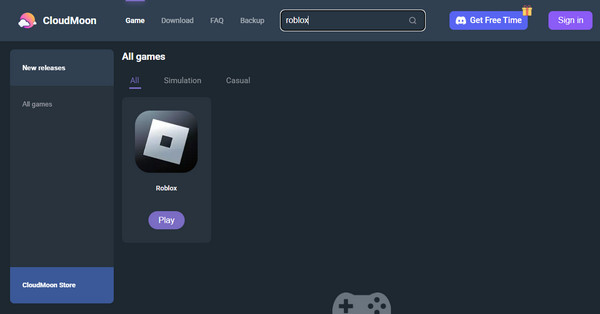
Several cloud gaming platforms are also well-known for offering unblocked versions of games, such as Roblox. Among them is CloudMoon, so if you want an easy and direct process to play it, access this platform's website, and you will quickly be able to enjoy the game without facing restrictions. However, be prepared to sign in to an account, as the website will prompt you to log in before allowing access to Roblox or another game on the platform.
Comply with the operation below to play Roblox unblocked online on a cloud gaming platform:
Step 1Start by opening your browser to enter CloudMoon's official website. Once its initial page is shown, use the search bar above to search for Roblox.
Step 2Shortly, the game will appear. Click its Play button, and when prompted, sign in to an account to start playing Roblox on the platform.
Part 3. Turn On a VPN Service or App
On the other hand, installing and turning on a VPN service or app is also an effective technique to play Roblox's unblocked version. Unlike the previous section, this one won't require you to access an alternative platform offering the game. Instead, you must only turn the VPN on first, and once everything is properly set, you will finally be allowed to access and play Roblox from its official source or platform. You may install a VPN app or access a VPN service online.
Yield to the instructions below to play Roblox free unblocked by turning on VPN:
Step 1First, access a VPN service or app and perform the initial setup before turning it on.
Step 2Once turned on, set the location to somewhere in Roblox where you can access it without restrictions. When ready, try the game again on your device.
Part 4. Use a Proxy Server to Play Unblocked Roblox
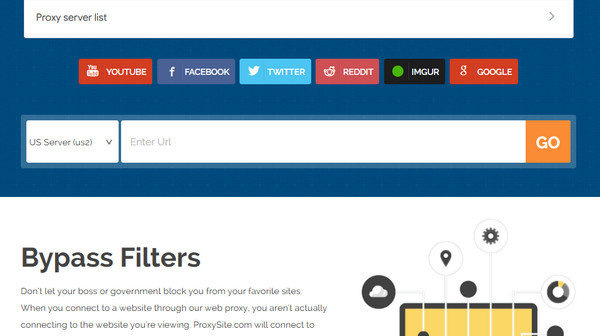
You can also use a proxy server to access Roblox on its official platform. Such websites, like proxysite.com, allow you to access another platform, such as the game's webpage, from its initial page. This way, you won't have to go directly to Roblox's website, facing all of the game's restrictions. This proxy server will access the official game's website for you, bypassing its restrictions that prevent you from entering and playing the game.
Abide by the procedure below to play Roblox unblocked at school no download, using the proxy server, proxysite.com:
Step 1On your browsing program, head to proxysite.com and scroll down to paste Roblox's site in the 'Enter URL' text field.
Step 2After that, hit Go to access the game from the proxy server without facing restrictions.
Part 5. Connect Your School Device to a Mobile Hotspot
Meanwhile, if the restriction is on the WiFi network you are connected to, try using a mobile hotspot instead. After all, your school may have blocked or restricted the students' devices from accessing gaming websites, as they might distract children from focusing on lessons. Hence, use a mobile hotspot to browse and access Roblox without a problem.
Have regard to the steps below to play Roblox unblocked for school by connecting the device to a mobile hotspot:
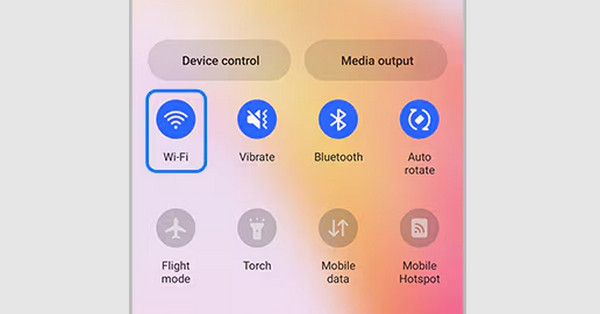
Step 1Connecting to a mobile hotspot is the same as connecting to a WiFi network. Hence, turn on your device's WiFi on the Quick Panel.
Step 2When available networks appear, select the name of the mobile hotspot you wish to connect to, then once connected, open Roblox again to start playing.
Part 6. Comparison of Ways to Play Roblox Unblocked
| Methods | Cloud Gaming Platform | VPN | Proxy Server | Mobile Hotspot |
| How It Works | Streams the game directly in your browser. | Encrypts your connection and routes it through a private server. | You visit the proxy, and it visits Roblox for you. | Uses a phone's cellular data to create a personal WiFi network, bypassing school Wi-Fi. |
| Ease of Use | Very Easy | Moderate | Easy | Easy |
| Speed | Good | Good | Slow | Depends on cell signal |
| Safety | High | High | Low | High |
Part 7. How to Play the Unblocked Roblox Game on Restricted iOS Devices
Are you an iOS device user? In this case, there's a high chance that the restriction preventing you from accessing Roblox is on the device itself, especially if it's from your school, work, or other organization. That's because iOS devices, like iPhones and iPads, have an MDM or Mobile Device Management feature that allows administrators to restrict your device from accessing certain websites, apps, features, or other platforms.
That said, let the specialized tool, FoneLab iOS Unlocker, help you remove MDM from your iPhone with its user-friendly Bypass MDM feature. You don't need to worry about having no prior knowledge regarding such processes. Its interface is designed to let users navigate the functions easily. Besides, it can also help you unlock iPhone without passcode later when needed.
Identify the effortless task below as a model to play Roblox unblocked on restricted iOS devices with FoneLab iOS Unlocker:

FoneLab Helps you unlock iPhone screen, Removes Apple ID or its password, Remove screen time or restriction passcode in seconds.
- Helps you unlock iPhone screen.
- Removes Apple ID or its password.
- Remove screen time or restriction passcode in seconds.
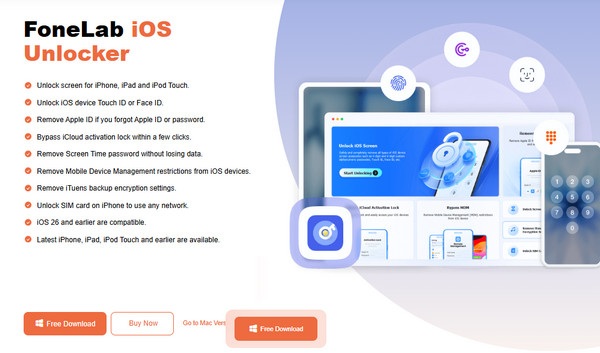
Step 1Begin by downloading FoneLab iOS Unlocker's installer from its official page via the Free Download tab. It will quickly appear in the Downloads folder; so, double-click it to begin the initial setup. A few seconds later, click the Start button that appears, launching the program.
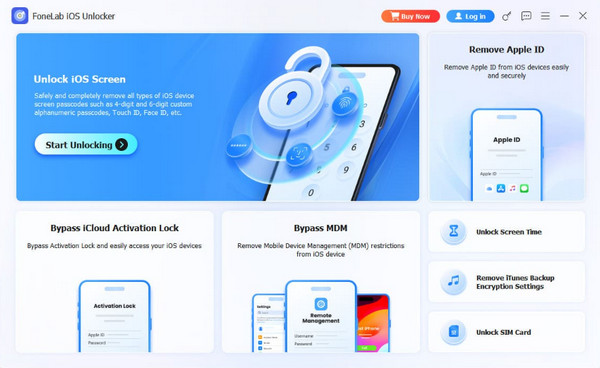
Step 2Select Bypass MDM when the tool's features are presented on the interface. Next, connect your iOS device with your Lightning cable, then select Start Now. If asked, disable your device's Find My or Stolen Device Protection, then proceed with the prompts to finish.
Part 8. FAQs about Roblox Unblocked
Is it legal to play Roblox unblocked at school?
Playing Roblox's unblocked version on a school-provided device is usually not illegal, but it generally violates the school policies.
Why is Roblox so slow when using a proxy?
Why is Roblox so slow when using a proxy, and free proxies, in particular, become overcrowded with users, slowing down your loading times and gameplay.
Whether you use cloud gaming, a VPN, or your phone's hotspot, playing Roblox unblocked is achievable. Just choose the method that works for you. Additionally, FoneLab iOS Unlocker is available if you encounter any further restrictions.



