
 iPhone Data Recovery
 iOS System Recovery
 iOS Data Backup & Restore
 iOS Unlocker
 iPhone Password Manager
 Location Changer
 Android Data Recovery
 Broken Android Data Extraction
 Android Data Backup & Restore
 Android Unlocker
 FoneTrans for iOS
 iPhone Data Eraser
 iPhone Cleaner
 HEIC Converter
 HyperTrans
 WhatsApp Transfer for iOS
 Mac Sweep
 Data Retriever
 Mac Data Retriever
 Video Converter Ultimate
 Screen Recorder
 Phone Mirror
- Unlock Apple ID
- Bypass iCloud Activation Lock
- Doulci iCloud Unlocking Tool
- Factory Unlock iPhone
- Bypass iPhone Passcode
- Reset iPhone Passcode
- Unlock Apple ID
- Unlock iPhone 8/8Plus
- iCloud Lock Removal
- iCloud Unlock Deluxe
- iPhone Lock Screen
- Unlock iPad
- Unlock iPhone SE
- Unlock Tmobile iPhone
- Remove Apple ID Password
Resolve A Locked SIM iPhone Smoothly with A Helpful Guide
 Updated by
 Does anyone know the SIM-locked iPhone meaning? I recently bought my iPhone, and when I tried to insert a new SIM card, the device wouldn't let it function. So, I asked around and found out the iPhone is locked to its carrier. Can somebody please guide me in handling this problem? I prefer the offers from the other network, so I hope to switch soon. Thank you in advance!
If your iPhone refuses to recognize a new SIM card, the details above are correct. The device must be locked to its original carrier. This restriction can be particularly frustrating, especially when trying to switch networks or use a local SIM while traveling. A carrier-locked iPhone will only work with approved SIM cards, limiting your flexibility in terms of network services.
Don't worry, though. Being locked doesn't mean you're stuck forever. Whether you inherited a locked iPhone, bought one, or simply want to switch carriers, the professional methods below will be here to help you. The key is knowing the appropriate one, so understand every detail in the upcoming section and perform your chosen procedure correctly to unlock your iPhone.


Guide List
Sadly, methods for unlocking an iPhone that is locked to its SIM are limited, and most of them are services. Fortunately, we found the professional and most reliable ones that you can use on your iPhone. Browse them below and ensure you manage every step correctly to unlock your iPhone that has been locked to its SIM or carrier.
Part 1. How to Unlock A SIM-Locked iPhone with FoneLab iOS Unlocker
Being locked out of your iPhone due to a locked SIM can be incredibly frustrating. Thankfully, FoneLab iOS Unlocker offers a professional way to regain access, even without entering the device's passcode. If you examine the program, you will discover that developers especially designed its Remove SIM Locks function to help you. Even without prior knowledge of unlocker tools or methods, you can rely on its quick and secure process without worries.
Additionally, FoneLab iOS Unlocker is compatible with almost any iOS model and version, enabling seamless use on various iPhones without compatibility issues. You can also expect its versatility to provide more benefits, as it not only removes SIM locks. It is reliable, even if your iPhone lock is a PIN code, Face ID, or Touch ID, ensuring you can access the device without any issues. Besides, you don't need technical expertise to maneuver its interface.

FoneLab Helps you unlock iPhone screen, Removes Apple ID or its password, Remove screen time or restriction passcode in seconds.
- Helps you unlock iPhone screen.
- Removes Apple ID or its password.
- Remove screen time or restriction passcode in seconds.
Discern the appropriate instructions below as a pattern for unlocking a SIM locked iPhone with FoneLab iOS Unlocker:
Step 1Launch your browser to enter FoneLab iOS Unlocker's official site. You can then locate the Free Download tab, typically located on the left side, and click it to obtain the installer. After downloading, run the setup file from Downloads and initiate the tool by selecting Start.

Step 2From the main interface, hit Remove SIM Locks. Using a compatible USB cable, connect your iPhone to the computer.
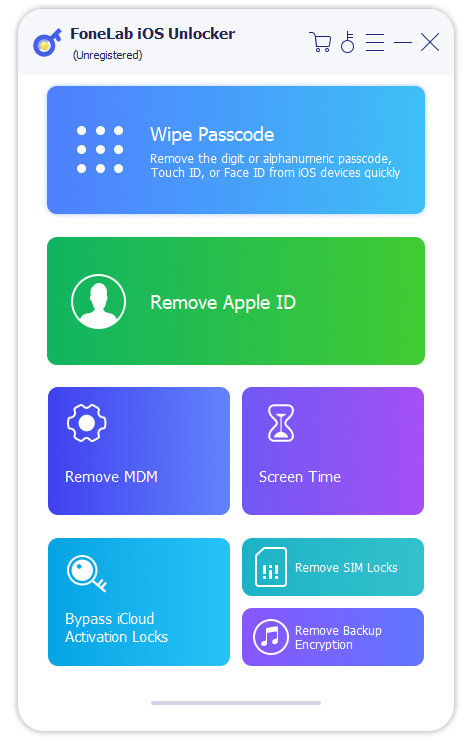
Step 3Carefully follow the on-screen instructions to finish the SIM unlocking procedure.
Part 2. Contact Your iPhone Carrier to Unlock A SIM-Locked iPhone
The most straightforward and official method for handling a SIM-locked iPhone is to request an unlock directly from your network provider. Carriers often lock devices to their network when sold under contract or installment plans. But once you've fulfilled the terms, such as paying off the device or completing your contract period, they are typically obligated to unlock it upon request. Therefore, you should only request an unlock code through customer support, online, or their mobile app, if available. Please remember to provide the requirements, which may include your iPhone's IMEI number, proof of purchase, or other relevant information.
Bear in mind the accurate directions below to determine how to unlock a SIM-locked iPhone by contacting your iPhone carrier:
Step 1First, locate your carrier's contact details either online or in the original packaging of your iPhone. Contact them and formally request that they unlock your device. Afterward, be prepared to verify your ownership using the needed information.
Step 2The carrier will request specific details about your iPhone, particularly the IMEI number. They may ask for more information, but once you have provided all the necessary details, wait until they have finished processing your request. Then, follow their directions to unlock your SIM-locked iPhone.
As mentioned, please don't forget to provide the requirements your carrier asks for. If you miss at least one piece of information, they might not be able to proceed and provide you with the necessary unlock code. Meanwhile, another drawback of this method is that the cooperation of some carriers' customer service is not always guaranteed due to unavailability. Therefore, we suggest an alternative convenient online solution in the upcoming section to assist you.
Part 3. Use A Professional Online Service to Unlock A SIM-Locked iPhone
Meanwhile, professional online services like Cellunlocker also offer a convenient process to unlock your iPhone that is SIM-locked. This method is advantageous if your carrier refuses to unlock the device or if you need a faster solution. It specializes in removing carrier restrictions remotely, allowing you to use any SIM card worldwide afterward. Aside from that, one of the most significant advantages you can enjoy with this online service is its compatibility with almost all iPhone models and carriers. So, expect it to be a versatile solution that can help you even later. After all, it is straightforward, especially with Cellunlocker's user-friendly page design.
Act under the effortless navigation below to unlock an iPhone SIM-locked using a professional online service:
Step 1First, visit Cellunlocker's official website, where you'll find their unlocking options. After that, select your iPhone model and carrier, then hit Unlock Your Phone to begin the process.
Step 2Enter your device details, such as the IMEI number, when prompted before clicking Quick Unlock Now. Afterward, proceed to payment by filling in the required information to complete the transaction. Once processed, your SIM-locked iPhone will unlock.

An iPhone that has been SIM-locked is only one of the lock problems you may encounter. Meanwhile, another common one is an iPhone with a forgotten passcode. Many find it the worst because it keeps you stuck on the lock screen, preventing access to the device and almost all its functions. Don't worry, FoneLab iOS Unlocker can also help you. Please download it on your computer and unlock your iPhone passcode within a few clicks.
Part 4. FAQs about SIM-Locked iPhone
Can I use eSIM on a locked iPhone?
Yes, you can. However, the eSIM must still be from the same carrier as your iPhone is locked to. If not, use the methods and directions above to unlock it from the network.
Will unlocking my iPhone erase data?
No, it won't. Unlocking an iPhone from its carrier doesn't require data deletion, especially if you use an appropriate method.
You can efficiently handle an iPhone that is SIM-locked as long as you know and perform the necessary procedures. Thankfully, the leading techniques above already provide professional yet convenient unlocking, making everything convenient. Aside from that, FoneLab iOS Unlocker, can be reliable. Thus, get it now!



