
 iPhone Data Recovery
 iOS System Recovery
 iOS Data Backup & Restore
 iOS Unlocker
 iPhone Password Manager
 Location Changer
 Android Data Recovery
 Broken Android Data Extraction
 Android Data Backup & Restore
 Android Unlocker
 FoneTrans for iOS
 iPhone Data Eraser
 iPhone Cleaner
 HEIC Converter
 HyperTrans
 WhatsApp Transfer for iOS
 Mac Sweep
 Data Retriever
 Mac Data Retriever
 Video Converter Ultimate
 Screen Recorder
 Phone Mirror
- Unlock Apple ID
- Bypass iCloud Activation Lock
- Doulci iCloud Unlocking Tool
- Factory Unlock iPhone
- Bypass iPhone Passcode
- Reset iPhone Passcode
- Unlock Apple ID
- Unlock iPhone 8/8Plus
- iCloud Lock Removal
- iCloud Unlock Deluxe
- iPhone Lock Screen
- Unlock iPad
- Unlock iPhone SE
- Unlock Tmobile iPhone
- Remove Apple ID Password
How to Play Snow Rider 3D Unblocked on Classroom Without Limitations
 Updated by
 Hi! The Snow Rider unblocked on Classroom 6x has been released. However, I do not have the chance to play it because of the restrictions on my iPhone. Can you help me access the game? I hope you can help me with this process. Thank you!
The Snow Rider 3D game might have been restricted from playing in Classroom 6x due to security features enabled on your iPhone. Let us dig deeper into this topic! Please scroll below to know the complete information you need to learn about it.

Guide List
Part 1. What is Snow Rider 3D?
Snow Rider 3D is a browser game intended for teenagers and kids. Its main gameplay is riding a sled down an endless snowy mountain. The game happens from a third-person point of view. It is a bit of a survival game that challenges you to a winter sports theme, jump, and more activities.
Also, the game is pure repetition. You are playing it to beat the previous distance, who last from a longer distance with a high speed, and more. It requires a quick reaction to dodge the objects that you will encounter to have a good score.
Part 2. Snow Rider 3D Gameplay Features
There are multiple supported features available in Snow Rider 3D. These features are designed to give users the best and smoothest gameplay in the browser game. See some of them from the list below.
1. Endless Tracks
Each run, the mountain path that your character passes through is randomly generated. The obstacles that your character can encounter change every time.
2. Instant Gameplay Accessibility
The game does not offer a tutorial. But there’s nothing to worry about because the game is easy and it is self-explanatory. It works from different devices, including computers and mobile phones.
3. Minimal Sound and Effects
You will hear minimal sound and effects that are not overwhelming. It has clean, straightforward visual effects, which help focus on the path your character travels. Additionally, the clear crash animations show your mistakes in your gameplay.
4. Dozen of Sled Appearances
The game offers different sled appearances. It includes the novelty holiday designs, colorful modern sleds, and more.
Part 3. Bypassing School Restrictions with FoneLab iOS Unlocker

FoneLab Helps you unlock iPhone screen, Removes Apple ID or its password, Remove screen time or restriction passcode in seconds.
- Helps you unlock iPhone screen.
- Removes Apple ID or its password.
- Remove screen time or restriction passcode in seconds.
However, Snow Rider 3D is not available on some devices, especially iPhones provided by work or schools. It can also happen at home due to the MDM profile made from the mentioned Apple device. FoneLab iOS Unlocker is here to help you with this restriction issue. Please browse below for complete information.
1. What is MDM
MDM or Mobile Device Management is a feature that is commonly used by schools, work, or other organizations to control your Apple devices, like your iPhone. It can control your iPhone remotely, which indicates that there will be multiple limitations to its operations. This profile is allowed to set rules from your iPhone. It can install apps, lock features, monitor the device, and more.
MDM is the top feature that restricts you from accessing Snow Rider 3D from your web browsers. By deleting or removing the mentioned profile, you can access the browser game without limitations.
The good thing about it is that you can remove MDM without jailbreak from your iPhone. This procedure can be done with a reliable third-party tool, which can be discovered as you continue reading this post.
2. What FoneLab iOS Unlocker Can Do
FoneLab iOS Unlocker is indeed a tool that can bypass the MDM profile on your iPhone without deleting your data. But aside from that, the tool can also remove other security features on your iPhone. Please see the table below for a better understanding of its features.
| Feature | Function |
| Unlock iOS Screen | Safely remove all types of screen locks on your iPhone, including 4-digit code, alphanumeric, Touch ID, Face ID, and more. It wipes out the iPhone data. |
| Remove Apple ID | It removes the Apple ID from your iPhone without the correct credentials. |
| Bypass iCloud Activation Lock | It bypasses iCloud Activation Lock when the associated Apple ID on your iPhone is unknown. |
| Bypass MDM | It removes the Mobile Device Management restrictions from your iPhone without deleting a single data. |
| Unlock Screen Time | It removes the restrictions from the Screen Time feature without deleting data on your iPhone. |
| Remove iTunes Backup Encryption Settings | It removes the iTunes backup encryption settings when the password is unknown. |
| Unlock SIM Card | It unlocks the SIM-locked iPhone so you can use a different SIM card that your carrier doesn't support. |
3. Removing MDM via FoneLab iOS Unlocker
Now, let us remove MDM from iPhone to access Snow Rider unblocked on Classroom 6x. The tool removes the MDM profile from corporate or school devices. It eliminates the access and usage restrictions made by the MDM profile. Your data will remain intact after the MDM profile removal. Please imitate the steps below to learn how this tool removes your MDM profile on iPhone or iPad.
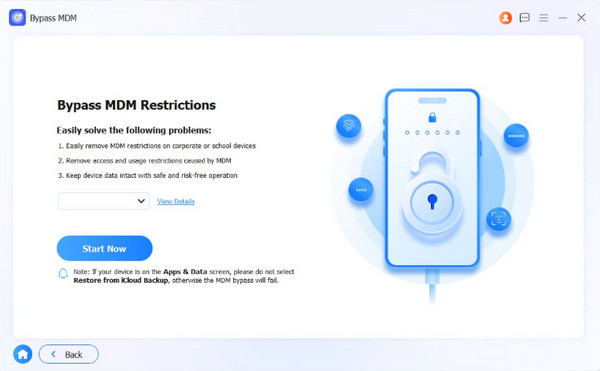
Step 1Download the tool on your computer. Set up and install it afterward. Later, click the Bypass MDM feature from the list. Plug an iPhone or iPad into the computer with a USB cable. After that, click the Start Now button on the next interface of the software.
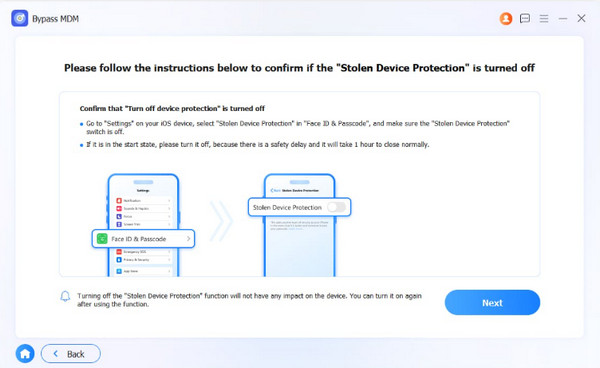
Step 2The instructions to turn off Find My will appear. Please follow the steps and click the Continue button when done. After that, confirm that the Stolen Device Protection is turned off. Later, please click the Next button at the bottom right to confirm the process.
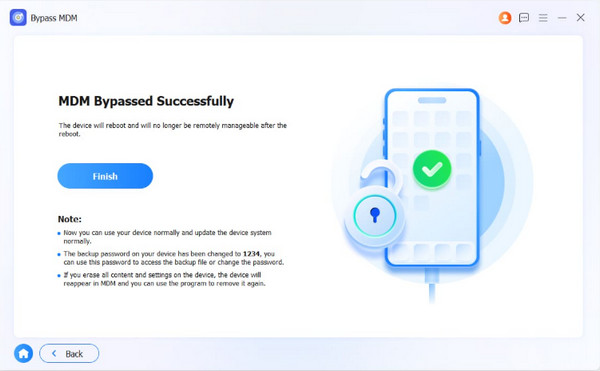
Step 3Please click the OK option at the bottom. The software will start to bypass the MDM profile on your iPhone or iPad. Wait for the bypass procedure to be completed. Finally, click the Finish option at the bottom left.
Part 4. FAQs about Snow Rider 3D Unblocked Classroom
Does Snow Rider 3D have good graphics?
Snow Rider 3D features a theme that delivers high-quality graphics that first-time users commonly appreciate. It has a vibrant, stylized festive winter theme. This way, it produces a comfortable ambiance for the users.
Is Snow Rider 3D safe for kids?
Snow Rider 3D is safe for kids. It has user-friendly controls that do not require intermediate to professional skills. Kids will love playing it because its controls are easy to use.
In short, the Snow Rider 3D on Classroom 6x unblocked process is needed due to MDM profile restrictions. This article helps you access and play it without restrictions! FoneLab iOS Unlocker is an excellent help with the process. It enables you to remove the MDM profile from your iPhone or iPad. You can also use it to remove your Apple ID account without the credentials, Screen Time restrictions, and more.



