
 iPhone Data Recovery
 iOS System Recovery
 iOS Data Backup & Restore
 iOS Unlocker
 iPhone Password Manager
 Location Changer
 Android Data Recovery
 Broken Android Data Extraction
 Android Data Backup & Restore
 Android Unlocker
 FoneTrans for iOS
 iPhone Data Eraser
 iPhone Cleaner
 HEIC Converter
 HyperTrans
 WhatsApp Transfer for iOS
 Mac Sweep
 Data Retriever
 Mac Data Retriever
 Video Converter Ultimate
 Screen Recorder
 Phone Mirror
- Unlock Apple ID
- Bypass iCloud Activation Lock
- Doulci iCloud Unlocking Tool
- Factory Unlock iPhone
- Bypass iPhone Passcode
- Reset iPhone Passcode
- Unlock Apple ID
- Unlock iPhone 8/8Plus
- iCloud Lock Removal
- iCloud Unlock Deluxe
- iPhone Lock Screen
- Unlock iPad
- Unlock iPhone SE
- Unlock Tmobile iPhone
- Remove Apple ID Password
How to Reset Apple Watch Without Passcode in 2 Quick Ways
 Updated by
 Good day! Can you help me reset Apple Watch without a passcode? I need to factory reset it before I give it to my brother. However, I forgot the passcode because I used my Apple Watch a long time ago. Thank you in advance!
An Apple Watch is used to communicate, track your health, and more. It offers everyday convenience because you only need to put it on your wrist. However, it will not be functional without its passcode. Due to this, you cannot reset it when needed. Do you want to reset the mentioned device? Please continue browsing to see the 2 leading ways for the process.


Guide List
Part 1. Reset Apple Watch Without Passcode on Charger
Apple provides a solution for forgotten passcode issues for your Apple Watch. It enables the factory reset process with the charger of the mentioned device! This method is a hidden recovery state to unlock your Apple Watch without its passcode.
This way, your Apple Watch will be in a fresh state, and it is ready for a new pairing. However, iCloud Activation Lock is still needed. You need to enter the Apple ID associated with the mentioned device to unlock it afterward. How to reset an Apple Watch without passcode? Use the steps below.
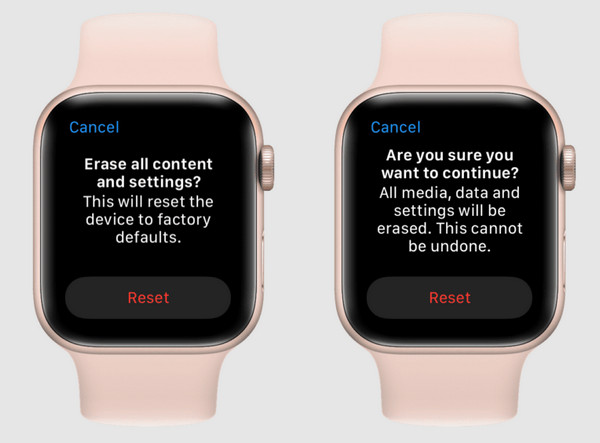
Step 1Place the Apple Watch on its charger. After that, you need to press and hold the Side button. Please note that it is not the Digital Crown physical button. Later, when you see the Power Off screen, press and hold the Digital Crown physical button.
Step 2Wait until the Erase All Content and Settings screen appears. Tap the Reset button and confirm it again afterward to start the process. Later, the content and settings of the Apple device will be deleted. You need to set it up as new afterward, and you need to enter the Apple ID account if the iCloud Activation Lock is shown.
Part 2. Reset Apple Watch Without Passcode With Find My
Besides the charger, Apple also allows you to reset your Apple Watch remotely. Find My is a free service that can be used. The Apple ID is needed for the process. You need an internet connection for this process to be executed.
Like the previous method, iCloud Activation Lock is still needed. Learn how to factory reset your Apple device remotely using the Find My feature.
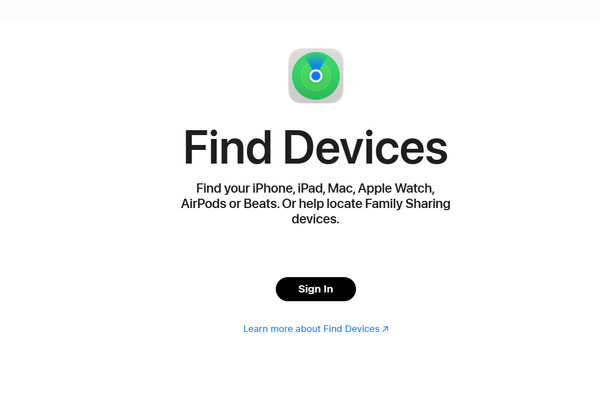
Step 1Open the device that you will be using for the reset process. Then, open the Find My app or visit the official website of iCloud Find My on your web browser. Enter the Apple ID from the mentioned service. Please choose the Devices or All Devices button.
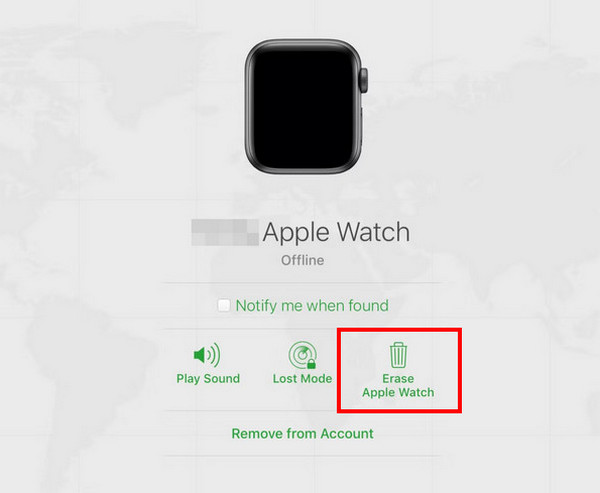
Step 2Later, the list of devices will appear. Choose the name of your Apple Watch. The supported features that can be used for your Apple Watch will appear. Please select the Erase Apple Watch button on the list.
Part 3. Remove Activation Lock from Apple Watch
The previous methods require your Apple ID for the iCloud Activation Lock after the factory reset. Not all Apple Watches require it. Only the one that has a logged-in Apple ID before the factory reset. The mentioned security feature can be unlocked by entering the Apple ID.
Alternatively, you can use Find My to remotely do the unlocking process. The Apple ID associated with the Apple Watch is also needed. This method does not delete data from the mentioned device. However, if the Apple ID is unknown, you cannot proceed with the process. Please note that there is no legitimate or supported Apple way to bypass the iCloud Activation Lock. Please use the steps below to remove iCloud Activation Lock on your Apple Watch.
Step 1Go to the main website of iCloud Find My. You can also use the application of the mentioned service. Enter the Apple ID associated with your Apple Watch. Then, go to the All Devices or Devices button from the main interface.
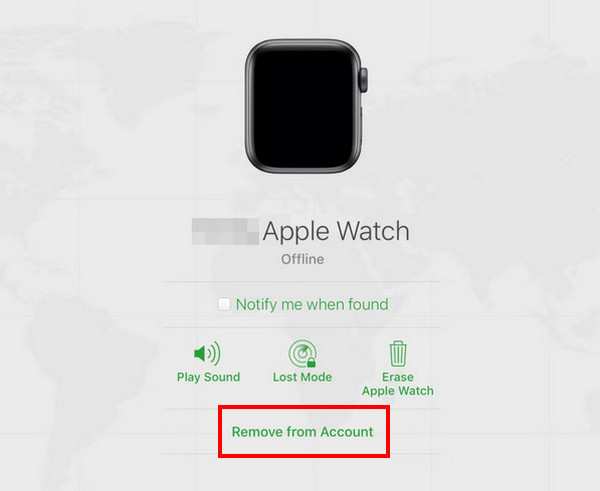
Step 2The devices that are associated with your Apple ID will appear. Select the name of the Apple Watch from the main interface. Later, please select the Remove from Account button from the list. Wait for the process to be confirmed. Then, you can now use the Apple Watch. Later, the list of devices associated with the Apple ID will appear. Select the name of your Apple Watch.
Part 4. Remove Activation Lock from iPhone or iPad With FoneLab iOS Unlocker
Besides the Apple Watch, an iPhone or iPad can also be locked with iCloud Activation Lock. How to get into a locked iPhone or iPad? Use FoneLab iOS Unlocker! It can remove the mentioned security feature with a few clicks due to its simple interface. It deletes all content and settings from your iPad or iPhone. But if you turned off your Find My iPhone/iPad feature, there will be no data loss. The tool can also bypass Screen Time passcode, screen lock, Apple ID, and more security features. Please use the steps below to know how to operate the tool.

FoneLab Helps you unlock iPhone screen, Removes Apple ID or its password, Remove screen time or restriction passcode in seconds.
- Helps you unlock iPhone screen.
- Removes Apple ID or its password.
- Remove screen time or restriction passcode in seconds.
Step 1Download FoneLab iOS Unlocker on your computer by clicking the Free Download button. Then, set up the downloaded file and install it. The tool will be launched afterward.

Step 2Click the Bypass iCloud Activation Lock feature at the bottom left. Plug your iPhone or iPad into the computer. Later, select the Start Now button.
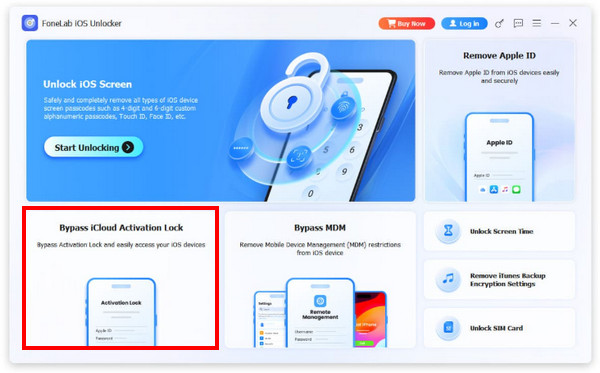
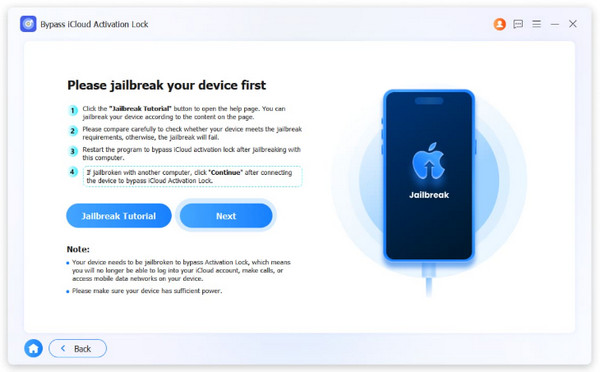
Step 3Choose the Jailbreak Tutorial button on the left. Later, click the Next button on the right. The bypass process will start immediately. After the process, please click the Finish button on the left.
Part 5. FAQs about Resetting Apple Watch Without Passcode
What is the disadvantage of a factory reset on an Apple Watch?
Losing the data permanently from your Apple Watch is the main disadvantage of the factory reset. The data are unrecoverable if you do not have a backup. Additionally, the Activation Lock will be encountered.
Can the Apple Watch still be tracked after a factory reset?
If the iCloud Activation Lock is enabled, an Apple Watch can still be tracked with Find My. However, if the Apple ID has been removed, the mentioned Apple device will not be tracked with the said service.
All in all, you can factory reset Apple Watch without passcode. This post proves that with the 2 leading ways. FoneLab iOS Unlocker is also here to help you bypass the iCloud Activation Lock when the Apple ID account is forgotten. It can also be used to remove the screen lock, MDM profile, Screen Time, and more. Download it now if you want to explore it!



