
 iPhone Data Recovery
 iOS System Recovery
 iOS Data Backup & Restore
 iOS Unlocker
 iPhone Password Manager
 Location Changer
 Android Data Recovery
 Broken Android Data Extraction
 Android Data Backup & Restore
 Android Unlocker
 FoneTrans for iOS
 iPhone Data Eraser
 iPhone Cleaner
 HEIC Converter
 HyperTrans
 WhatsApp Transfer for iOS
 Mac Sweep
 Data Retriever
 Mac Data Retriever
 Video Converter Ultimate
 Screen Recorder
 Phone Mirror
- Convert AVCHD to MP4
- Convert MP4 to WAV
- Convert MP4 to WebM
- Convert MPG to MP4
- Convert SWF to MP4
- Convert MP4 to OGG
- Convert VOB to MP4
- Convert M3U8 to MP4
- Convert MP4 to MPEG
- Embed Subtitles into MP4
- MP4 Splitters
- Remove Audio from MP4
- Convert 3GP Videos to MP4
- Edit MP4 Files
- Convert AVI to MP4
- Convert MOD to MP4
- Convert MP4 to MKV
- Convert WMA to MP4
- Convert MP4 to WMV
Excellent Guide on How to Remove TikTok Watermark Cleanly
 Updated by
 Hello! Can’t TikTok remove watermark? The platform’s logo, along with the post creator’s username, always gets in the way whenever I download a video; thus, I tried to explore the app to see if it has an option for removing the watermark. However, I don’t think it’s possible. Could someone please advise me on an effective alternative method? It would be a huge help!
TikTok’s watermark is a common concern for the platform’s users, whether a creator, viewer, or someone who only wants to download content. Although people understand it is to protect content ownership, it sometimes does not align with the users’ desired presentation. Hence, it is also understandable if you wish to remove it. Luckily, it is possible to erase TikTok’s watermark neatly using the methods we gathered in the subsequent parts. Continue to learn now.

Guide List
Part 1. Remove TikTok Watermark with FoneLab Video Converter Ultimate
A professional tool is the best option if you seek a clean and efficient yet painless way to remove watermark from video. Hence, FoneLab Video Converter Ultimate is the perfect suggestion we can provide, as many have already proven its professional performance. It can remove logos, names, or any watermark from a video without affecting the content’s quality, but even with its excellent performance, you can still expect a user-friendly process.

Video Converter Ultimate is the best video and audio converting software which can convert MPG/MPEG to MP4 with fast speed and high output image/sound quality.
- Convert any video/audio like MPG, MP4, MOV, AVI, FLV, MP3, etc.
- Support 1080p/720p HD and 4K UHD video converting.
- Powerful editing features like Trim, Crop, Rotate, Effects, Enhance, 3D and more.
Meanwhile, you may notice how this program’s initial function is video conversion, but no worries. That is only because FoneLab Video Converter Ultimate offers numerous services for enhancing media files. Once you reach the correct interface location, you will quickly find the Video Watermark Remover with adjustable settings to remove the watermark smoothly. You can manage the watermark removal area’s size, time frame, and more to ensure a neat result.
Distinguish the stress-free steps below as a model to remove watermark TikTok with FoneLab Video Converter Ultimate:
Step 1Initialize a browser you trust on the computer, then use it to visit the necessary site, FoneLab Video Converter Ultimate. A Free Download button is available in its left section, so optimize it to acquire the installer. Once the file is in your Downloads, launch it to begin setting up the prompts for the tool installation. Later, the screen will show a Start tab for you to click.
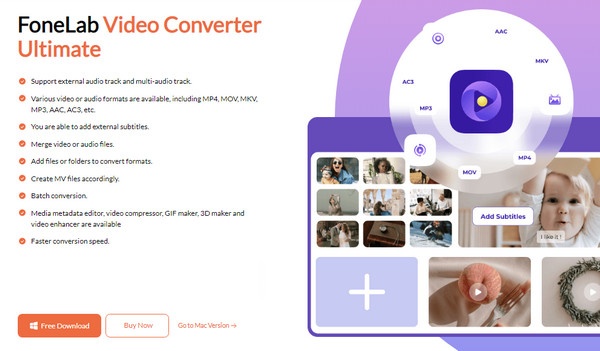
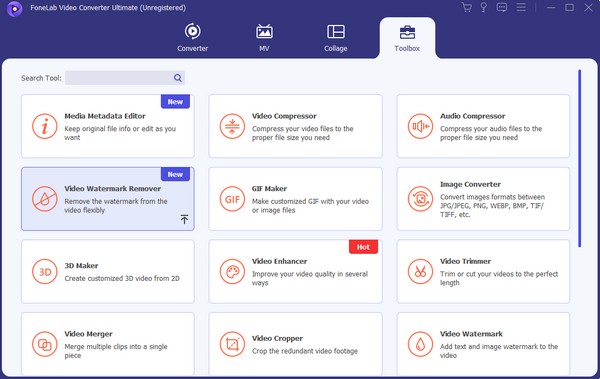
Step 2It won’t be long until the main interface launches on your desktop. When it happens, you will see the conversion feature immediately. To get to the correct location, click the Toolbox button on the upper right. Numerous functions will then appear; thus, use the search bar or manually find the Video Watermark Remover box. Then, click the Plus symbol on the subsequent interface.
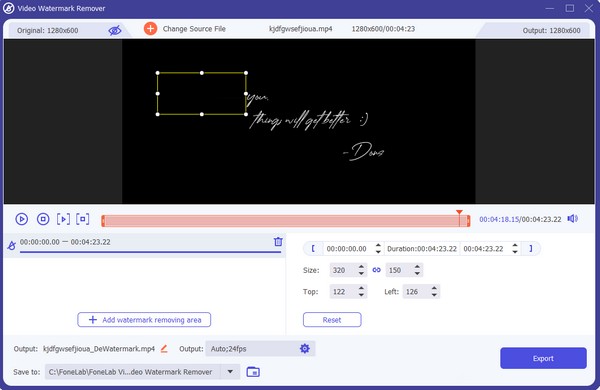
Step 3A folder containing your files will pop up afterward, so browse it to locate and click your TikTok video with the watermark. Once the media file is imported, various watermark removal options will be available. Hit Add watermark removing area to start eliminating the platform’s name or logo from the screen, then manage the other options accordingly. When satisfied, click Export to finish.
Part 2. Remove TikTok Watermark via X-Design Remove TikTok Watermark
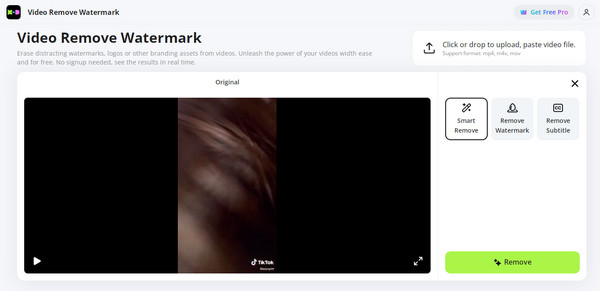
What if you prefer to remove your TikTok video’s watermark online? That is not a problem because web programs, like X-Design Remove TikTok Watermark, are also available at your service. Meanwhile, this specific online tool is easily accessible on almost any browsing app, so it won’t be challenging to find it and eliminate your media file’s watermark on the website. Additionally, among its features is the Smart Remove, which automatically removes the TikTok name or logo without the need to trace anything. However, kindly consider that the result might not turn out as clean.
Conform to the simplified procedure below to remove TikTok watermark online free using X-Design Remover TikTok Watermark:
Step 1Launch a reliable browser and use its address bar to access the X-Design Remove TikTok Watermark website. Afterward, scroll down, and an Upload Video tab will slide up for you to click.
Step 2When prompted, pick the TikTok video from your pop-up folder to import it into the page. Then, choose from the options: Smart Remove, Remove Watermark, or Remove Subtitle accordingly. Once ready, hit the Remove button below to eliminate the watermark from your TikTok video.
Please remember that a stable internet connection is necessary for this method. If your network suddenly acts up during the process, especially if the page reloads, the online program might force you to start over. Therefore, it would be best to use an offline-based program for better reliability if your device is not associated with a stable network.
Part 3. Remove TikTok Watermark Using Watermark remover, Logo eraser App
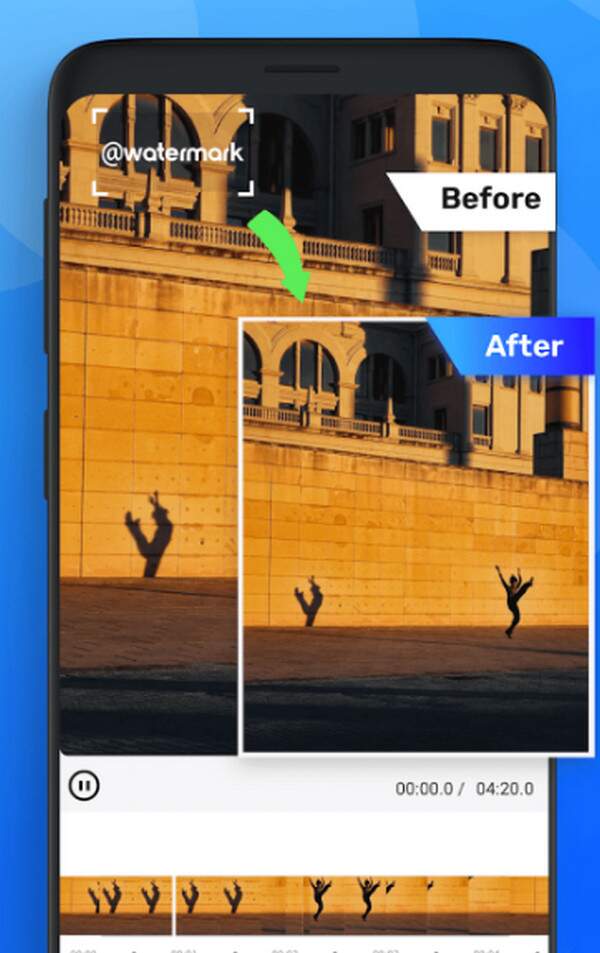
On the other hand, the Watermark remover, Logo eraser app is what we suggest if you prefer a mobile third-party app instead. As its name indicates, it allows you to remove watermarks or logos from your chosen videos. You may obtain it from the Play Store, taking only a few minutes to install. Hence, navigating it also won’t be difficult. Additionally, the app offers more editing functions that can help you enhance the video further. Media files from TikTok aren’t even the only logo the app can remove. It can also eliminate other types of watermarks without an issue.
Mimic the uncomplicated guide below to grasp how to remove the TikTok watermark through the Watermark remover, Logo eraser app:
Step 1Acquire the Watermark remover, Logo eraser app by searching for it on the Play Store and tapping Install. Once the app is ready, launch it and set up the requirements to begin using it.
Step 2When the app interface materializes, choose the option to upload your TikTok video. Then, use the available selections to eliminate the watermark from the content manually. The app will save the video output to your device storage once the procedure finishes.
However, you must expect the output to have a larger size than the original. Most editing apps adjust the files’ sizes for the results, so since you only modified something and didn’t cut the video, your TikTok video’s size will likely be larger after you finish the watermark removal.
Part 4. Comparison
To have a deeper understanding of the TikTok watermark removers’ advantages and disadvantages above, check out the comparison table below. It will help you pick which app or program suits you best.
| Feature | FoneLab Video Converter Ultimate | X-Design Remove TikTok Watermark | Watermark remover, Logo eraser |
| Type | Desktop Program | Web-based Tool | Mobile App |
| Ease of Use | Easy. User-friendly interface with minimal learning curve. | Very easy. A simple “upload and process” workflow. | Easy. Designed for quick operations with a little learning curve. |
| Output Quality | Excellent. Preserves the video’s original resolution and bitrate with minimal to no quality loss. | Good - Very Good. The output video’s quality can vary, depending on server load; some compression is common. | Fair to good. The video quality can be inconsistent. It may reduce the resolution or leave artifacts. |
| Processing Speed | Fast. The watermark removal is locally processed on the computer. | Variable. Depends on the internet speed and server queue. It can be slow for large files. | Fast. Optimized for short, mobile videos, like most TikTok content. |
| Best For | Users who need excellent quality outputs, batch processing, and regular watermark removal. | Users who need a quick, one-time solution on almost any device and don’t mind potential quality loss. | Users who want a fast, convenient video watermark removal process directly on their mobile devices for occasional use. |
That said, you must choose the watermark remover that best suits your preferences. For quality, convenience, and reliability, choose FoneLab Video Converter Ultimate. For speed and convenience, in which privacy isn’t a top concern, use X-Design Remove TikTok Watermark. Then, for speed and convenience on a phone, pick the Watermark remover, Logo eraser app.
Part 5. FAQs about Removing TikTok Watermark
Is it legal to remove watermark from TikTok video?
It is legal to remove your own TikTok video’s watermark. However, if you’re not the original creator, you must understand the copyright law, which states that eliminating the content’s logo is a violation. Thus, it is generally illegal, but no one really cares, especially if you don’t use the video for your own gain.
Are watermark removers safe to use?
Yes, many of them are, especially the recommendations in this article. However, you must still be cautious when trying other watermark removers from different platforms. Some aren’t as safe and trusted.
TikTok’s name and logo, or other watermarks, can be a distraction for your desired presentation. Fortunately, removing it is possible and convenient with the right program, like FoneLab Video Converter Ultimate. Besides, this specific tool can also help you learn how to add watermark to a video. Hence, we encourage everyone to install it and learn the correct process to use its functions whenever needed.



