
 iPhone Data Recovery
 iOS System Recovery
 iOS Data Backup & Restore
 iOS Unlocker
 iPhone Password Manager
 Location Changer
 Android Data Recovery
 Broken Android Data Extraction
 Android Data Backup & Restore
 Android Unlocker
 FoneTrans for iOS
 iPhone Data Eraser
 iPhone Cleaner
 HEIC Converter
 HyperTrans
 WhatsApp Transfer for iOS
 Mac Sweep
 Data Retriever
 Mac Data Retriever
 Video Converter Ultimate
 Screen Recorder
 Phone Mirror
- Part 1. Why Is Pinterest Blocked?
- Part 2. Use a VPN to Unblock Pinterest
- Part 3. Access Pinterest Unblocked Using a Proxy Website
- Part 4. Switch to Mobile Data to Unblock Pinterest
- Part 5. Change Your DNS Settings to Enter Pinterest Unblocked
- Part 6. Try FoneLab iFoneWiz to Bypass Restrictions on Devices
- Part 7. FAQs about Pinterest Unblocked
- Unlock Apple ID
- Bypass iCloud Activation Lock
- Doulci iCloud Unlocking Tool
- Factory Unlock iPhone
- Bypass iPhone Passcode
- Reset iPhone Passcode
- Unlock Apple ID
- Unlock iPhone 8/8Plus
- iCloud Lock Removal
- iCloud Unlock Deluxe
- iPhone Lock Screen
- Unlock iPad
- Unlock iPhone SE
- Unlock Tmobile iPhone
- Remove Apple ID Password
A Guide to Pinterest Unblocked with Methods to Access
 Updated by
 Is there a way to access Pinterest unblocked for school or other places where it’s blocked? As you may know, Pinterest is a popular tool for saving creative ideas, planning lessons, or organizing work boards. So, if you enjoy viewing visual arts, designs, etc., you have likely already encountered the platform. However, users find themselves staring at a restriction message when trying to access the official site, indicating that it is blocked.
It can be frustrating, since Pinterest is probably the most trusted platform of its kind, making it hard to find another reliable website like it. Luckily, unblocked versions or ways to unlock such platforms are now available, allowing you to access them even if they're blocked by your network, location, or other specific reasons. The most practical ones are discussed in the following parts, so kindly proceed and absorb the information for each method.

Guide List
- Part 1. Why Is Pinterest Blocked?
- Part 2. Use a VPN to Unblock Pinterest
- Part 3. Access Pinterest Unblocked Using a Proxy Website
- Part 4. Switch to Mobile Data to Unblock Pinterest
- Part 5. Change Your DNS Settings to Enter Pinterest Unblocked
- Part 6. Try FoneLab iFoneWiz to Bypass Restrictions on Devices
- Part 7. FAQs about Pinterest Unblocked
Part 1. Why Is Pinterest Blocked?
Like other platforms, Pinterest gets blocked for a few common reasons. The first and most frequent one is school or office rules. If the device you use is connected to your school or workplace’s WiFi network, it's no surprise that Pinterest is blocked, since organizations like these usually restrict such platforms because they see them as entertainment or social media sites that can be a distraction. So, they do this to make people focus on work.
Aside from that, Pinterest contains a wide range of images. Some of these images may be tagged as adult content, even if they are actually art, fashion, or fitness photos. Automated filters sometimes mistake harmless pins for something inappropriate. It may also be due to location limitations, since the platform isn’t available in some countries. Or, some networks block Pinterest simply to reduce data usage. Pinterest is full of high-resolution images and videos; thus, this can slow down the internet speed for everyone on a shared network with many users.
Part 2. Use a VPN to Unblock Pinterest
Pinterest being inaccessible doesn’t always mean it is specifically blocked by school, work, or an organization. Sometimes, it is simply unavailable in a country. Hence, the first solution we suggest is using a VPN. It is a service that allows users to change their device locations. So, when you set yours to a country where Pinterest is accessible, you will be able to use it as well.
Follow the operation below to access Pinterest unblocked using VPN:
Step 1On your App Store, install a VPN app and set it up before running it on your device.
Step 2Once the app is ready, set the location to a country or place offering Pinterest. Then, start browsing its website afterward.
Part 3. Access Pinterest Unblocked Using a Proxy Website
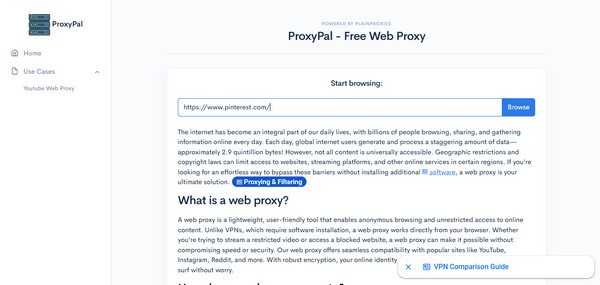
Another solution is to use a proxy website, like ProxyPal. This proxy site provides a text field where you can enter the platform’s web address. The proxy will then fetch the Pinterest page and display it in your browser, even if it’s blocked, since the service bypasses restrictions that prevent you from accessing the platform’s official site. Then, on the school or office network, it only sees that you are visiting the proxy site, not Pinterest itself.
Follow the procedure below to grasp how to unblock Pinterest at school using the proxy website, ProxyPal:
Step 1Enter the ProxyPal website first, and in its page’s URL field, enter Pinterest’s web link.
Step 2Afterward, hit Browse, and the proxy site will direct you to the platform’s page.
Part 4. Switch to Mobile Data to Unblock Pinterest
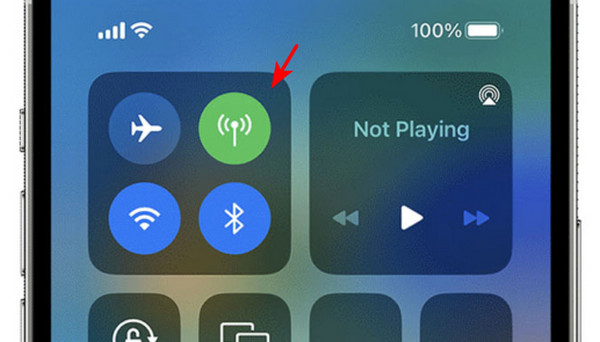
Meanwhile, if Pinterest’s official site is only blocked by your school, work, or organization’s WiFi network, the quick and effective way to access it is to switch to your mobile data. Since your network doesn’t block or restrict the platform, you can access it on your device. Just ensure you have enough data balance, as a subscription is needed to browse the internet. Simply go to your Control Center to turn WiFi off before enabling the Mobile data symbol.
Part 5. Change Your DNS Settings to Enter Pinterest Unblocked
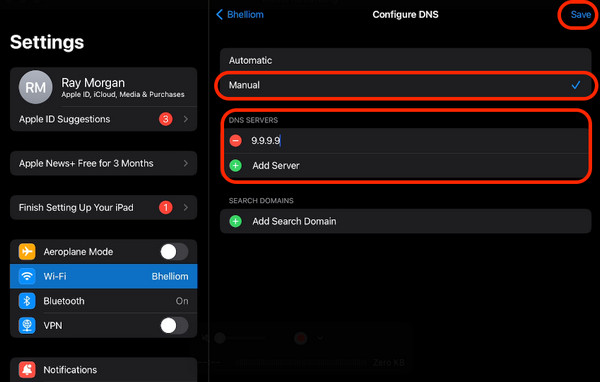
Changing your DNS settings can also help you access Pinterest. That’s because when a school or office blocks the platform, they often do it at the DNS level. It means their DNS server refuses to look up Pinterest's address. By switching to a different DNS server, you can bypass this block completely. The process can be easily done in your iPhone’s Settings.
Follow the navigation below to enter an unblocked Pinterest by changing your DNS settings:
Step 1Go to your device’s WiFi section and tap the network to which you are connected. Next, select Configure DNS and set its option to Manual.
Step 2Following that, change your DNS to (8.8.8.8), (8.8.4.4), or (1.1.1.1). Then, restart your browser and access Pinterest’s website, which is now unblocked.
Part 6. Try FoneLab iFoneWiz to Bypass Restrictions on Devices
On the other hand, Screen Time can also be the reason you can’t access Pinterest. Perhaps you or someone in your family activated the restriction on the website, whether intentionally or not. However, this feature requires a passcode, and many users often can’t provide it because they have forgotten it. On this occasion, you can let FoneLab iFoneWiz help.

iFoneWiz Helps you unlock iPhone screen, Removes Apple ID or its password, Remove screen time or restriction passcode in seconds.
- Helps you unlock iPhone screen.
- Removes Apple ID or its password.
- Remove screen time or restriction passcode in seconds.
This program can turn off restrictions on iPhone, whether or not you remember your Screen Time passcode. It also doesn’t require technical knowledge since you will only need to navigate the intuitive interface with the right options. It also works on all iOS and iPadOS versions, so it’s not a problem if you forgot iPad restrictions passcode, your iPhone, or your iPod Touch.
Determine the easy task below as a model to access Pinterest unblocked with FoneLab iFoneWiz:
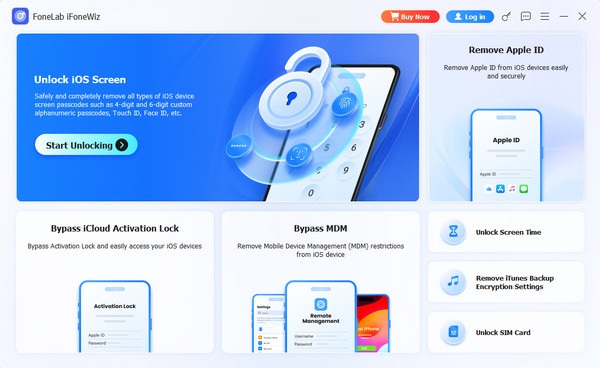
Step 1Use the Free Download button to save FoneLab iFoneWiz’s installer, then open it once the file appears in your Downloads folder. The installation will be quick, so once you see the Start option, click it and let the program run until the interface appears. From there, choose Unlock Screen Time.
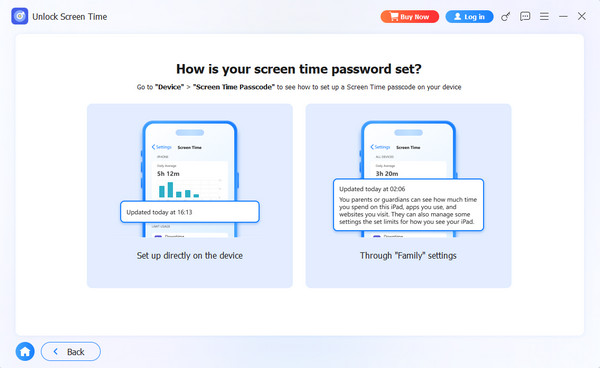
Step 2Afterward, let your device connect using a Lightning cable. Then, on the “How is your screen time password set? interface, select Set up directly on the device or Through “Family” settings. Finally, follow the remaining prompts accordingly.
Part 7. FAQs about Pinterest Unblocked
Is it safe to use a VPN or proxy to unblock Pinterest?
Yes, most reputable VPNs and proxy sites are safe. Just avoid unknown or sketchy proxies that may show too many ads or collect your data.
Will I get in trouble for unblocking Pinterest at school?
That depends on the rules of your school or workplace. Some allow it, others do not. Check their internet policy first to be on the safe side.
With the simple methods outlined in this guide—from using a VPN and proxy websites to using a professional tool, like FoneLab iFoneWiz, you can easily access an unblocked Pinterest at school, work, or anywhere it's restricted.



