
 iPhone Data Recovery
 iOS System Recovery
 iOS Data Backup & Restore
 iOS Unlocker
 iPhone Password Manager
 Location Changer
 Android Data Recovery
 Broken Android Data Extraction
 Android Data Backup & Restore
 Android Unlocker
 FoneTrans for iOS
 iPhone Data Eraser
 iPhone Cleaner
 HEIC Converter
 HyperTrans
 WhatsApp Transfer for iOS
 Mac Sweep
 Data Retriever
 Mac Data Retriever
 Video Converter Ultimate
 Screen Recorder
 Phone Mirror
- Unlock Apple ID
- Bypass iCloud Activation Lock
- Doulci iCloud Unlocking Tool
- Factory Unlock iPhone
- Bypass iPhone Passcode
- Reset iPhone Passcode
- Unlock Apple ID
- Unlock iPhone 8/8Plus
- iCloud Lock Removal
- iCloud Unlock Deluxe
- iPhone Lock Screen
- Unlock iPad
- Unlock iPhone SE
- Unlock Tmobile iPhone
- Remove Apple ID Password
Prominent Unblocked Game Websites with An Easy Guide
 Updated by
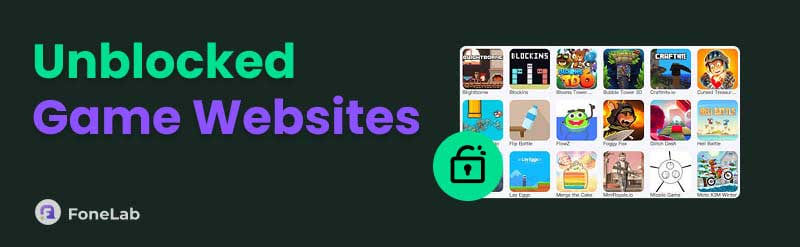
 Game sites unblocked have become a popular solution for players who find their favorite games restricted, whether at school, in the workplace, or on other managed networks. That’s because these platforms offer a way to enjoy quick gameplay without running into the usual procedures or barriers, so if you’re interested, kindly browse the succeeding sections. We will walk you through some of the most prominent unblocked game websites available today, and additional solutions for restrictions are also introduced, as they will likely be helpful later.

Guide List
Part 1. Why Unblocked Games?
Before anything else, you must wonder, why choose an unblocked game website? The primary answer is simple: accessibility. In many environments, such as schools or offices, network administrators restrict access to popular gaming platforms to minimize distractions. So, to still have access to your favorite game, you can visit these websites, as they are especially designed to bypass these restrictions, allowing you to enjoy games without such blocks.
Meanwhile, another key reason is convenience. Unlike traditional gaming platforms that often require downloads, installations, or account creations, unblocked game sites typically work in your browser. Hence, you can simply open a tab, click on a game, and start playing within a few minutes. It’s perfect for those who only want short, spontaneous gaming sessions. Besides, they offer a variety of games, like puzzles, arcade classics, strategic time-killers, and more.
Part 2. Top Unblocked Game Websites for 2026
Now that you understand the appeal of unblocked games, explore the best unblocked game sites this year with the platforms we gathered below. Each site offers something unique, so pick the one that best fits your preferences.
- • Poki - A visually appealing site with a massive selection of curated games, known for its fast loading times and mobile-friendly design.
- • Unblocked Games 66 - A straightforward site with an extensive collection of popular titles, organized by category with mirror sites for continued access.
- • GitHub Games - Hidden gem where developers host unblocked classic and indie games on GitHub pages, often overlooked by standard filters.
- • Coolmath Games - A long-standing favorite focused on puzzle and logic games. Its educational angle often keeps it allowed on school networks.
- • Kongregate - A massive library of user-created titles, RPGs, action games, and idle clickers with community features like chat and achievements.
- • Y8 - A long-running classic with thousands of games across every genre, from retro arcade to multiplayer and dress-up games.
Part 3. Removing iOS Restrictions
Would you like to try removing your iOS device’s restrictions instead? No matter how many unblocked games are available on these websites, playing from the source still hits differently. Hence, don’t miss the strategies below to remove your device restrictions.
Method 1. Remove Screen Time on iPhone
As you may know, iOS restrictions are typically from the Screen Time feature. You may have set up a specific restriction before that now prevents you from accessing your desired game. In this case, turning Screen Time off is a suitable solution to remove the limitations as well. The official method to remove Screen Time is handled directly through the iPhone's Settings app. This approach requires the feature’s passcode that you have set when restrictions were first enabled.
Bear in mind the appropriate steps below to remove Screen Time restrictions on iPhone:
Step 1Open Settings to view its initial options, including Screen Time. Once seen, tap it and provide the Screen Time passcode you have set, as prompted.
Step 2When the feature’s management settings appear, turn it off by tapping the Turn Off Screen Time at the bottom and entering the passcode, turning off all its restrictions as well.
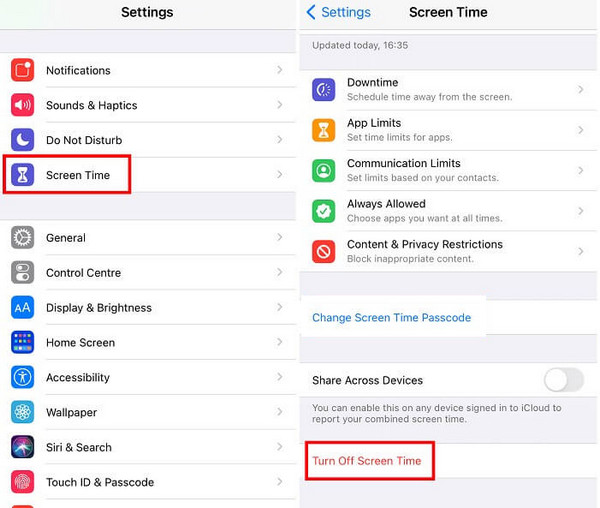
As mentioned, the Screen Time passcode is a requirement when managing or turning off the feature. The problem is that several users struggle to recall their passcode, as it is not as frequently used as the device passcode. If you also face this, we suggest going directly to Method 3, as it will help you bypass Screen Time passcode.
Method 2. Remove MDM on iPhone
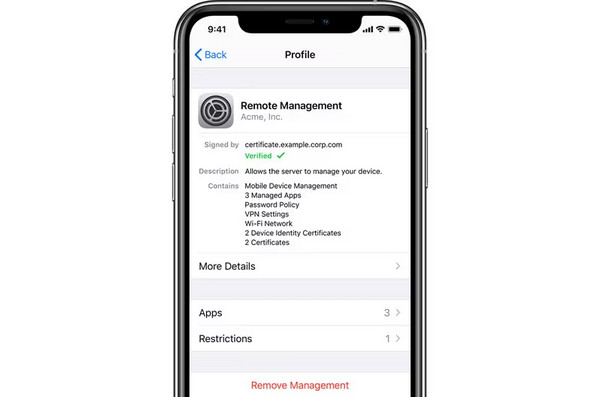
Meanwhile, Mobile Device Management is a profile often installed by schools, employers, or organizations to supervise and restrict how an iPhone can be used. So, if they manage your iPhone or iOS device, they may have set up restrictions that prevent you from accessing or playing the games you wish to play. You can remove this through the Settings app, but like Screen Time, it requires a passcode, which means you need the administrator’s approval.
Pay attention to the painless task below to remove MDM restrictions on iPhone:
Step 1Launch your Settings, and on the initial screen, select General. Afterward, scroll down to find and tap VPN & Device Management.
Step 2Once you see the MDM profile that is set on your iPhone, select it and hit Remove Management. You must then provide the needed passcode to eliminate its restrictions.
Method 3. Remove Screen Time/MDM with FoneLab iOS Unlocker
For situations where the Screen Time passcode is forgotten or the MDM profile cannot be removed through the official methods, FoneLab iOS Unlocker offers an alternative solution. This tool is designed specifically for iOS devices to bypass or turn off restrictions on iPhone without requiring the original passcode or credentials.
Hence, it will be your perfect detour on the way to your desired game’s original platform. Not to mention, it doesn’t require technical knowledge, so don’t be intimidated if it’s your first time trying the tool. Aside from that, your data’s safety is guaranteed when you use its Screen Time removal feature. You can also handle other locks later easily with the tool’s additional features.

FoneLab Helps you unlock iPhone screen, Removes Apple ID or its password, Remove screen time or restriction passcode in seconds.
- Helps you unlock iPhone screen.
- Removes Apple ID or its password.
- Remove screen time or restriction passcode in seconds.
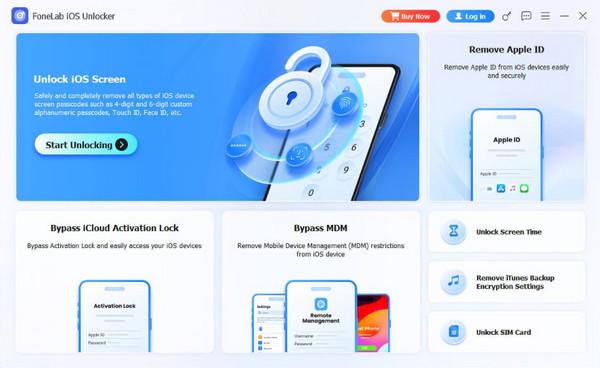
Discern the unchallenging directions below to remove Screen Time/MDM with FoneLab iOS Unlocker:
Step 1Let the FoneLab iOS Unlocker installer go to your Downloads. Once the file is prepared, launch it for the initial setup and let the prompts help you choose your preferences. Afterward, select Start.
Step 2Once the unlocking tool is running, pick Unlock Screen Time or Bypass MDM on the key interface, depending on the feature you need. You will immediately be asked to link your iOS device via a Lightning cable; thus, do it, and the interface will display further guidelines and prompts. Manage them until you successfully remove the Screen Time or MDM.
Part 4. FAQs about Game Websites Unblocked
Is it risky to play unblocked games?
It can be risky if you visit unknown unblocked gaming sites that contain intrusive ads or malicious pop-ups. So, stick to the reputable ones for safety.
Is there an unblocked game site that is free?
Yes, there is. In fact, most unblocked gaming sites are free. You can visit one of them and play your desired game straight away.
Unblocked game websites provide a simple way to enjoy games when access is limited. Stick to trusted sites, such as the recommendations above, and you can play safely and hassle-free. Besides, methods to remove restrictions, including FoneLab iOS Unlocker, are also available if you prefer the most secure way to play. Install it anytime.