
 iPhone Data Recovery
 iOS System Recovery
 iOS Data Backup & Restore
 iOS Unlocker
 iPhone Password Manager
 Location Changer
 Android Data Recovery
 Broken Android Data Extraction
 Android Data Backup & Restore
 Android Unlocker
 FoneTrans for iOS
 iPhone Data Eraser
 iPhone Cleaner
 HEIC Converter
 HyperTrans
 WhatsApp Transfer for iOS
 Mac Sweep
 Data Retriever
 Mac Data Retriever
 Video Converter Ultimate
 Screen Recorder
 Phone Mirror
- Unlock Apple ID
- Bypass iCloud Activation Lock
- Doulci iCloud Unlocking Tool
- Factory Unlock iPhone
- Bypass iPhone Passcode
- Reset iPhone Passcode
- Unlock Apple ID
- Unlock iPhone 8/8Plus
- iCloud Lock Removal
- iCloud Unlock Deluxe
- iPhone Lock Screen
- Unlock iPad
- Unlock iPhone SE
- Unlock Tmobile iPhone
- Remove Apple ID Password
How to Play Slope Unblocked Game Without Restrictions
 Updated by
 Hi! My iPhone and other devices have different limitations. Where can I access Slope Game unblocked 76, including other websites? I hope you can let my friends and me play it without restrictions. Thank you in advance!
Blocking websites on different devices, including the iPhone, is common. It is the way of the organization or parents to restrict the children from accessing them, such as the Slope Game. This article will help you access the game without restrictions. The tips and tricks to use it are also included. Please scroll below to know more about it.


Guide List
Part 1. What Is Slope Game?
The Slope Game unblocked games are accessible on the website. It is a game where players control a ball to roll forward. The slope will constantly change. The faster the ball moves, the higher the score will be. However, the game will be faster.
The controls of the Slope Game require you to control the ball from left to right. You need to avoid the red obstacles, including the blocks. Having a focus on the game will help you increase your score. Also, preventing the ball from falling off the edge is important.
Part 2. Why You Need Unblocked Versions of Slope Game
The unblocked versions of websites to access the restricted websites from your iPhone, including other devices. In this case, you can access them without any restrictions. If you cannot unblock the website from the network, you can visit the unblocked versions of the games.
Also, the unblocked versions of the online games do not require any downloads. The best thing about them is that they are lightweight and simple. They are best for novices and devices that do not have a large storage space.
Part 3. Mastering Slope Game: Tips & Tricks
The Slope Game has different tips and tricks that can be used to get a higher score. In this case, you can enter the leaderboards around the globe! Please see the list below.
- 1.Keep Movements Small and Well-timed: You need to control the movement of the ball. Ensure that it is at the perfect time. Also, the movements must be controlled.
- 2.Stay Near the Center: Staying the ball at the center will help you gain a high score. However, ensure that you also avoid the obstacles and red lines if they are at the center.
- 3.Look Ahead on the Track: Ensure that you watch the patch ahead. This way, you will know when to react to the obstacles.
- 4.Practice to Improve Reaction Time: You need to react on time. In this case, you will not hit or bump the obstacles. This way, you will stay longer with the game, which can be the reason for a higher score compared to your opponents on the leaderboard.
Part 4. How to Remove iOS Restrictions for Gaming on iPhone or iPad
To prevent blocking the Slope Game unblocked on Google and other web browsers, you need to turn off restrictions on iPhone. In this section, you will see the 3 methods to do that. Please scroll below to know the full details.
1. Turn Off Screen Time
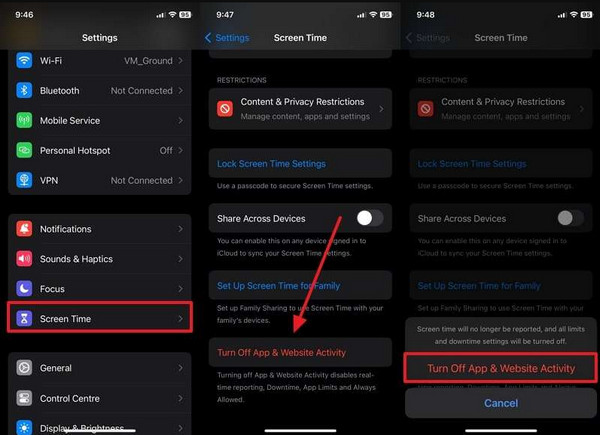
Screen Time is commonly used by parents to restrict some apps and features from their kids' Apple devices, including an iPhone. In this section, you will know how to turn off Screen Time to access the blocked websites on your iPhone. See the steps below for a faster process.
Open the Settings app on your iPhone from its Home Screen. After that, select the Screen Time button from the list that will be prompted on the screen. Later, select the Turn Off App & Website Activity button from the next screen. Enter the Screen Time passcode on the screen. Later, the mentioned feature will be turned off.
2. Remove MDM
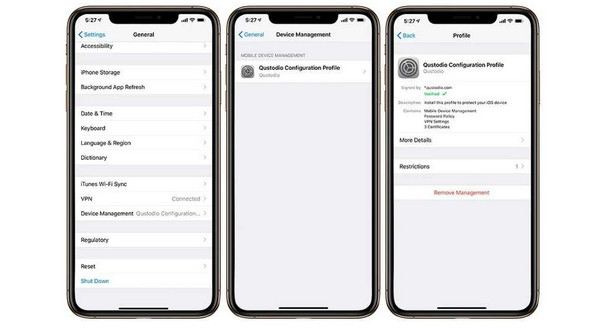
Besides Screen Time, MDM is another feature that can block websites on your iPhone. It is used by organizations to restrict their members' access to websites that are not related to their tasks, including school and work. You can turn off MDM using the detailed instructions below.
Please open Settings on your iPhone. After that, select the General button from the list that will appear on the screen. Swipe down on the screen and tap the VPN & Device Management button from the list. Choose a profile from the screen. Tap the Remove Management button under it and enter the credentials needed to confirm the process.
3. Use FoneLab iOS Unlocker
FoneLab iOS Unlocker is a third-party program that allows you to bypass Screen Time passcode and MDM profile without the credentials. Removing the Screen Time passcode will not delete the data from your iPhone. Bypassing the MDM profile will delete all the data from the mentioned device. But having a backup of your iPhone data will be a great help! Please use the steps below to know how to use the tool.

FoneLab Helps you unlock iPhone screen, Removes Apple ID or its password, Remove screen time or restriction passcode in seconds.
- Helps you unlock iPhone screen.
- Removes Apple ID or its password.
- Remove screen time or restriction passcode in seconds.
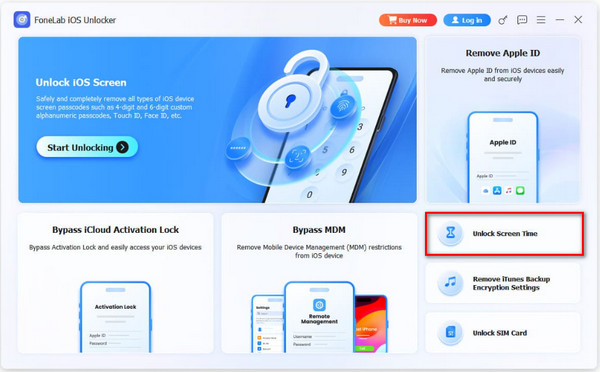
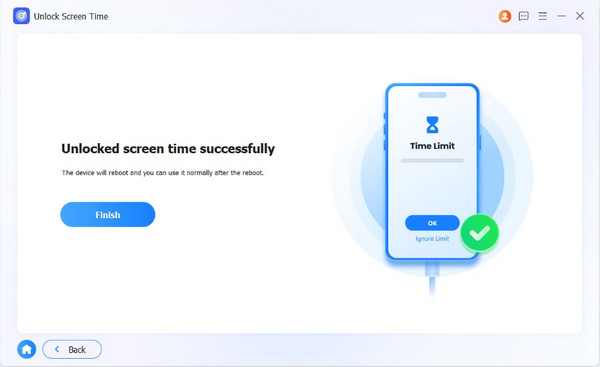
Step 1Download FoneLab iOS Unlocker. Then, click Free Download to download it. Later, please set up the downloaded file and install it. After that, the tool will open automatically. The supported features of the tool will be visible. Then, please click the Unlock Screen Time feature from the main screen.
Step 2Later, plug the iPhone into the computer using the USB cable. Select the name at the bottom left. Click Start Now at the bottom left to proceed.
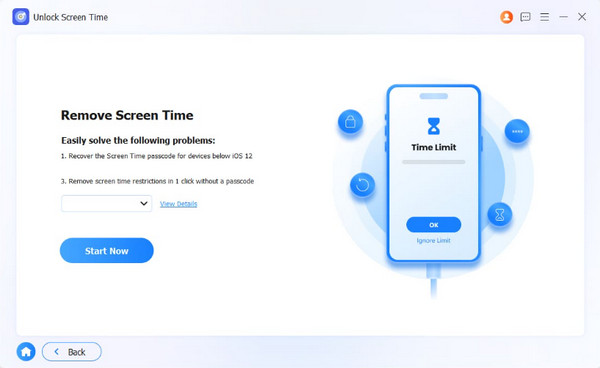
Step 3Follow the on-screen steps to turn off Find My on your iPhone. Then, click the Continue button. Click the Unlock button to start bypassing the mentioned feature on the mentioned Apple device. Finally, click the Finish button to complete the process.
Part 5. FAQs about Slope Game Unblocked
Does Slope Unblocked have an ending?
No. The Slope Game has no ending. This game will continue unless your character bumps into a red line. The speed will increase every time the score goes high. It is the primary reason why users end the game.
What games aren't blocked by schools?
Slope Game is commonly blocked by schools due to its addictive nature. If you cannot access it, you can try other games that are not usually blocked by schools. It includes Unblocked Games 24h, Tyrone's Unblocked Games, Unblocked Games 66, and Unblocked Games Premium.
The Slope Game unblocked 2 and other versions can be accessed on different websites. It depends on the network restrictions of your iPhone or other devices. FoneLab iOS Unlocker is here to help you bypass the MDM and Screen Time passcode. The tool can also be used to remove the Apple ID, screen lock passcode, and other security features. Download the tool for more information about it!



