
 iPhone Data Recovery
 iOS System Recovery
 iOS Data Backup & Restore
 iOS Unlocker
 iPhone Password Manager
 Location Changer
 Android Data Recovery
 Broken Android Data Extraction
 Android Data Backup & Restore
 Android Unlocker
 FoneTrans for iOS
 iPhone Data Eraser
 iPhone Cleaner
 HEIC Converter
 HyperTrans
 WhatsApp Transfer for iOS
 Mac Sweep
 Data Retriever
 Mac Data Retriever
 Video Converter Ultimate
 Screen Recorder
 Phone Mirror
- Convert AVCHD to MP4
- Convert MP4 to WAV
- Convert MP4 to WebM
- Convert MPG to MP4
- Convert SWF to MP4
- Convert MP4 to OGG
- Convert VOB to MP4
- Convert M3U8 to MP4
- Convert MP4 to MPEG
- Embed Subtitles into MP4
- MP4 Splitters
- Remove Audio from MP4
- Convert 3GP Videos to MP4
- Edit MP4 Files
- Convert AVI to MP4
- Convert MOD to MP4
- Convert MP4 to MKV
- Convert WMA to MP4
- Convert MP4 to WMV
4 Considerable Audio Joiners You Should Not Miss to Discover
 Updated by
 Hi! My classmates and I are making a music file to be passed to our professor on Monday. However, the music clips are not yet combined because we do not know which tool or app we will be using. Can you help us with this issue? Thank you!
You will need an audio joiner to combine your music files or audio clips. There are multiple options when you search online or in digital stores. Which one will you be using? This article offers the 4 most trusted audio joiners to combine your music files. Please discover them as you scroll below.

Guide List
Part 1. Best Audio Joiner - FoneLab Video Converter Ultimate
There are countless audio joiners you can use for your devices. The best one is FoneLab Video Converter Ultimate. This third-party tool permits you to merge multiple audio files in one procedure. It does not matter how long the seconds or minutes are. The good thing about it is that it will not ruin the audio quality of the files contained. It supports multiple audio formats, including AAC, WMA, MP3, and more. This tool offers a lossless compression that will not lessen the audio quality.
This tool has other operations it can perform on your files. It allows you to edit, convert, enhance, and more. You can also use it to convert video to audio. Please refer to the steps below on how to use this tool to merge your audio files.
Step 1Please go to the main interface of FoneLab Video Converter Ultimate. After that, click the Free Download button on the screen to start downloading the tool. Then, set up the downloaded file and install it afterward. Later, open it to begin the process.

Step 2Click the Converter button at the top of the screen. Then, the import screen will appear. Please click the Add Files button at the top left. The computer album will appear, and you only need to select the audio files you need to merge. Alternatively, you can choose the files from the computer album and drag them to the software’s screen for a faster import process.
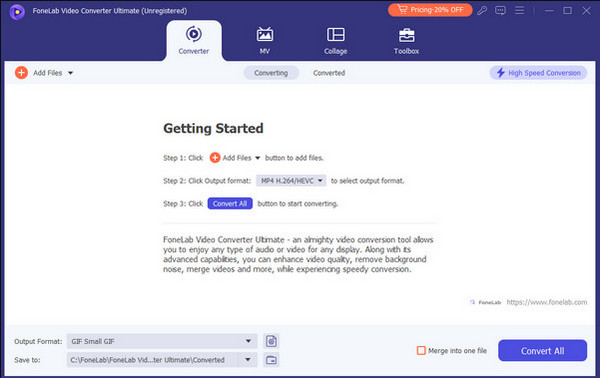
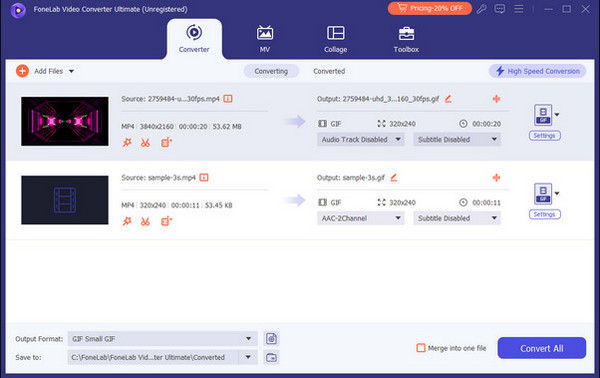
Step 3Please click the Merge Into One File button at the bottom right of the main screen. This way, the audio files will be combined, depending on their order, while you import them. Click the Convert All option at the bottom to merge the audio files. Export them afterward to your computer.
Part 2. Online Audio Joiners
Audio joiners online can also be used to merge your audio files. If you check online, there are many tools available. Which are the best? This section lists the 2 best online audio joiners you can consider. Please see the 2 leading online tools to merge your audio files.
1. 123APPS Audio Joiner
123APPS Audio Joiner is known for having a simple interface that is best for beginners. This tool offers unlimited tracks that can be used for your audio files. It has a crossfade feature that can join songs so that they can flow into one another smoothly. However, some users report that there are leaks in the audio files after using this online tool. Please use the online tool with the steps below.
Step 1Please search for the online website of 123APPS Audio Joiner. After that, the import interface of the online tool will be shown on the screen. Then, select the Add Files button at the top left corner. Then, the computer album will appear on the screen. Select the audio file formats you need to merge. Then, wait for the audio files to be imported afterward.
Step 2The audio files will appear on the main interface. Then, other features will appear on the main interface. Finally, please click the Join button at the bottom right of the screen. Then, please save the merged files afterward on your device to keep them.

2. Clideo Audio Joiner
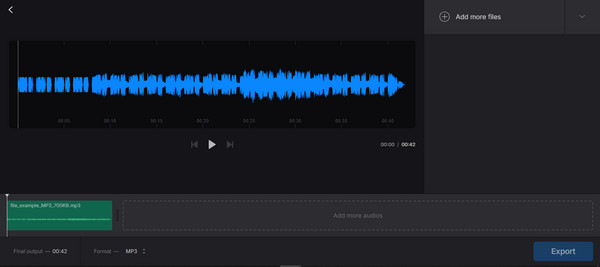
Clideo Audio Joiner is an online audio joiner that allows you to import multiple audio files to your computer or mobile phone. This online tool has an intuitive interface that is best for novices. However, this program is entirely online. It does not have a desktop or app version. Also, it has a limited 1 GB for your audio files. Please use the online tool below.
Visit the official website of Clideo Audio Joiner. After that, select the Choose Files button at the center of the screen. Please select the audio files you want to merge using the online tool. Then, select the Export option at the bottom to merge your audio files using the online tool.
Part 3. Audio Joiner App on Mobile Phone
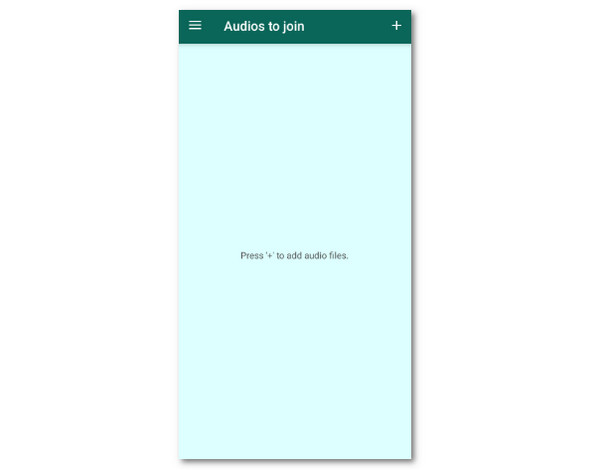
Audio Joiner is an app available on your Android phone and iPhone. This app is known for having straightforward features for merging your audio files on the mentioned mobile phones. However, this application has annoying advertisements that are inconvenient for some users. Also, it does not have other features. It means that this application can only merge the audio files, and it cannot edit or enhance them. Please use the steps below to use the app.
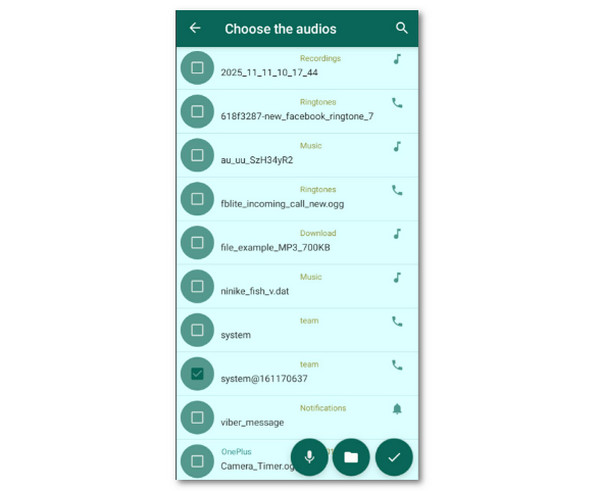
Step 1Please download Audio Joiner from your Google Play Store or App Store to get it on your Android phone or iPhone. After that, please access the app to see its first interface. Then, select the Plus button at the top right of the screen. The next screen will show you the available audio files you can merge. Then, choose the audio files you prefer to merge and import them.
Step 2Please tap the Check button at the bottom right. Next, the audio files will be imported into the app. You only need to tap the Download button at the bottom right to merge the audio files and export them at the same time.
Part 4. Comparison Table about Audio Joiners
The previous programs or apps for joining your audio files are indeed helpful, right? In this section, you will see their summarized versions. Please see the table below for a quick browse.
| Name | Platform Type | Supported Formats | Ease of Use | Extra Feature |
| FoneLab Video Converter Ultimate | Desktop Tool | MP3, AAC, WMA, and more audio or video file formats. | The tool is best for beginners and professionals. | It can convert, enhance, edit, and more of your files. |
| Clideo Audio Joiner | Online Web Tool | MP3 and AAC. | This online tool is best for professionals. It is due to the settings it requires for the audio files before merging them. | None. It only has a merger feature that can join your audio files in a few minutes. |
| 123APPS Audio Joiner | Online Web Tool | MP3 | Professionals can use this online tool. It is because of the required skills for merging the audio files after importing them. | None. It focuses on merging the audio files on your device. |
| Audio Joiner | Mobile App for Android phone and iPhone. | MP3 | This app is best for novices. However, it is not recommended for professionals due to the simple features it offers. | None. The application only focuses on merging the audio files on your Android phone or iPhone. |
Part 5. FAQs about Audio Joiner
How to convert audio to MP3?
You can use FoneLab Video Converter Ultimate for converting any audio file to MP3. Download it and set up the needed requirements. Then, click the Converter button at the top left. Import the audio files into the software by dragging and dropping them. Later, go to the Output Format section at the bottom and select the Audio tab. Later, select MP3 and choose a file quality. Finally, click the Convert All button at the bottom right and save the audio files.
What is the lowest quality audio file?
The lowest quality of the audio file is the one who are processed with lossy compression. You can avoid losing the good quality of your files if you use lossless compression. It depends on the tool or app used for the audio files.
How many GB is 1 hour of MP3?
The GB of a one-hour MP3 file depends on the settings and bitrate included. For example, if you have a 16-bit, 44.1 KHz, and 1,411.2 Kbps setting and bitrate, you will have 635.04 MB per hour. The higher the settings and bitrate, the higher the GB it can get.
This article shows the 4 top picks of audio joiners you can consider. FoneLab Video Converter Ultimate is the leading one among them. It permits you to merge multiple audio files. Do you want to experience the smooth process of this tool? Download the tool now!



