
 iPhone Data Recovery
 iOS System Recovery
 iOS Data Backup & Restore
 iOS Unlocker
 iPhone Password Manager
 Location Changer
 Android Data Recovery
 Broken Android Data Extraction
 Android Data Backup & Restore
 Android Unlocker
 FoneTrans for iOS
 iPhone Data Eraser
 iPhone Cleaner
 HEIC Converter
 HyperTrans
 WhatsApp Transfer for iOS
 Mac Sweep
 Data Retriever
 Mac Data Retriever
 Video Converter Ultimate
 Screen Recorder
 Phone Mirror
- Convert AVCHD to MP4
- Convert MP4 to WAV
- Convert MP4 to WebM
- Convert MPG to MP4
- Convert SWF to MP4
- Convert MP4 to OGG
- Convert VOB to MP4
- Convert M3U8 to MP4
- Convert MP4 to MPEG
- Embed Subtitles into MP4
- MP4 Splitters
- Remove Audio from MP4
- Convert 3GP Videos to MP4
- Edit MP4 Files
- Convert AVI to MP4
- Convert MOD to MP4
- Convert MP4 to MKV
- Convert WMA to MP4
- Convert MP4 to WMV
4 Easy and Dependable Video Merger to Combine Your Videos
 Updated by
 Hi! We have a project at our work regarding the model houses. We took a lot of videos to capture every corner of the houses. However, we cannot send them individually to our clients. We want to merge the videos if possible. Is there a video verger online, on mobile phones, or on a computer? Please help us. Thank you!
There are countless video mergers available online or in digital stores. In this article, you will see the 4 most helpful video mergers you can consider. Please continue browsing in this post to see them.


Guide List
Part 1. Best Video Merger - FoneLab Video Converter Ultimate
There are lots of video mergers on computers, but FoneLab Video Converter Ultimate is the best. This tool’s primary operation is to convert videos and audio files. The good news is that it has a Video Merger feature that can merge your videos in just a few clicks. This tool supports various video file formats, including MP4, MOV, MPEG, and more.

Video Converter Ultimate is the best video and audio converting software which can convert MPG/MPEG to MP4 with fast speed and high output image/sound quality.
- Convert any video/audio like MPG, MP4, MOV, AVI, FLV, MP3, etc.
- Support 1080p/720p HD and 4K UHD video converting.
- Powerful editing features like Trim, Crop, Rotate, Effects, Enhance, 3D and more.
You will also know how to edit videos with this tool using its basic editing tools. Besides that, this tool supports different additional tools for your files. It includes Video Trimmer, Video Cropper, Volume Booster, and more. Please follow the instructions below to use FoneLab Video Converter Ultimate to merge your video files.
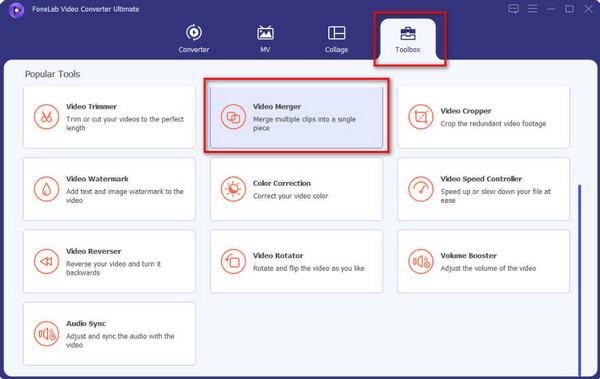
Step 1Click the Free Download option from the main interface of the website. After that, select the downloaded file from the browser and set it up. Later, install and launch it afterward. Then, click the Toolbox button at the top of the main interface. Please search for the Video Merger tool and click it to access its features.
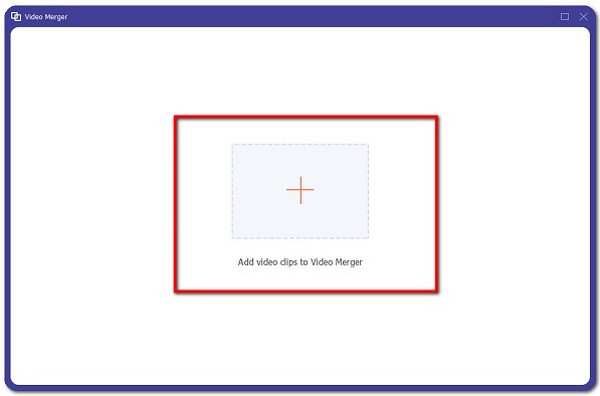
Step 2A new window will be shown on the screen. Please click the Plus button at the center of the main interface. The computer album will appear afterward. Please select the videos you prefer to merge. Then, they will be imported into the software’s interface. You can also simply drag and drop them into the interface to import them.
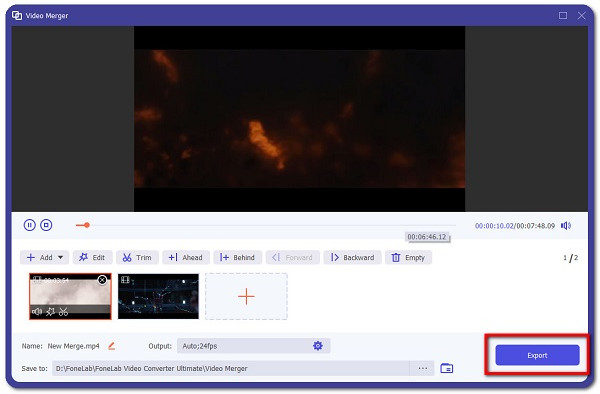
Step 3Drag and arrange your video files based on their order. Then, you can edit them using the basic editing tools. Finally, click the Export option at the bottom right corner to save the video files that are merged on your computer.
Part 2. Adobe Express Video Merger
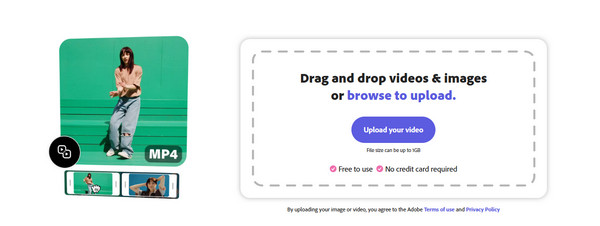
Adobe Express Video Merger can also guide you on how to merge videos. It is a professional tool that can merge your videos in just a few clicks. However, this tool has a complex interface and features that might be inconvenient for some users. It is also an online tool, which means that it works with a strong internet connection. Please use this Adobe Express Video Merger to merge your video files with the steps below.
Open your device and search for the website of Adobe Express Video Merger. After that, the primary interface of the tool will be prompted, and click the Upload Your Video button on the right. Choose the videos you prefer to merge and import them to the tool. Finally, click the Download button at the top right to save the videos.
Part 3. Video Merger Online - Clideo Merge Videos
There are also online video mergers that can be utilized on a computer or mobile phone. Clideo Merge Videos is one of them. This tool works with a strong internet connection. It allows you to add audio and use other editing features on your video files. However, this tool only allows you to import limited video file sizes. Also, it supports limited video file formats, such as MP4 and MOV. Refer to the steps below to know how to use this online tool to merge your video files.
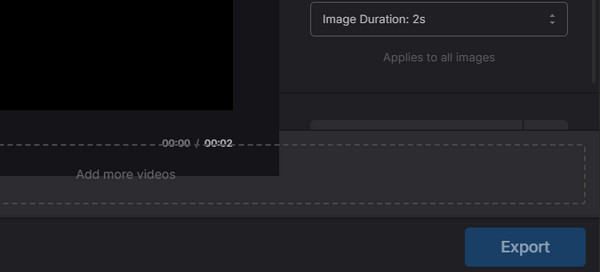
Step 1Search for the website of Clideo Merge Videos. After that, click the Choose Files button at the center of the main interface. Later, the computer album will be prompted on the screen. Please select the videos you prefer to merge. The videos will appear on the screen afterward.

Step 2Please edit the videos depending on your preference. Please click the Export button at the bottom right afterward to save the videos on your computer.
Part 4. Video Merger App - Filmora: AI Video Editor & Maker
Filmora: AI Video Editor & Maker is a free video merger app that is available on your iPhone and Android phone. However, it offers a limited feature for the free version. You cannot use some of them as features because they are only available to the premium version. Also, this app is not really meant to merge your videos using a built-in feature. It will only combine them after you upload them to the app.
Additionally, this application pops up advertisements during the free version. The exported video has watermarks, which might be inconvenient for some of you. Follow the steps below to know how to use the app.
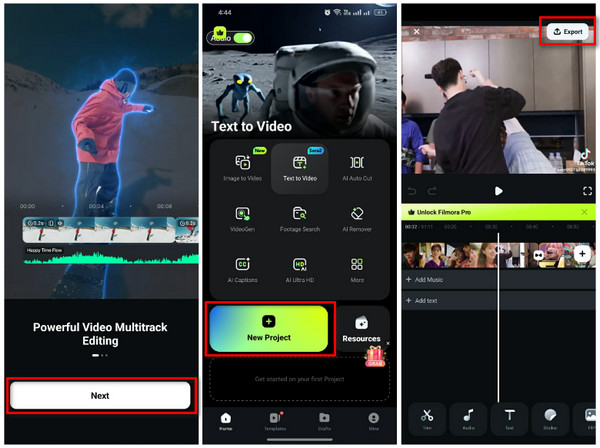
Step 1Download Filmora: AI Video Editor & Maker on your iPhone or Android phone. After that, open it on the mentioned device and tap the Next button, and follow the on-screen instructions to set it up. Tap the New Project button from the first interface and choose the videos you want to merge.
Step 2The videos will be posted on the application. Please edit the videos on the app and tap the Export button at the top right.
Part 5. Comparison Table of Video Mergers
| Tool/App | Compatible Devices | Quality Loss | Supported Format | Accessibility |
| FoneLab Video Converter Ultimate | Mac and Windows | No | MOV, MPEG, MP4, and more. | Offline |
| Adobe Express Video Merger | Mac, Windows, and Mobile Phones | No | MOV, MPEG, and MP4 | Online |
| Clideo Merge Videos | Mobile Phones and Computers | Yes | MOV and MP4 | Online |
| Filmora: AI Video Editor & Maker | iPhone and Android Phone | Yes | MP4 and WebM | Online |
Part 6. FAQs about Video Mergers
Are online video mergers really free?
Yes. Some online video mergers are really free. However, it only happens for their free versions, as they offer a limited file size. On the other hand, they allow you to upgrade the file size you can use for their free versions by purchasing their plans.
What are common video merger problems?
The main problem when using video merger is video quality loss. If you do not want to experience this, it is recommended to utilize FoneLab Video Converter Ultimate.
The video merger apps and programs are in this post. You are free to choose the one that meets your expectations. FoneLab Video Converter Ultimate is the most recommended software that can merge your videos on Mac and Windows. Do you want to experience more of the tool? Download it now!



