
 iPhone Data Recovery
 iOS System Recovery
 iOS Data Backup & Restore
 iOS Unlocker
 iPhone Password Manager
 Location Changer
 Android Data Recovery
 Broken Android Data Extraction
 Android Data Backup & Restore
 Android Unlocker
 FoneTrans for iOS
 iPhone Data Eraser
 iPhone Cleaner
 HEIC Converter
 HyperTrans
 WhatsApp Transfer for iOS
 Mac Sweep
 Data Retriever
 Mac Data Retriever
 Video Converter Ultimate
 Screen Recorder
 Phone Mirror
- Unlock Apple ID
- Bypass iCloud Activation Lock
- Doulci iCloud Unlocking Tool
- Factory Unlock iPhone
- Bypass iPhone Passcode
- Reset iPhone Passcode
- Unlock Apple ID
- Unlock iPhone 8/8Plus
- iCloud Lock Removal
- iCloud Unlock Deluxe
- iPhone Lock Screen
- Unlock iPad
- Unlock iPhone SE
- Unlock Tmobile iPhone
- Remove Apple ID Password
PUK Code on iPhone: Everything You Should Know About It
 Updated by
 Good day! I inserted my SIM card into my iPhone a while ago. It asks for the SIM card PIN. However, I cannot remember my SIM PIN. Now, my sister told me that I can use a PUK code on iPhone. Is that true? I hope you can help me. Thank you!
A forgotten SIM card PIN is indeed a disaster. You cannot access the SIM card on your iPhone if that’s the case. A PUK code is the best solution to unlock the SIM card without its PIN. Do you want to know what it is and how to get one? Please continue browsing in this article to know the complete information about it.

Guide List
Part 1. What is the PUK Code on iPhone
The PUK or Personal Unlocking Key on your iPhone is an 8-digit code. It is assigned to ICCID or Integrated Circuit Card Identifier. In short, the serial number of your iPhone SIM card. The SIM PIN can be changed to your preference. But a PUK code is static. You cannot change it because it is factory generated. It happens when the SIM is manufactured before it is sold in the market.
The PUK code serves as the lifeline for your SIM card when you enter the wrong PINs consecutively and it freezes. It is the only code that can unfreeze the forgotten PIN from your SIM card.
Part 2. How to Get PUK Code on iPhone
In this section, we will help you get the PUK code for your iPhone SIM card. However, there are some things you need to know. A PUK code for your SIM card must be entered correctly, not exceeding 10 incorrect attempts. 10 wrong consecutive PUK codes will make it blocked.
In short, do not forget the PUK code for your SIM card because it is the most important to access it. If you cannot remember your iPhone PUK code for your SIM card, there is no way to unlock it. Please see the instructions below to get a PUK code on your iPhone SIM card.
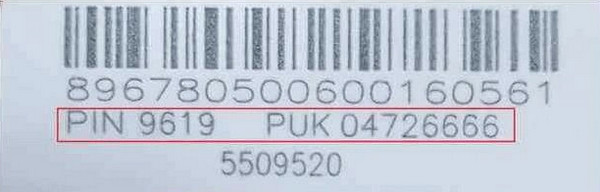
The SIM card PIN and PUK code are included when you buy the SIM card. They are included in the packaging of your SIM card after you buy it from a digital or physical store. It is commonly placed where the SIM card is attached. You can check the packaging to get the PUK code on your iPhone.
Part 3. Unlock iPhone Without SIM PUK
However, not everyone knows that the PUK code is included on the SIM card packaging. Mostly, they throw the packaging away without knowing that this information is contained in it. Don’t worry. There are ways to unlock your SIM without the PUK code.
1. Contact The Carrier
Carriers are the one who offers the SIM card PUK code for your SIM cards. The best way to unlock your iPhone without a PUK code is to contact them. This way, the carrier unlocks iPhone without the PUK code. You can contact your carrier via live chat, phone, email, and more. For quick contact information, see the common carriers with their contact details below.
- • Mint Mobile: 1-800-683-7392
- • T-Mobile: 1-800-937-8997
- • Verizon: 1-800-922-0204
- • AT&T: 1-800-331-0500
2. Use a New SIM Card or eSIM
But before you can unlock the SIM-locked iPhone from your carrier, there are various pieces of information and requirements you need to know and bring. It includes account standing, fully paid off, contract fulfilled, proof of purchase, and more.
However, some users cannot fulfill them. So, it is recommended to get or buy a new SIM card or eSIM. This way, you do not need to unlock your SIM card using a PUK code. You may buy from online and physical stores. Mostly, the SIM card prices range from $10 to $30, depending on your carrier.
3. Use FoneLab iOS Unlocker
FoneLab iOS Unlocker can help you unlock a SIM-locked iPhone in just a few clicks! It uses a USB connection for the unlocking process. Also, the tool can be used to wipe your iPhone passcode, password, Touch ID, PIN, and Face ID. You can also perform an Apple ID removal without the credentials with the help of it. The software supports iOS 26, iOS 27 Beta and earlier versions.

FoneLab Helps you unlock iPhone screen, Removes Apple ID or its password, Remove screen time or restriction passcode in seconds.
- Helps you unlock iPhone screen.
- Removes Apple ID or its password.
- Remove screen time or restriction passcode in seconds.
Furthermore, there will be no data loss if you use it to bypass the Screen Time restrictions on your iPhone. Besides the iPhone, the tool can also remove multiple restrictions from your iPad and iPod Touch. Do you want to know how to use this unlocking tool? Please use the steps below as your guide.
Step 1Go to the main website of FoneLab iOS Unlocker. After that, please choose the Free Download button on the screen. The downloading procedure will start. Wait for it to be completed and set it up afterward. A small window will appear. Please install the tool on your computer to start the unlocking process.

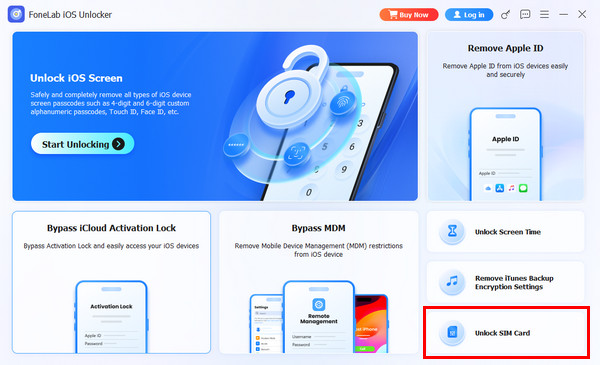
Step 2The full features of the mentioned tool will appear. Please select the Unlock SIM Card feature at the bottom right. This way, you will access the correct features for your unlocking procedure.
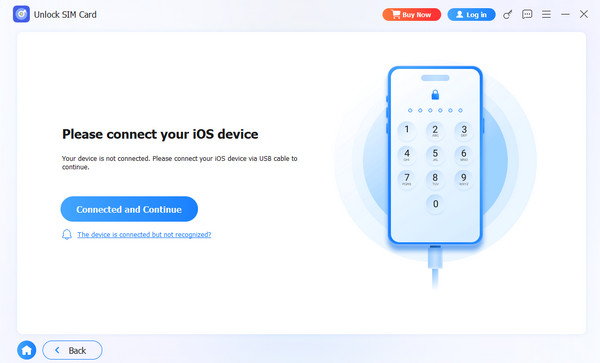
Step 3The tool will show you instructions on how to plug the iPhone into your computer. Please grab a USB cable and follow the on-screen steps to complete the plugging process. Finally, click the Connected and Continue button. This way, the unlocking process for the SIM-locked iPhone will begin. Wait for the unlocking procedure to be completed. Please unplug the iPhone from the computer after the process completes.
Part 4. FAQs about PUK Code on iPhone
Is PUK the same as SIM PIN?
No. The PUK SIM and SIM PIN are not the same. SIM PIN is a 4-digit PIN that allows you to secure your SIM data. On the other hand, a PUK PIN is an emergency master key when you forget the SIM PIN from your iPhone.
How many attempts do I have to enter my PUK?
You only have 10 consecutive attempts to enter the PUK PIN correctly. If you exceed that limit, the SIM card must be replaced. The PUK PIN cannot be used anymore.
All in all, the PUK on an iPhone is an 8-digit code used when you do not know your SIM PIN. In this article, you will learn how to get one. Also, we will help you unlock an iPhone without a SIM PUK. FoneLab iOS Unlocker can unlock your SIM-locked iPhone in just a few clicks. The tool can also be used for removing the iOS lock screen, MDM, Screen Time, and other restrictions. Download it to know more about these features!



