
 iPhone Data Recovery
 iOS System Recovery
 iOS Data Backup & Restore
 iOS Unlocker
 iPhone Password Manager
 Location Changer
 Android Data Recovery
 Broken Android Data Extraction
 Android Data Backup & Restore
 Android Unlocker
 FoneTrans for iOS
 iPhone Data Eraser
 iPhone Cleaner
 HEIC Converter
 HyperTrans
 WhatsApp Transfer for iOS
 Mac Sweep
 Data Retriever
 Mac Data Retriever
 Video Converter Ultimate
 Screen Recorder
 Phone Mirror
- Convert AVCHD to MP4
- Convert MP4 to WAV
- Convert MP4 to WebM
- Convert MPG to MP4
- Convert SWF to MP4
- Convert MP4 to OGG
- Convert VOB to MP4
- Convert M3U8 to MP4
- Convert MP4 to MPEG
- Embed Subtitles into MP4
- MP4 Splitters
- Remove Audio from MP4
- Convert 3GP Videos to MP4
- Edit MP4 Files
- Convert AVI to MP4
- Convert MOD to MP4
- Convert MP4 to MKV
- Convert WMA to MP4
- Convert MP4 to WMV
4 Trustworthy Music Speed Changer with An Easy Guide
 Updated by
 Do you need to adjust the speed of your audio file? If so, check out the best music speed changer, along with the other reliable solutions that can also help you. Whether you're a content creator needing to fit a track to a video's length or a musician trying to learn a portion of the music, adjusting the playback speed can be helpful. The methods below will be beneficial.
It doesn’t matter if you are new to these types of tools. Simply read and understand the information we provided in each part, and the process for changing your music’s speed will be effortless. Additionally, various methods are available, including computer programs, online services, mobile apps, and more. You can simply use the one you can navigate comfortably.

Guide List
Part 1. Best Music Speed Changer - FoneLab Video Converter Ultimate
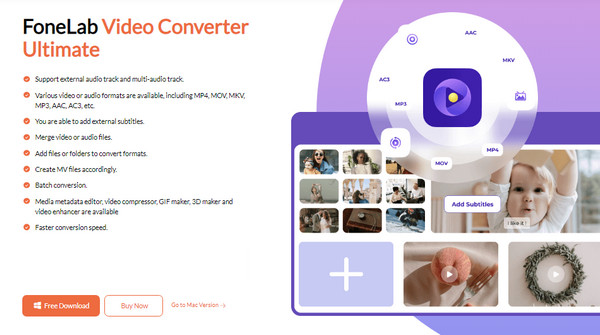
A competent program many users trust when it comes to their media files is FoneLab Video Converter Ultimate. You may feel confused because its name indicates a converter, but if you learn about it a little more deeply, you will be delighted to discover how it also offers a music speed-changing feature. It is only one of the many functions this program has in its Toolbox section, and you can use it, even without being connected to the internet.
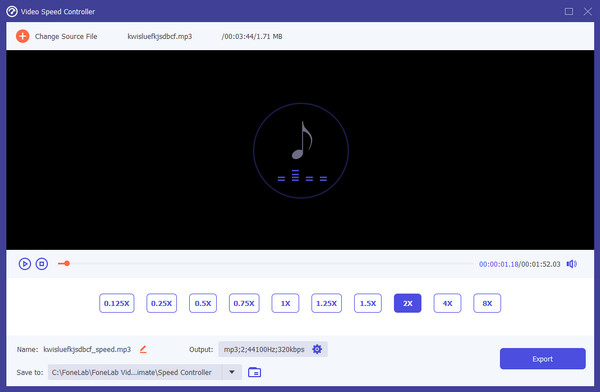
Meanwhile, several audio formats, including MP3, WMA, AAC, M4R, AMR, AC3, WAV, and more, are supported by FoneLab Video Converter Ultimate. So, feel free to import almost any audio file without worrying about compatibility. You can then adjust its speed from 0.125x to 8x, depending on your preference. The process will be hassle-free and can take only a few moments, thanks to the tool’s efficient performance and user-friendly design.

Video Converter Ultimate is the best video and audio converting software which can convert MPG/MPEG to MP4 with fast speed and high output image/sound quality.
- Convert any video/audio like MPG, MP4, MOV, AVI, FLV, MP3, etc.
- Support 1080p/720p HD and 4K UHD video converting.
- Powerful editing features like Trim, Crop, Rotate, Effects, Enhance, 3D and more.
See the stress-free guideline below as a pattern to learn the best music speed changer, FoneLab Video Converter:
Step 1On FoneLab Video Converter Ultimate’s site, hit Free Download, saving the installer to your Downloads. You can then open the file and begin the installation from there. Afterward, initialize the tool and click Toolbox on the upper part when the interface is shown. Then, pick the Video Speed Controller box from the available features.
Step 2Next, select (+) in the middle of the screen and import your chosen music file when prompted. The audio will preview on the upper half of the interface, so choose the speed you want accordingly. Once satisfied, you can modify the file’s information below before opting for the Export tab.
Aside from changing a music file’s speed, this program can also speed up videos, as the feature’s name indicates. Don’t hesitate to rely on it whenever needed.
Part 2. Music Speed Changer Web App
Do you prefer an online-based solution? If so, it is also understandable since online services have their own advantages. For instance, they no longer require installation since you can easily access their websites on your chosen browser. In this case, Music Speed Changer Web App is the online speed-changing service we recommend. You won’t have problems with its accessibility, especially since it immediately comes up when searching for reliable music or audio speed changers. Like before, the procedure will also be effortless. You must only manage the tempo section accordingly.
Mimic the convenient procedure below to familiarize yourself with the online music speed changer, Music Speed Changer Web App:
Step 1Access the Music Speed Changer Web App’s initial page with your browser, then hit Choose Audio File. Once prompted, pick and upload the music you intend to change the speed of.
Step 2After that, adjust the bar under Tempo or select (+) or (-) to change the audio speed. You can then review it using the playback below before hitting the Save symbol, downloading the file.
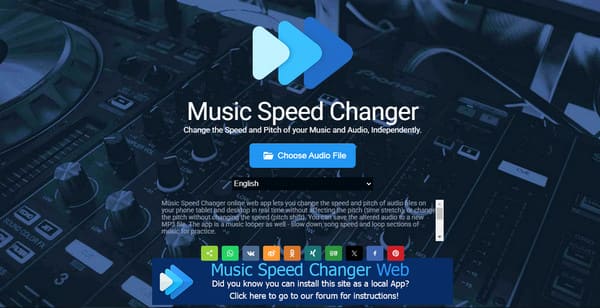
As you can see, it’s not hard to speed up audio with this online program. You must be aware that it heavily relies on the internet; thus, ensure your WiFi or data network is fast and stable.
Part 3. AudioStretch:Music Pitch Tool
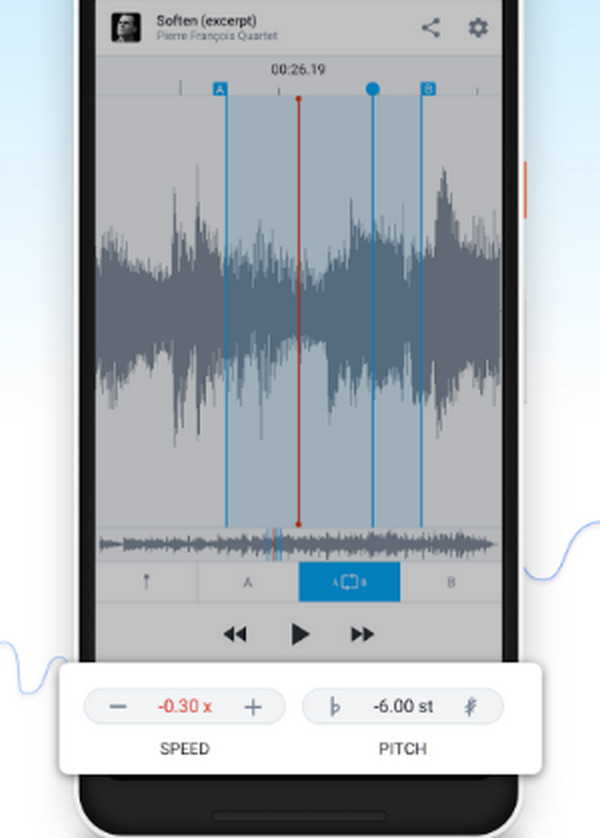
Meanwhile, AudioStretch:Music Pitch Tool is a reliable option for those who prefer installing a mobile app. It can be acquired through the Play Store; thus, it won’t be challenging to get it. Meanwhile, you will also find it easy to understand the process because of the app’s comprehensive interface and functions. However, its other features, like the Pitch, might be restricted in the free version. So, although it offers different services, you won’t be able to enjoy all of them thoroughly.
Go along with the unexacting task below to comprehend the music speed changer app, AudioStretch:Music Pitch Tool:
Step 1Get AudioStretch:Music Pitch Tool on your Play Store, then set it up to launch afterward.
Step 2Once opened, import your music file to the app and adjust the Speed on the lower left of the interface until you’re satisfied. Lastly, opt for the Save option to finish.
Part 4. Global Speed
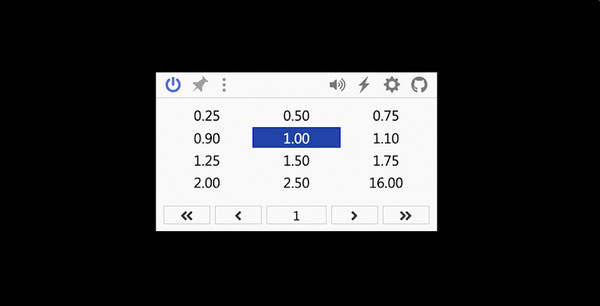
What if the music you’d like to change the speed of is on your browser? If so, an extension, like Global Speed, is the appropriate solution to try. It is a universal tool for video and audio speed control, which you can use when listening to audio on sites like YouTube, Netflix, and Spotify. But if the audio or music file you wish to adjust is saved to your device or computer storage, this extension won’t help.
Take to heart the simple directions below to understand the music speed changer extension, Global Speed:
Step 1First, head to the Chrome Web Store and find the Global Speed extension. Then, click Add to Chrome to set it up on your browser.
Step 2Once ready, proceed to the site containing your audio and play it. You can then click the Extensions symbol on the upper right and manage audio speed options accordingly.
Part 5. Music Speed Changer Attributes
| Feature | FoneLab Video Converter Ultimate | Music Speed Changer Web App | AudioStretch: Music Pitch Tool | Global Speed |
| Type | Desktop Program | Online Tool | Mobile App | Chrome Extension |
| Ease of Use | Easy | Very Easy | Moderate | Easy |
| Output Quality | Excellent | Good to Fair | Very Good | Excellent |
| Processing Speed | Fast | Depending on the internet | Fast | Instant |
| Best For | Everyone | Casual Users | Musicians and Students | Online listeners |
Part 6. FAQs about Music Speed Changer
Are music speed and tempo the same?
Yes, speed and tempo refer to the same thing in music. They both determine how fast or slow an audio is, contributing to the music’s overall mood.
Does changing the music speed affect the pitch?
No, it doesn’t. Some music speed-changing services may affect the pitch, but the options above won’t. So, use them without worries.
Speed-changing tools offer different features and advantages, so feel free to rely on the most beneficial one for you. But if you want a recommendation, use FoneLab Video Converter Ultimate, as it provides the most functions with convenient processes.



