
 iPhone Data Recovery
 iOS System Recovery
 iOS Data Backup & Restore
 iOS Unlocker
 iPhone Password Manager
 Location Changer
 Android Data Recovery
 Broken Android Data Extraction
 Android Data Backup & Restore
 Android Unlocker
 FoneTrans for iOS
 iPhone Data Eraser
 iPhone Cleaner
 HEIC Converter
 HyperTrans
 WhatsApp Transfer for iOS
 Mac Sweep
 Data Retriever
 Mac Data Retriever
 Video Converter Ultimate
 Screen Recorder
 Phone Mirror
- Part 1. How to Check If iPhone Is Unlocked via Settings
- Part 2. How to Check If iPhone Is Unlocked With a Physical SIM Card
- Part 3. How to Check If iPhone Is Unlocked via IMEI Number
- Part 4. How to Remove SIM Locks on iPhone With FoneLab iFoneWiz
- Part 5. FAQs about How to Check If iPhone Is Unlocked
- Unlock Apple ID
- Bypass iCloud Activation Lock
- Doulci iCloud Unlocking Tool
- Factory Unlock iPhone
- Bypass iPhone Passcode
- Reset iPhone Passcode
- Unlock Apple ID
- Unlock iPhone 8/8Plus
- iCloud Lock Removal
- iCloud Unlock Deluxe
- iPhone Lock Screen
- Unlock iPad
- Unlock iPhone SE
- Unlock Tmobile iPhone
- Remove Apple ID Password
How to Check If My iPhone Is Unlocked in 3 Quick Ways
 Updated by
 Apple allows you to buy an iPhone online or from its physical stores. But some users buy an iPhone from carriers. They make this purchase because they want a monthly payment plan or freebies. However, the iPhone will remain locked until it is fully paid off to the carrier.
Some users are unsure if their iPhone is still locked to their carriers. If that’s the case, this article will be helpful for you! It has 3 easy methods to help you check iPhone unlock status. If it is locked, you can use a third-party tool that can unlock it from its SIM or carrier. Scroll down for full details.

Guide List
- Part 1. How to Check If iPhone Is Unlocked via Settings
- Part 2. How to Check If iPhone Is Unlocked With a Physical SIM Card
- Part 3. How to Check If iPhone Is Unlocked via IMEI Number
- Part 4. How to Remove SIM Locks on iPhone With FoneLab iFoneWiz
- Part 5. FAQs about How to Check If iPhone Is Unlocked
Part 1. How to Check If iPhone Is Unlocked via Settings
There are various ways to find out if your iPhone is still locked to your carrier. Some want to know how because they do not know if they can already use a different SIM card. The iPhone Settings app can be the first method that you can use.
It is the central hub of your iPhone for configuring and customizing the features and apps it contains. It is the most convenient and fastest method for checking the status of your iPhone. You do not need to use a third-party tool or website to check it. Discover how to check if an iPhone is unlocked with the steps below using the Settings app.
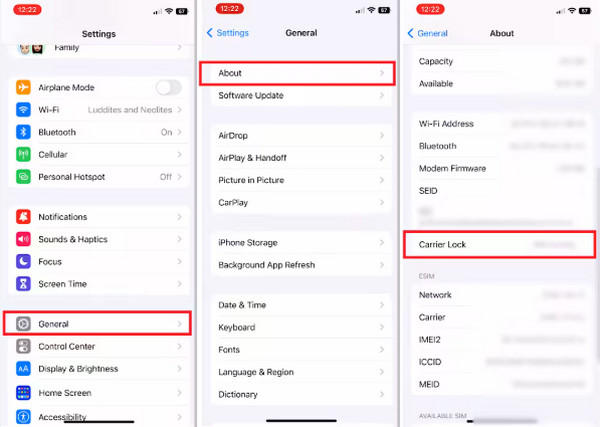
Open the Settings app on your iPhone. Then, the Settings menu will appear. Later, please tap the General button on the next screen. Select the About button at the top. Finally, you will know if the iPhone is unlocked if you see the No SIM Restrictions message from the Carrier Lock section.
Part 2. How to Check If iPhone Is Unlocked With a Physical SIM Card
Each carrier supports one SIM card. It means that you cannot use another SIM card when your iPhone is locked to their network. This is a common restriction applied to iPhones that are bought from carriers, like T-Mobile, Sprint, Verizon, and more.
You can use a physical SIM card to check if your iPhone is still locked to your carrier. There will be 2 signs for a locked iPhone from its carrier. You will see the SIM locked or SIM Not Supported error message, and the SIM will ask for the network unlock PIN. How do I check if my iphone is unlocked? Please use the technique below.
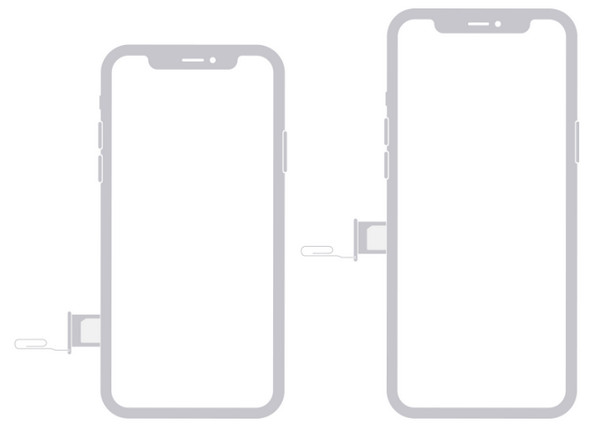
Turn off your iPhone and use your SIM ejector tool to remove the current SIM card from the device. Later, insert the SIM you prefer to use. Turn the iPhone on again and wait for the SIM card to be recognized. If you did not see the SIM locked or SIM Not Supported error message, or the SIM card did not ask for a network unlock PIN, your iPhone is no longer locked by its carrier.
Part 3. How to Check If iPhone Is Unlocked via IMEI Number
The iPhone IMEI number is a unique 15-digit code that serves as the iPhone’s fingerprint. It is commonly used for finding a lost phone and making sure it is legit. You can also unlock iPhone free with IMEI number. This method requires an online tool checker. Most online checkers require only your IMEI number.
However, some IMEI checkers are not effective enough to check if your iPhone is still locked by its carrier. Their success rate is less than 50%. Learn how IMEI checks iPhone unlocked with the steps below.
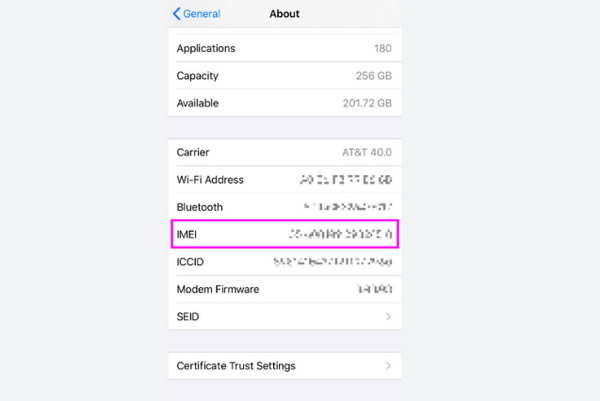
Step 1Go to the Settings app on your iPhone. After that, please tap the General button on the list. Tap the About button, and all the information from your iPhone will appear. Look for the IMEI number and copy it.
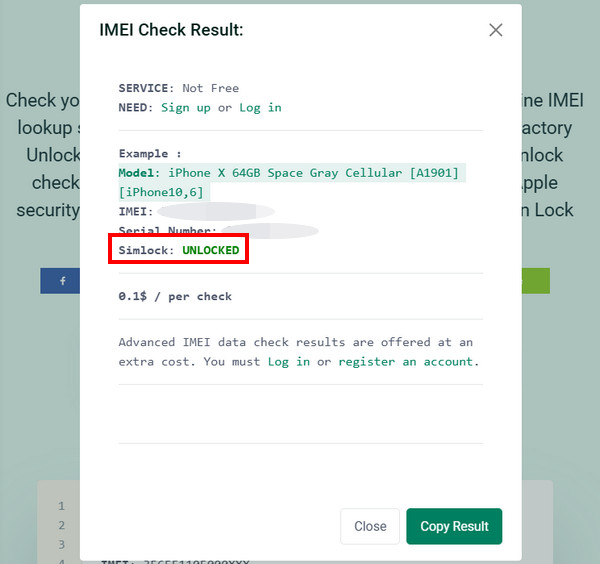
Step 2Please visit the website of IMEI Unlock Check. Later, please paste the IMEI number of your iPhone from the Enter IMEI Number section. Later, click the Check IMEI button on the right. The SIM lock status will appear in the Simlock section. You will see the Unlocked indication.
Part 4. How to Remove SIM Locks on iPhone With FoneLab iFoneWiz
If you still have a SIM-locked iPhone after checking, you cannot use a different SIM card aside from the supported one from your carrier. If so, you can use FoneLab iFoneWiz to unlock it for global use! It supports different carriers, including Sprint, Verizon, AT&T, and T-Mobile. The good thing about this tool is that it does not affect your iPhone data. There will be no data loss before, during, or after the process. Do you want to know how it functions? Please use the steps below as your guide for unlocking your carrier-locked iPhone.

iFoneWiz Helps you unlock iPhone screen, Removes Apple ID or its password, Remove screen time or restriction passcode in seconds.
- Helps you unlock iPhone screen.
- Removes Apple ID or its password.
- Remove screen time or restriction passcode in seconds.
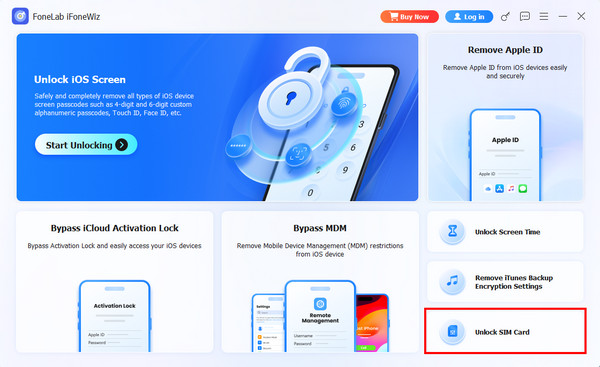
Step 1Download, install, and open FoneLab iFoneWiz. Then, the first interface of the tool will be prompted. Please familiarize yourself with the screen to have a faster process.

Step 2Click the Unlock SIM Card feature at the bottom right. Then, plug your iPhone into the computer. Choose the Start Now button at the bottom left. Follow the on-screen steps and click the OK button to proceed.
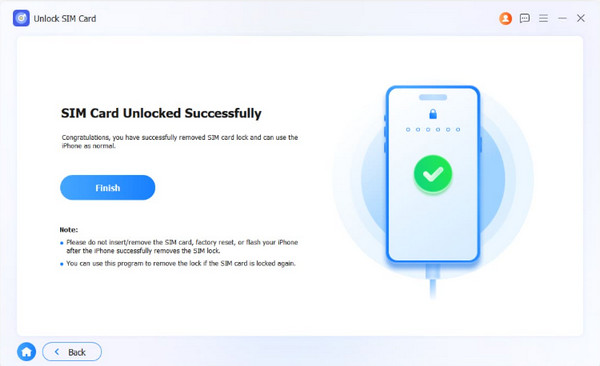
Step 3The process will take a few seconds to a few minutes. Finally, please click the Finish button on the left. This completes the unlocking process.
Part 5. FAQs about How to Check If iPhone Is Unlocked
How to check iPhone unlock date?
Go to the iPhone’s Settings application. Then, select the General button from the options list. Choose the About button on the next screen. Long-press the serial number from the main interface. Later, paste it to the AppleCare & Warranty website.
Can Apple tell you when it was unlocked?
No. Apple cannot tell you if your iPhone carrier lock is already unlocked. However, you can check it by yourself by contacting your carrier, including the methods in this post.
How to check if your iPhone is unlocked? This article presents the 3 leading ways for the checking process. FoneLab iFoneWiz is also here to help you unlock a SIM-locked iPhone when it is still locked, and you need to use another SIM. The tool can also be utilized for bypassing Screen Time, iCloud Activation Lock, MDM, Apple ID, etc. Download it now if you want to explore it!



