
 iPhone Data Recovery
 iOS System Recovery
 iOS Data Backup & Restore
 iOS Unlocker
 iPhone Password Manager
 Location Changer
 Android Data Recovery
 Broken Android Data Extraction
 Android Data Backup & Restore
 Android Unlocker
 FoneTrans for iOS
 iPhone Data Eraser
 iPhone Cleaner
 HEIC Converter
 HyperTrans
 WhatsApp Transfer for iOS
 Mac Sweep
 Data Retriever
 Mac Data Retriever
 Video Converter Ultimate
 Screen Recorder
 Phone Mirror
- Unlock Apple ID
- Bypass iCloud Activation Lock
- Doulci iCloud Unlocking Tool
- Factory Unlock iPhone
- Bypass iPhone Passcode
- Reset iPhone Passcode
- Unlock Apple ID
- Unlock iPhone 8/8Plus
- iCloud Lock Removal
- iCloud Unlock Deluxe
- iPhone Lock Screen
- Unlock iPad
- Unlock iPhone SE
- Unlock Tmobile iPhone
- Remove Apple ID Password
Resolve Forgot Apple Watch Passcode Using Renowned Ways
 Updated by
 Hi! I have a concern and hope someone can help me find a solution. The thing is, I genuinely forgot my Apple Watch passcode, and now it's unusable. I purchased it for a significant amount, so it would be such a waste if I just let it remain stuck because of my forgetfulness. Would anyone be able to provide me with a way to access it again? If so, I’d be forever grateful.
A forgotten Apple Watch passcode is a common dilemma for Apple Watch users. However, unlike iPhones, which offer multiple biometric unlock options, its security is designed to lock down tightly after too many incorrect attempts, leaving many users feeling helpless. You don’t have to worry, though, as this isn’t as hopeless as it may seem. Whether you're facing the "Too Many Passcode Attempts" message or simply can't recall the 4-digit code, the following sections offer solutions to help you restore access to your watch.


Guide List
Part 1. What Happens When You Forgot Apple Watch Passcode
“I forgot my Apple Watch passcode” is among the most common concerns users report with their Apple devices, leading them to lose access to everything on the device. That’s because when you forget your Apple Watch passcode, it essentially locks to protect your personal information. And if you make multiple incorrect attempts, you'll see a "Too Many Passcode Attempts" message, and the watch will disable itself. At this point, you won't be able to access any apps, notifications, or features on the device, leaving you no choice but to resolve the problem by erasing it. That said, check out the proper procedures for this in Part 2.
Part 2. Erase Apple Watch If You Forgot Apple Watch Passcode
There are multiple ways to erase an Apple Watch, including erasing its passcode. However, we understand the difficulty in choosing the most reliable one. Thus, we gathered the leading and safest ones below. Browse them to erase your Apple Watch securely.
Option 1. On Apple Watch
The primary solution Apple Watch offers when it comes to forgotten passcodes is performed on the device itself. Although it is already inaccessible, you can still reset it using the watch’s buttons and with the help of the charger. This process is quick and easy as long as the device’s Digital Crown and designated buttons are functional. You will no longer need a passcode for access since the screen will provide the reset option once you perform the correct navigation.
Note the convenient task below to resolve your Apple Watch forgot passcode concern on the watch itself:
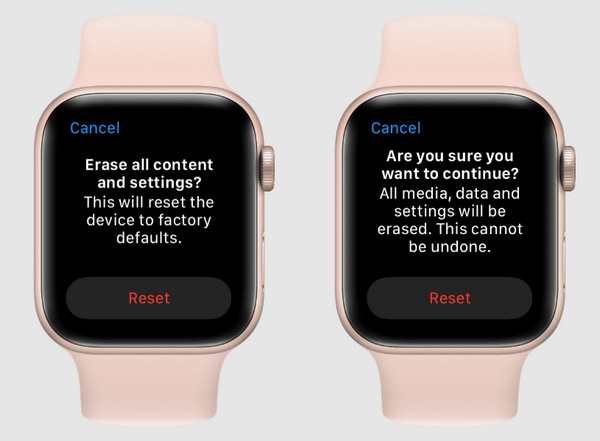
Step 1First, ensure that you put your Apple Watch on its charger. When ready, long-press the Side button until the watch’s screen shows the Power slider, but don’t select anything yet.
Step 2Long-press the Digital Crown and tap Erase all content and settings once it appears. Finally, choose Reset, then Reset again to confirm erasing your Apple Watch.
Option 2. On iPhone
Another easy and official technique to erase an Apple Watch is by accessing it on its paired iPhone. As you may know, you can control some of the watch’s management options using the Apple Watch app that is installed on the iPhone paired to your watch. Hence, optimize its function and opt for the option to erase the device. Like the last solution, it doesn’t require the Apple Watch’s passcode, so feel free to navigate the designated options on your iPhone.
Bear in mind the easy procedure below if you forgot passcode to Apple Watch to perform the deletion on your iPhone:
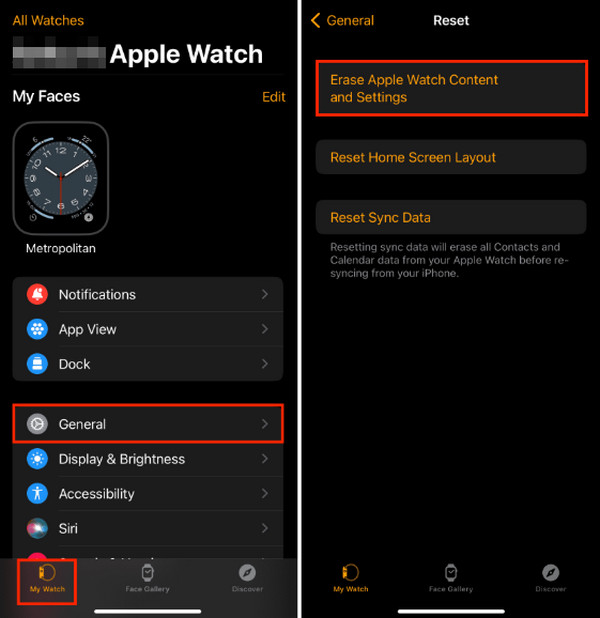
Step 1Open your iPhone’s Apple Watch app and ensure the devices are close together. Once launched, opt for the My Watch selection. Next, tap the General > Reset options.
Step 2The Erase Apple Watch Content and Settings will shortly appear, so choose it and confirm your decision by tapping the same option, erasing the Apple Watch.
Option 3. On iCloud
Meanwhile, erasing your Apple Watch on iCloud to regain access is also effective. Instead of directly performing the deletion on your watch or iPhone, you can use a browsing app or program on any of your computers or devices. After all, iCloud’s website is accessible on almost, if not all, browsers. It only requires your Apple ID credentials to enter Find My, which is the designated section to manage or erase your chosen devices, including the Apple Watch.
Mimic the simplified directions below to erase and reset Apple Watch forgot passcode on iCloud:
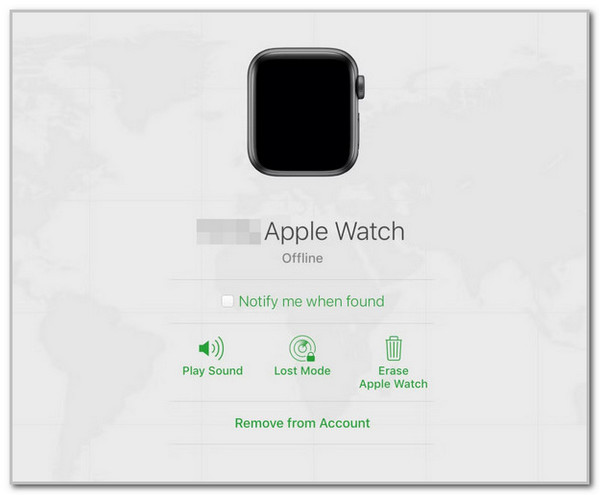
Step 1Enter iCloud’s Find My iPhone from computer by accessing its website on your trusted browser. Simply provide your Apple credentials and choose Find My once logged in.
Step 2You will see All Devices on the succeeding page; thus, choose it and select your Apple Watch with a forgotten passcode. Finally, opt for Erase Apple Watch to delete the device.
Part 3. How to Bypass iPhone Passcode with FoneLab iOS Unlocker
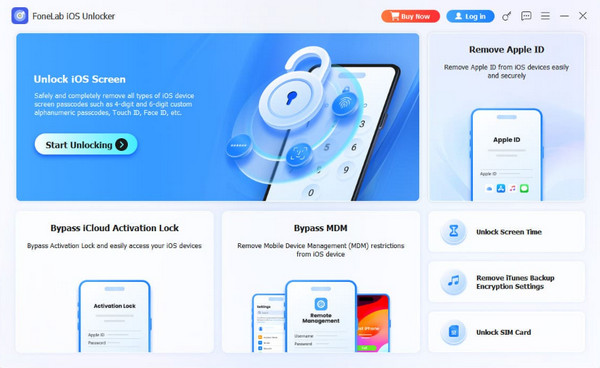
On the other hand, you may also struggle accessing your iPhone later for the same problem, which is a forgotten passcode. In this case, we suggest FoneLab iOS Unlocker, as it is highly reliable to bypass iPhone passcode without complications. Whether you can’t remember the code you have set or your biometrics don’t work, this program will help you regain access to the iPhone. It offers a user-friendly design and navigation, but what makes this unlocker even better is that it can also work for your other devices, including your iPad and iPod Touch.

FoneLab Helps you unlock iPhone screen, Removes Apple ID or its password, Remove screen time or restriction passcode in seconds.
- Helps you unlock iPhone screen.
- Removes Apple ID or its password.
- Remove screen time or restriction passcode in seconds.
See the effortless operation below as a sample of how to bypass iPhone passcode with FoneLab iOS Unlocker:
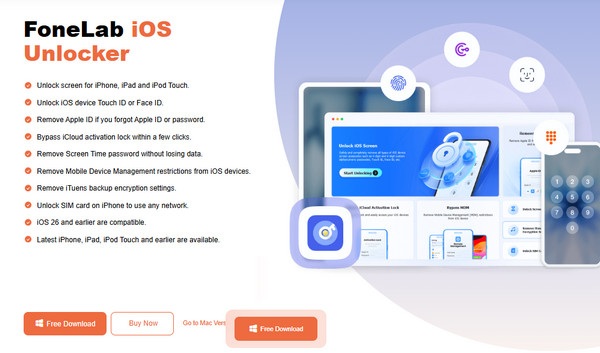
Step 1Display FoneLab iOS Unlocker’s website, and on its initial page, select Free Download, saving the installation file to the computer’s Downloads. Once the file is settled, start the initial setup to view the Start option, allowing you to open and run the program.
Step 2Choose Unlock iOS Screen when the tool’s interface launches on your desktop. Next, attach it with a Lightning cable, as the instructions command. More guidelines will greet you on the following screen, so understand and perform them correctly until you bypass the passcode.
Part 4. FAQs about Forgotten Apple Watch Passcode
Can I unlock an Apple Watch with a forgotten password without resetting it?
Unfortunately, you can’t. All official and effective methods to regain access to an Apple Watch require resetting the device. It is the only way for the watch to let you set up another passcode and re-access your device.
What if I purchased a used, locked Apple Watch?
In this case, it would be best to contact the original owner and let them handle the deletion, as their passcode or account will be needed to access the Apple Watch.
Check out and don’t hesitate to perform the most suitable solution above for your Apple Watch with a forgotten passcode. Every method with the guidelines has already been proven, so all you must do is perform them correctly. As a bonus, FoneLab iOS Unlocker was included, allowing you to handle your locked iPhone if you face difficulties later.



