
 iPhone Data Recovery
 iOS System Recovery
 iOS Data Backup & Restore
 iOS Unlocker
 iPhone Password Manager
 Location Changer
 Android Data Recovery
 Broken Android Data Extraction
 Android Data Backup & Restore
 Android Unlocker
 FoneTrans for iOS
 iPhone Data Eraser
 iPhone Cleaner
 HEIC Converter
 HyperTrans
 WhatsApp Transfer for iOS
 Mac Sweep
 Data Retriever
 Mac Data Retriever
 Video Converter Ultimate
 Screen Recorder
 Phone Mirror
- Unlock Apple ID
- Bypass iCloud Activation Lock
- Doulci iCloud Unlocking Tool
- Factory Unlock iPhone
- Bypass iPhone Passcode
- Reset iPhone Passcode
- Unlock Apple ID
- Unlock iPhone 8/8Plus
- iCloud Lock Removal
- iCloud Unlock Deluxe
- iPhone Lock Screen
- Unlock iPad
- Unlock iPhone SE
- Unlock Tmobile iPhone
- Remove Apple ID Password
Tenorshare 4uKey Review: Is It Safe, and What Is the Best Pick?
 Updated by
If you are locked out of your own iPhone, Tenorshare 4uKey is one of the first names that pops up in search. It is a well-known passcode-removal tool, and like any piece of software you would trust with a locked phone, it deserves a straight answer: does it work, is it safe, and what should you actually expect?

This is an honest review, written from the perspective of someone who has watched people get burned by both sides of this market — tools that overpromise, and tools that quietly wipe a phone with no warning. I will explain what 4uKey genuinely can do, where it falls short, and what a fair alternative looks like so you can choose with eyes open.
Start with Part 1, because the most important thing to understand about any passcode tool is what "unlock" actually means here. It is not what most people picture.

Guide List
Part 1: What Tenorshare 4uKey Actually Does
4uKey is a desktop program for Windows and Mac that removes the lock-screen passcode from a disabled or forgotten-password iPhone or iPad. It also offers to remove an Apple ID and to bypass Screen Time passcodes. In everyday terms: if you cannot get past the lock screen because you forgot the code, the tool restores the device so you can set it up again.

Here is the crucial point that many ads blur: removing the passcode means erasing the device. There is no tool that reads the six-digit code out of a locked iPhone while keeping your photos. The security of iOS does not allow that. Any passcode-removal program works by wiping the phone and reinstalling the system, which clears the passcode along with everything else. If you have a backup, you restore it afterward; if you do not, the on-device data is gone.
That single fact sets honest expectations. 4uKey is a legitimate way back into a phone you own, not a magic decoder ring. Keep that in mind as you read through the marketing, which often skips the "your data will be erased" part.
It also explains why the tool needs a computer at all. An iPhone locked to its home screen will not let any app reach the storage, so a mobile "unlocker" you install from the App Store is not a thing that can work — the app sandbox blocks it. That is why every real solution, from Apple's own recovery mode to 4uKey, runs on a Mac or Windows PC and talks to the phone over a cable. If you ever see a product promising to unlock the phone entirely on the device itself, that is the tell that it is not a real unlocker.
Part 2: How It Works — and Its Real Limits
The process is broadly the same across every tool in this category: connect the locked phone to a computer, put it into recovery mode, download the matching firmware, and let the program wipe and reinstall iOS so the passcode is gone. 4uKey walks you through each step.
The limits matter more than the steps. First, it erases the phone — full stop. Second, after the wipe, Activation Lock often still asks for the original Apple ID and password; if you do not have that, you are still locked out. Third, it cannot break into a phone that is genuinely lost or stolen, and it should not be used that way. Fourth, newer iOS versions and newer devices sometimes need a day or two before the tool catches up.
So when does 4uKey actually save the day? When you forgot your own passcode, the phone is yours, you can prove that, and either you have a backup or you accept the data loss. In that exact situation it is a reasonable option. Outside it, you will be disappointed.
Real-world timing matters too. Expect the whole process — installing the program, putting the phone in recovery mode, downloading firmware (which can be a gig or more), and wiping — to take somewhere between ten and thirty minutes, depending on your internet speed. Do not start this when you are in a rush, and use a cable you trust, because a disconnect mid-firmware-flash leaves the phone in a worse state than before. Plug the computer directly into power as well, so it does not sleep halfway through.
Part 3: Is Tenorshare 4uKey Safe?
Tenorshare is an established software company, and 4uKey itself is not malware. The real safety question is how and where you download it. The risks people actually run into are: downloading a cracked or repackaged "free" copy from a mirror site (that is where the malware lives), or being pushed into a subscription renewal they did not expect.
The honest checklist: only install from the official site, pay attention to whether you are buying a one-time license or a subscription, and never enter your Apple ID password into the unlock program itself beyond what the official iOS screens require. Also be realistic about "free" versions — the free download usually scans but does not actually unlock; that part is paid. Anyone promising a fully free, no-data-loss unlock of a modern iPhone is lying to you.
One more comfort point: the unlock process itself does not hand your data to the vendor. It downloads Apple's official firmware and reinstalls it locally on your computer. The thing to be careful about is the website you clicked "download" on, and the license screen that auto-checks a recurring billing option. Reading those two screens costs ten seconds and saves a real headache.
Part 4: An Alternative — FoneLab iFoneWiz
If you have decided a passcode-removal tool is the right route, it is worth knowing you have a direct alternative. FoneLab iFoneWiz does the same core job — wipe a forgotten lock-screen passcode so you can get back into the iPhone — with a simpler layout and the same honest data-erase warning up front.

iFoneWiz Helps you unlock iPhone screen, Removes Apple ID or its password, Remove screen time or restriction passcode in seconds.
- Helps you unlock iPhone screen.
- Removes Apple ID or its password.
- Remove screen time or restriction passcode in seconds.
The honest limits are the same as any tool here: it erases the phone, it cannot bypass Activation Lock without the original Apple ID, and it is meant for devices you own. It will not magically preserve your data. Think of it as a guided, reliable wipe-and-restore path rather than a data-extraction tool. If your real goal is to rescue photos before wiping, pair it with a recovery tool instead.
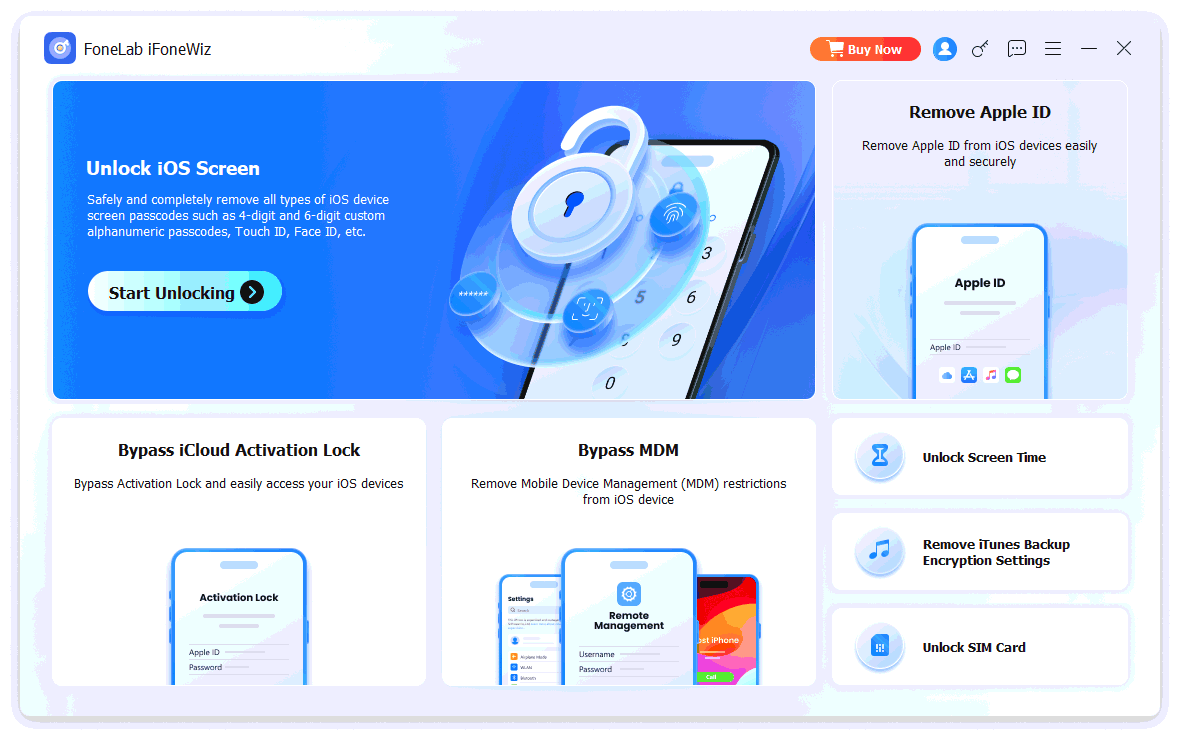
Step 1Install and open FoneLab iFoneWiz, then choose Unlock iOS Screen and connect the locked iPhone with a USB cable.
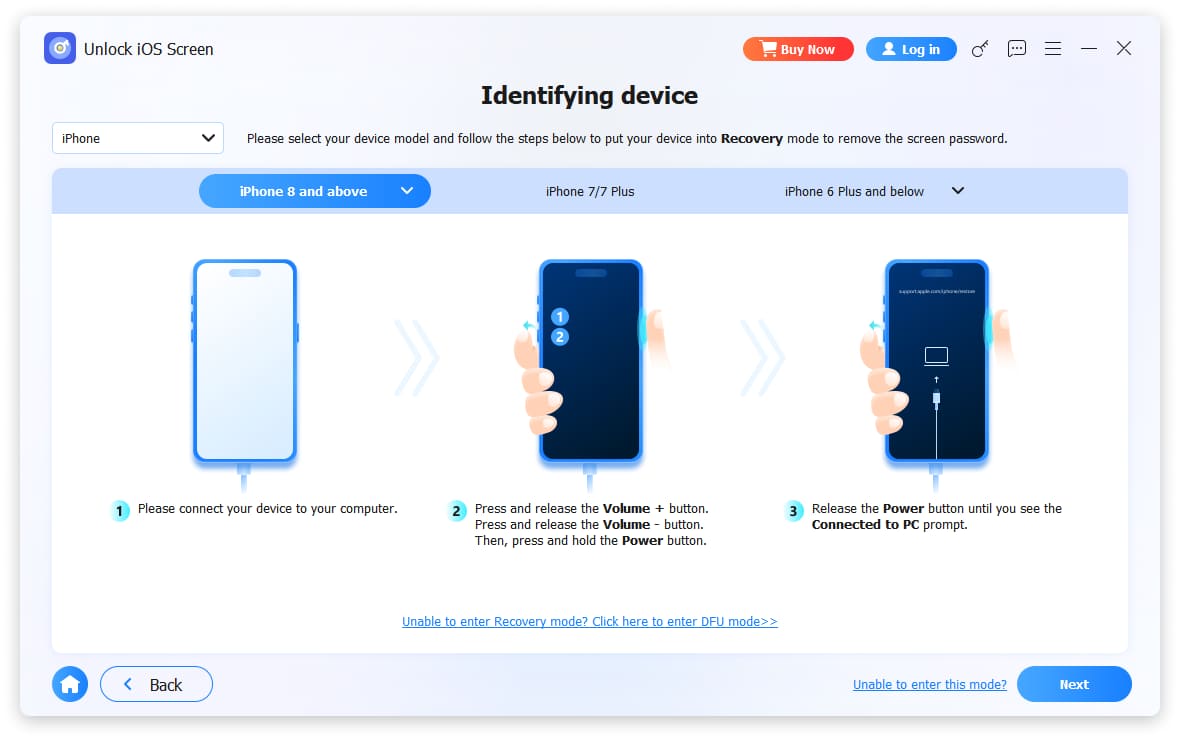
Step 2Select your iPhone model at the top-left and follow the on-screen steps to put the device into recovery mode.
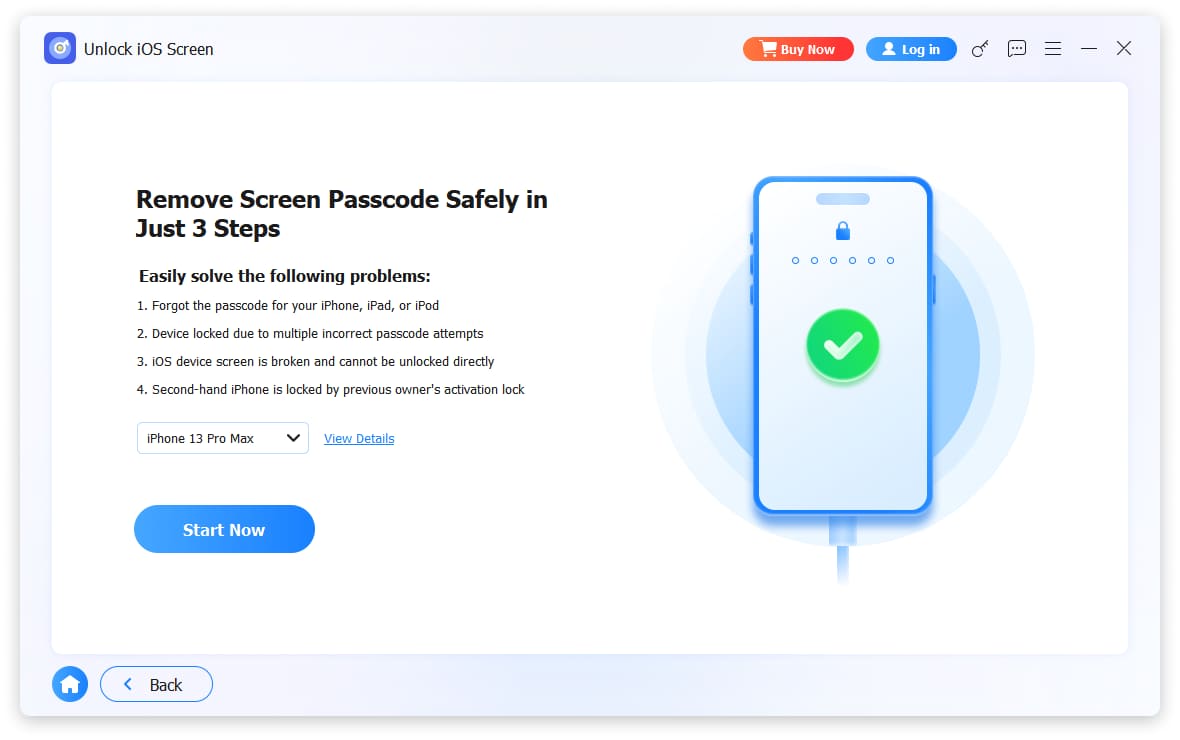
Step 3Confirm the device information shown, then click Start Now to download the firmware package.
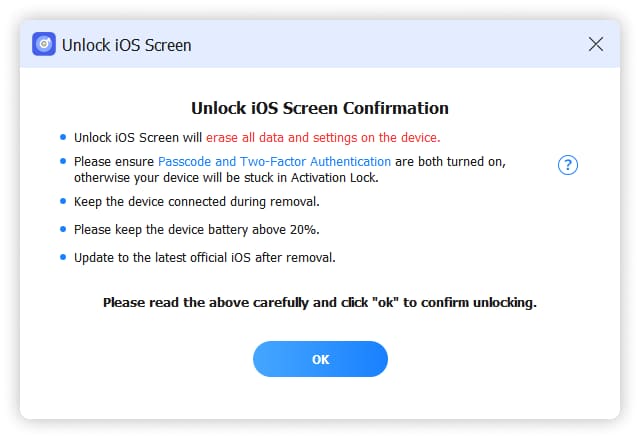
Step 4Wait while the firmware downloads, then read the notes and click OK > Confirm Again. Once the wipe finishes, set the phone up and restore your backup.
If you just want the steps rather than a tool comparison, this guide on unlocking an iPhone passcode walks through every route.
Before you pay for any unlocker, I would do one thing first: try Apple's free route. If you have another Apple device signed into the same account, or you can sign in at iCloud.com, the "Erase iPhone" option clears the lock screen the same way a paid tool does — at no cost. A tool is only worth it when the free options are not available to you, like a phone you bought used and cannot reach the original owner's iCloud. That is the honest place a third-party unlocker earns its keep.
Watch out for one more category of site while you shop: services that advertise "online iPhone unlock" for a small fee, asking for only your IMEI. Some of those are legitimate for carrier unlocking, but many are scams that take the money and do nothing, and none of them bypass a screen passcode. If what you forgot is the six-digit code, you need a desktop wipe tool like the ones above, not an IMEI service. And if the phone reports it is disabled after too many wrong tries, that is the same path — connect to the tool, put it in recovery mode, and wipe.
iFoneWiz Helps you unlock iPhone screen, Removes Apple ID or its password, Remove screen time or restriction passcode in seconds.
- Helps you unlock iPhone screen.
- Removes Apple ID or its password.
- Remove screen time or restriction passcode in seconds.
Part 5: Side-by-Side Comparison
| Comparison | Tenorshare 4uKey | FoneLab iFoneWiz |
|---|---|---|
| Removes forgotten passcode | Yes | Yes |
| Preserves data | No, erases device | No, erases device |
| Bypasses Activation Lock | No | No |
| Removes Apple ID / Screen Time | Yes | Yes |
| Platforms | Windows / Mac | Windows / Mac |
My recommendation: both tools do the same core job with the same honest limits. Pick whichever interface you prefer and whichever pricing fits — just never expect either of them to unlock a phone without wiping it, or to beat Activation Lock.
Part 6: FAQs
Can 4uKey unlock an iPhone without losing data?
No. Removing the lock-screen passcode on a modern iPhone requires wiping the device, and this applies to 4uKey and every similar tool. If you have an iCloud or computer backup, you can restore your data after the unlock.
Is Tenorshare 4uKey free?
The download is free to try, but it will not complete the unlock until you buy a license. Be careful to choose a one-time purchase rather than a subscription if that is what you want.
Will 4uKey remove Activation Lock?
Not on its own. After the passcode is wiped, Activation Lock still asks for the original Apple ID and password. If you cannot provide those, the device is not yours to unlock and you should contact Apple with proof of purchase.
Is there a free way to unlock a disabled iPhone?
Yes — you can erase a disabled iPhone through recovery mode using Finder on a Mac or the Apple Devices app on Windows, or through iCloud's "Erase iPhone" feature. The paid tools just automate and guide that same process.
Need to get back into your own iPhone? Try FoneLab iFoneWiz to wipe a forgotten passcode and restore from your backup.
iFoneWiz Helps you unlock iPhone screen, Removes Apple ID or its password, Remove screen time or restriction passcode in seconds.
- Helps you unlock iPhone screen.
- Removes Apple ID or its password.
- Remove screen time or restriction passcode in seconds.