
 iPhone Data Recovery
 iOS System Recovery
 iOS Data Backup & Restore
 iOS Unlocker
 iPhone Password Manager
 Location Changer
 Android Data Recovery
 Broken Android Data Extraction
 Android Data Backup & Restore
 Android Unlocker
 FoneTrans for iOS
 iPhone Data Eraser
 iPhone Cleaner
 HEIC Converter
 HyperTrans
 WhatsApp Transfer for iOS
 Mac Sweep
 Data Retriever
 Mac Data Retriever
 Video Converter Ultimate
 Screen Recorder
 Phone Mirror
- Unlock Apple ID
- Bypass iCloud Activation Lock
- Doulci iCloud Unlocking Tool
- Factory Unlock iPhone
- Bypass iPhone Passcode
- Reset iPhone Passcode
- Unlock Apple ID
- Unlock iPhone 8/8Plus
- iCloud Lock Removal
- iCloud Unlock Deluxe
- iPhone Lock Screen
- Unlock iPad
- Unlock iPhone SE
- Unlock Tmobile iPhone
- Remove Apple ID Password
A Guide to Squid Game Unblocked and Its Information
 Updated by
 Have you seen the Squid Game series? If so, you may have also heard about the Squid Game games unblocked, which allows almost anyone with a device to enjoy the thrilling experience that the characters played in each episode. However, the game's official website or platform may be inaccessible if your school or work network has put a restriction in place to lessen distractions. Luckily, unblocked gaming websites have become many people's solution to access various blocked games, including Squid Game. If you are ready to learn what it is all about and how to optimize the gameplay, kindly move on to the following sections.

Guide List
Part 1. What is Squid Game Unblocked
The unblocked Squid Game is the version of the game that is not restricted, as it is usually available on websites that organizations, workplaces, or school networks don't block. Hence, if you are looking for a way to play it without such restrictions, trying the game's unblocked version on a reliable website will be the best solution.
Besides, Squid Game has quickly gained attention from players and even non-players who have seen the series with the same name. So, you can share it as well with your schoolmates or friends who also want to play but don't have access to it. Instead of going to the official source that may be blocked, you can go to the unblocked site to play the game directly on the web.
Meanwhile, the unblocked version works just like the original game. You will still see the same challenges, sounds, and design, and the only difference is that you can play it on sites usually blocked by networks. However, note that not all gaming websites are safe. Some may contain too many ads or pop-ups that can harm your device. Thus, choosing a reliable one is essential.
Part 2. Squid Game Unblocked Game Modes
If you have seen the Squid Game series, you must be aware of how the players didn't only play a single game. There are multiple ones, so if you explore the game, you will also find different modes to play it, along with each of their different mechanics, rules, etc. Discover them below.
- • Red Light, Green Light - Move only when the doll isn't looking. Stop before she turns around.
- • Honeycomb - Carefully carve out a shape from a thin candy without breaking it.
- • Pentathlon - A team-based mode with five mini-games played in quick succession.
- • Mingle - Players must form groups of a called-out number and run into rooms in time.
- • Night Brawl - A free-for-all fight mode where players attack each other with hidden weapons.
- • Rebellion - Has a 30% chance to appear after Night Brawl. Players team up to fight against the guards.
- • Tug of War - Pull the rope with your team. The stronger and more coordinated side wins.
- • Hide and Seek - One player or guard searches while others hide. Getting caught means elimination.
- • Jump Rope - Time your jumps as a giant rope swings. One mistake sends you out.
- • Marbles - A one-on-one mode where players bet marbles in games of their choice.
- • Rock, Paper, Scissors Minus One - A twist on the classic game. Each player uses two hands and loses one option each round.
- • Glass Stepping Stones - Choose between two glass tiles. One is safe, the other breaks.
- • Squid Game - The final mode. Attack and defend in a squid-shaped court.
- • Sky Squid Game - A floating version of the final game with platforms and falling risks.
Part 3. Survival Strategies for Squid Game Unblocked
As you can see, there are 14 main modes in the Squid Game game. Each mode requires a different strategy, so what works in one game might get you eliminated in another. Hence, in each game, always choose to play wisely.
For beginners, start with Red Light, Green Light, or Honeycomb to learn the controls first. Or you can also practice harder modes first if the website allows it, to get used to each mode more easily. Night Brawl and Rebellion are especially unpredictable, so stay alert in those plays. The key to winning most modes is staying calm, as panic causes mistakes.
Strategies don't only apply inside the game. Since you're playing online, it is also important to prioritize safety. For instance, you should always play on safe, trusted websites to avoid ads, malware, or fake versions. Also note that unblocked versions are fan-made. They are fun but not official. Most importantly, play for fun. Winning is great, but enjoying the challenge is what matters.
Part 4. Bypassing Web Filters on iPhone or iPad
Once you're ready to play, it should be easy to find an unblocked website offering Squid Game. However, you may still encounter web filters that prevent you from accessing the game. In this case, we highly suggest bypassing them on your iPhone or iPad with the methods below.
Option 1. Remove Screen Time in Settings
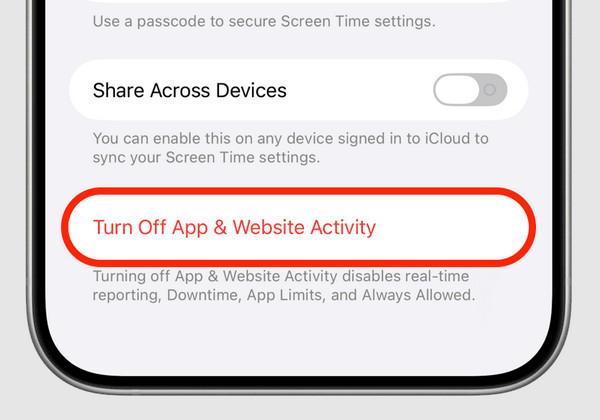
Screen Time is the primary feature to set up restrictions on Apple devices. Thus, the first solution on our list is to remove Screen Time to turn off restrictions on iPhone or iPad. It is done on Settings and requires the feature's passcode that you have previously set.
Mind the steps below to remove Screen Time in Settings:
Step 1Start on the initial interface of your Settings, then scroll down to tap Screen Time.
Step 2If asked, type the feature's passcode, and you will be directed to its section. After that, get to the bottom and hit Turn Off App & Website Activity. The passcode will also be required.
Option 2. Remove MDM in Settings
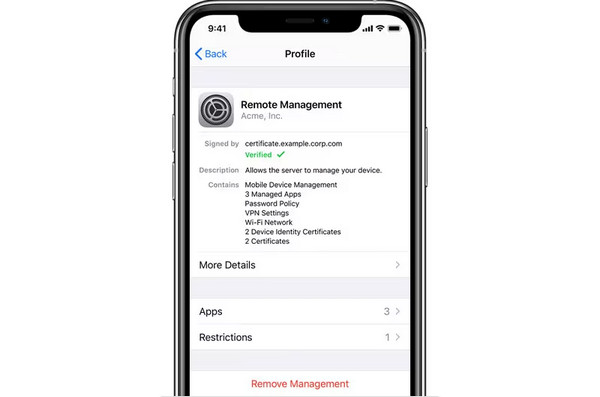
Removing the MDM or Mobile Device Management profile that may be controlling your device is also another solution, especially if it's from an organization, like your school or workplace. They may have setup this feature on your iPhone or iPad to block or restrict gaming sites. Like the last process, it is done on Settings, but the administrator's passcode is required.
Observe the directions below to remove MDM in Settings:
Step 1Head to Settings and quickly tap General. Next, pick VPN & Device Management.
Step 2When you see the MDM profile that controls your device, tap it and opt for the Remove Management option. As mentioned, the passcode will be required to remove it finally.
Option 3. Bypass Screen Time/MDM with FoneLab iOS Unlocker
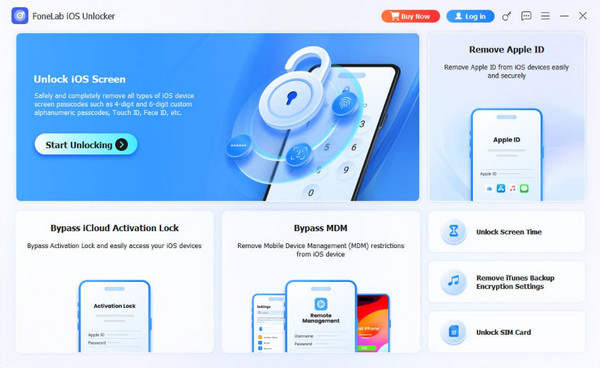
As mentioned, passcodes are necessary in the previous solutions. But if you can't provide them, let FoneLab iOS Unlocker handle this concern. This tool has the ability to bypass Screen Time passcode or MDM with its specialized features. Thus, no worries if you no longer remember your credentials. Its functions and intuitive design have your back.
Besides, FoneLab iOS Unlocker's Unlock Screen Time feature won't erase any data on your device. Aside from that, its other functions, such as Bypass iCloud Activation Lock, Unlock iOS Screen, Remove Apple ID, and more, could help you with other lock problems later.
See the suitable guide below as a sample to bypass Screen Time or MDM with FoneLab iOS Unlocker:

FoneLab Helps you unlock iPhone screen, Removes Apple ID or its password, Remove screen time or restriction passcode in seconds.
- Helps you unlock iPhone screen.
- Removes Apple ID or its password.
- Remove screen time or restriction passcode in seconds.
Step 1Click the FoneLab iOS Unlocker's download option and let the installer save to your computer's Downloads. From there, open the file, immediately setting up the program. Then, follow along until the Start option appears, allowing you to run the unlocker.
Step 2Following that, opt for Unlock Screen Time or Bypass MDM on the interface, depending on the feature you need. You will be asked for your device's connection, so use a Lightning cable to establish it. Then, maneuver further directions on the screen to finish.
Part 5. FAQs about Squid Game Unblocked
Is the Squid Game online unblocked version free to play?
Yes, it is. Most unblocked versions are completely free and don't require signing up.
Can I play with my friends?
Yes, if the version you choose has a multiplayer mode. Some sites allow you to share a link or join the same lobby.
Play and enjoy Squid Game's unblocked version without facing troubles with restrictions using the bypass solutions in this article. We especially recommend FoneLab iOS Unlocker — it won't only be helpful right now. You can also take advantage of its other functions later. Install it today!



