
 iPhone Data Recovery
 iOS System Recovery
 iOS Data Backup & Restore
 iOS Unlocker
 iPhone Password Manager
 Location Changer
 Android Data Recovery
 Broken Android Data Extraction
 Android Data Backup & Restore
 Android Unlocker
 FoneTrans for iOS
 iPhone Data Eraser
 iPhone Cleaner
 HEIC Converter
 HyperTrans
 WhatsApp Transfer for iOS
 Mac Sweep
 Data Retriever
 Mac Data Retriever
 Video Converter Ultimate
 Screen Recorder
 Phone Mirror
- Unlock Apple ID
- Bypass iCloud Activation Lock
- Doulci iCloud Unlocking Tool
- Factory Unlock iPhone
- Bypass iPhone Passcode
- Reset iPhone Passcode
- Unlock Apple ID
- Unlock iPhone 8/8Plus
- iCloud Lock Removal
- iCloud Unlock Deluxe
- iPhone Lock Screen
- Unlock iPad
- Unlock iPhone SE
- Unlock Tmobile iPhone
- Remove Apple ID Password
Eminent Ways for iPad Activation Lock Removal with Guide
 Updated by
 Locked out of your device after a reset? No worries. This post discusses the Activation Lock iPad removal methods to help you reaccess it. If you aren’t aware of this specific lock on the iPad, let us walk you through the following parts to understand what it is all about and how it works. Afterward, feel free to proceed to the official methods for removing the Activation Lock. That’s not all. Other alternatives and a professional tool will also be introduced in case you face a certain situation that might prevent the official ways from working. That said, kindly continue.

Guide List
Part 1. What is Activation Lock on iPad
Activation Lock is a feature developed to prevent anyone else from using your iPad if it is ever lost or stolen. It activates when the Find My feature turns on; thus, it is automatically enabled since the said feature is already turned on by default on the device. The way it works is simple. When you reset your iPad, the device requires your Apple ID email and password to reactivate. This way, you can ensure that even if someone gains physical access to your iPad, they cannot set it up and use it without your credentials. The question is, how will you remove the lock correctly on your iPad? Well, browse the next sections for an answer.
Part 2. Apple Official Methods to Remove iPad Activation Lock
Below are Apple’s official solutions for removing the Activation Lock on the iPad. Choose which could apply and would be the most suitable one for your situation, for a smooth process.
Method 1. On-Device Removal
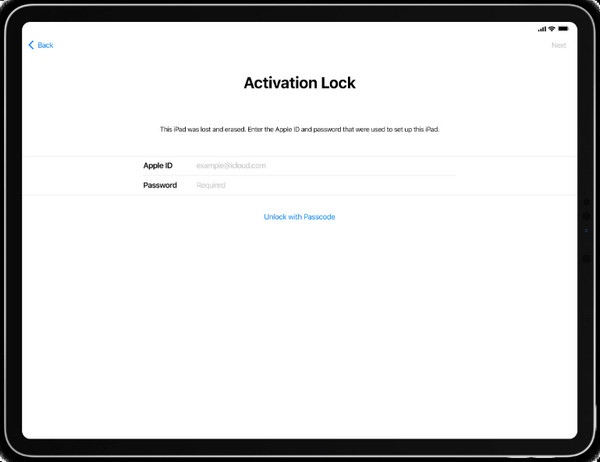
Generally, on-device removal offers the fastest and most convenient Activation Lock removing procedure. After restarting your iPad, you have probably seen the Activation Lock screen that’s preventing you from setting up the device. But if you notice, it also provides text fields where you can enter your Apple credentials. That's because it is your primary key to getting through the Activation Lock. Once you follow correctly, the iPad will let you access it with ease.
Note the instructions below for iPad Activation Lock removal free on the device:
Step 1As mentioned, text fields are available on the screen, so input your Apple ID and password into their designated places.
Step 2Next, ensure the credentials are correct before entering. The iPad will finally let you set it up, then you can use it afterward.
Method 2. Remote Removal (iCloud)
Meanwhile, a web removal process for your iPad’s Activation Lock would be perfect if you prefer a remote solution. You may already be aware of the iCloud website, but do you know about its Find My page? If not, this is the right time to learn about this service, offering various management options for your device remotely. Among them is the selection to erase the iPad. If you erase the device through this specific page, Activation Lock will immediately be removed.
Follow the operation below for iPad Activation Lock removal on the web, iCloud.com:
Step 1On your trusted web browser, enter iCloud.com and fill out the text fields with your Apple credentials to log in. Then, proceed to the Find My page.
Step 2The All Devices tab at the top will show you your device list, so click it and pick the iPad. On the succeeding page, hit Erase iPad for the Activation Lock removal.
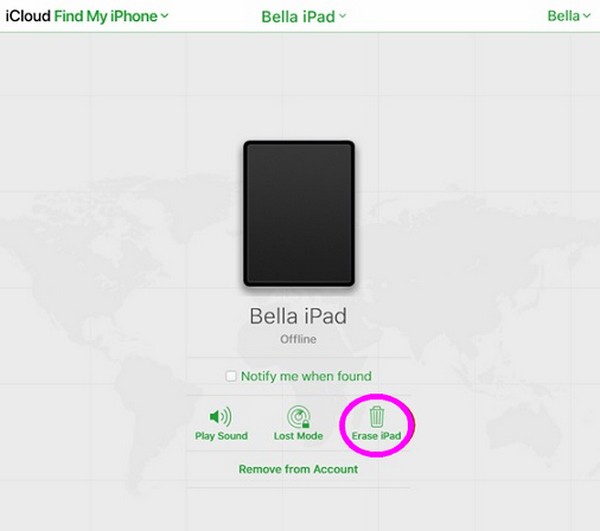
You can also perform the process on the app, as they have the same options.
Method 3. Reset Apple ID Password
Do you not remember your Apple account password? Unfortunately, many users get stuck in the Activation Lock screen because they fail to remember their credentials, especially the password. In this case, your best choice would be to reset Apple ID password through the iForgot website. Like the previous solutions, it is officially developed by Apple to help users handle forgotten passwords. Just note that this takes longer than the other processes.
Obey the procedure below for Activation Lock iPad removal through a password reset:
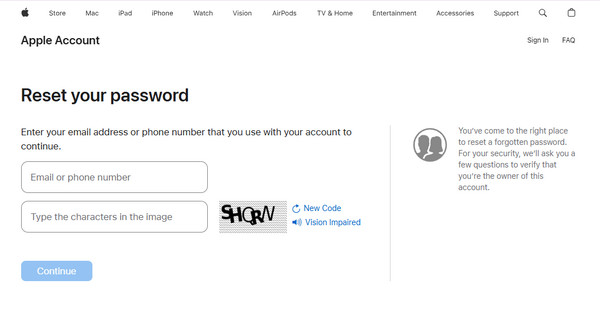
Step 1Enter iForgot’s official webpage and quickly choose the Reset Password tab below.
Step 2After that, fill out the necessary information on the page before hitting Continue. Later, you will receive the email containing the appropriate actions for your concern. Follow them.
Method 4. Request Online Request
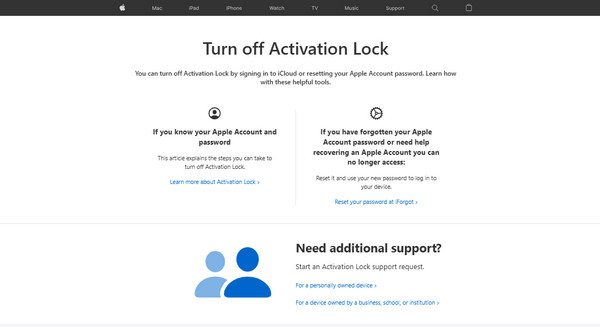
You can also access the al-support.apple.com website to request support from Apple’s customer service online. Simply choose the relevant prompts from the page that are suitable for your iPad’s situation. Then, follow along their provided on-screen guides to reach their customer service, and they will be the ones to tell you the appropriate action to take.
Part 3. What to Do When You Aren't the Original Owner
On the other hand, you may have purchased a second-hand iPad and got stuck on the Activation Lock screen because it requires the previous owner’s credentials. Fortunately, you can still do the options below to overcome this.
Option 1. Contact the Previous Owner
The initial action you should take is to contact your iPad’s previous owner. You can simply communicate with them through the phone number, social media account, or other contact information you previously used to transact with them. Afterward, inform them of your device’s situation, and they will be able to handle it remotely using the iCloud website. Just ensure you will coordinate accordingly for a smooth Activation Lock removal process.
Option 2. Contact Apple
Sadly, some users can no longer reach the original owner after getting the iPad for various reasons. Perhaps the seller isn’t the previous owner and was only told to put the device on sale. If this is the case, you could try relying on Apple’s customer service instead. For concerns regarding your iPad’s Activation Lock, simply head to the al-support.apple.com site. Then, be guided by the on-screen instructions and prompts to contact Apple and ask for their help.
Part 4. Bypass iPad Activation Lock with FoneLab iOS Unlocker
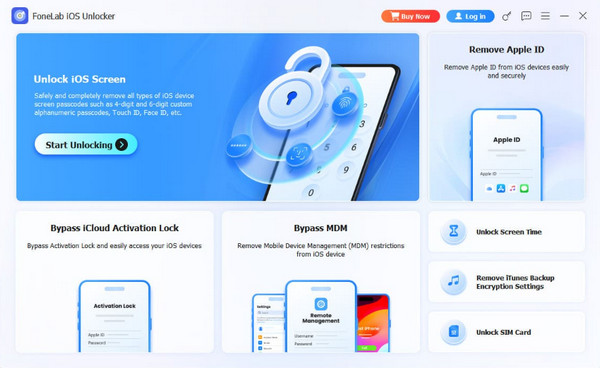
Learning FoneLab iOS Unlocker is also highly-recommended. This program is a professional approach to bypass or remove Activation Lock without previous owner, and you don’t even have to worry about your lack of knowledge regarding the issue. Despite being a beginner, we ensure you will be able to handle the lock removal effortlessly, thanks to this tool’s intuitive design. Apart from that, it doesn’t only cater to iPad users. If you encounter this concern on your iPhone or iPod Touch as well, FoneLab iOS Unlocker will be ready to help anytime. Besides, this program can handle more locks on your device, such as Unlock iOS Screen, Bypass MDM, Bypass iCloud Activation Lock, Remove Apple ID, and more, in case you need them later.

FoneLab Helps you unlock iPhone screen, Removes Apple ID or its password, Remove screen time or restriction passcode in seconds.
- Helps you unlock iPhone screen.
- Removes Apple ID or its password.
- Remove screen time or restriction passcode in seconds.
Recognize the untroubled task below as a pattern of iPad Activation Lock removal with FoneLab iOS Unlocker:
Step 1Acquire the FoneLab iOS Unlocker installer and launch the saved file when it appears in your Downloads folder. As the prompts suggest, you must set up the program, and when ready, select Start.
Step 2Pick Bypass iCloud Activation Lock on the lower left of the key interface. When asked, let a Lightning cable help you link your iPad to the program. Then, follow the prompts shown on the screen until your device becomes free from the Activation Lock.
Part 5. FAQs about iPad Activation Lock Removal
Can Apple remove Activation Lock without proof of purchase?
Unfortunately, most likely Apple won’t. Whether you’re requesting a removal online or from their physical store, a proof of purchase is necessary to validate your ownership of the iPad.
Can third-party tools be trusted to remove my iPad’s Activation Lock?
It depends on the tool. Most tools are effective, but you must ensure you choose a reliable one, like FoneLab iOS Unlocker.
Removing the Activation Lock on the iPad is painless with the owner’s credentials, but even without it, don’t hesitate to trust other alternatives like FoneLab iOS Unlocker, as they also deliver excellent performance and results.



