
 iPhone Data Recovery
 iOS System Recovery
 iOS Data Backup & Restore
 iOS Unlocker
 iPhone Password Manager
 Location Changer
 Android Data Recovery
 Broken Android Data Extraction
 Android Data Backup & Restore
 Android Unlocker
 FoneTrans for iOS
 iPhone Data Eraser
 iPhone Cleaner
 HEIC Converter
 HyperTrans
 WhatsApp Transfer for iOS
 Mac Sweep
 Data Retriever
 Mac Data Retriever
 Video Converter Ultimate
 Screen Recorder
 Phone Mirror
- Part 1. What Does iCloud Activation Lock Do
- Part 2. iCloud Activation Lock Removal Free with Password
- Part 3. iCloud Activation Lock Removal Using iCloud Find My
- Part 4. iCloud Activation Lock Removal through FoneLab iOS Unlocker
- Part 5. Comparison of iCloud Activation Lock Removal Methods
- Part 6. FAQs about iCloud Activation Lock Removal
- Unlock Apple ID
- Bypass iCloud Activation Lock
- Doulci iCloud Unlocking Tool
- Factory Unlock iPhone
- Bypass iPhone Passcode
- Reset iPhone Passcode
- Unlock Apple ID
- Unlock iPhone 8/8Plus
- iCloud Lock Removal
- iCloud Unlock Deluxe
- iPhone Lock Screen
- Unlock iPad
- Unlock iPhone SE
- Unlock Tmobile iPhone
- Remove Apple ID Password
3 Proven and Tested Techniques for iCloud Lock Removal
 Updated by
 Hi! I factory reset my iPhone and noticed that the Apple ID is being asked for. I tried to restart my iPhone, and the screen prompted again. Can you help me with this issue? Thank you so much!
The iCloud Activation Lock is the feature you encountered on your iPhone. It asks for the associated Apple ID from the iPhone before it performs a factory reset. Perform the iCloud Activation Lock removal in this post! The 3 best methods are included for your benefit. Continue browsing to know them.


Guide List
- Part 1. What Does iCloud Activation Lock Do
- Part 2. iCloud Activation Lock Removal Free with Password
- Part 3. iCloud Activation Lock Removal Using iCloud Find My
- Part 4. iCloud Activation Lock Removal through FoneLab iOS Unlocker
- Part 5. Comparison of iCloud Activation Lock Removal Methods
- Part 6. FAQs about iCloud Activation Lock Removal
Part 1. What Does iCloud Activation Lock Do
A factory reset is needed when the iPhone, iPad, or Mac faces a significant issue with its system. In this state, the mentioned Apple devices will be prone to unauthorized access. iCloud Activation Lock will secure your data and prevent the mentioned issue. The associated Apple ID from the mentioned Apple devices is needed. Without it, no one can access the devices.
It is convenient for users who know the account information. However, it will be a disaster for users who accidentally forget their Apple ID account credentials. Also, it is the same way for people who bought Apple devices with an activated iCloud Activation Lock.
Part 2. iCloud Activation Lock Removal Free with Password
Unlocking the iCloud Activation Lock is free. There is no hidden cost in unlocking this security feature. Additionally, you are not required to download any app or tool to remove it. You can unlock it using the Apple ID associated with your iPhone, iPad, and Mac. The unlocking procedure of iCloud Activation Lock is encountered when you set up the Apple device again.
You will see the Activation Lock screen during the mentioned process. You need to fill out the Apple ID and Password empty sections. Then, select the Next button at the top right to unlock iCloud Activation Lock on your iPhone, iPad, or Mac.
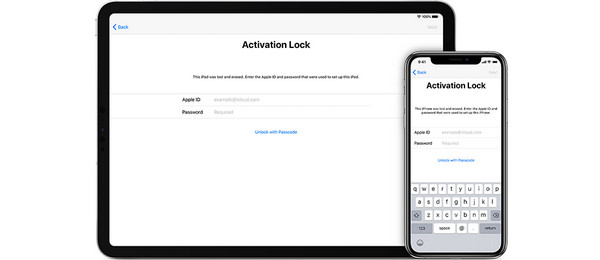
However, the iCloud Activation Lock cannot be removed if you forgot your Apple ID credentials. Resetting the Apple ID account is the primary solution for this issue.
Part 3. iCloud Activation Lock Removal Using iCloud Find My
Find My is a free service that is offered by Apple to help you track your Apple devices when misplaced, stolen, or lost. It can determine the real-time location of the devices using GPS location and an internet connection. Like the previous method, you can use it for free because it is released by Apple for its users. The good thing about it is that it can be used to remove the iCloud Activation Lock on your iPhone, iPad, and Mac.
Some Apple devices that have been locked with iCloud Activation Lock are bought second-hand. If you do not have the Apple ID of the previous owner, you can ask them to remove it using Find My. It will remove Apple ID from iPhone, iPad, and Mac. The steps below will help you.
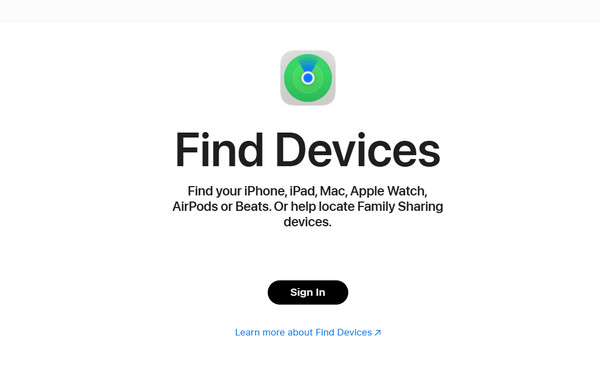
Step 1Go to the main website that iCloud Find My offers. Then, click the Sign In button at the bottom of the main interface. Enter the Apple ID account associated with the iCloud-locked iPhone, Mac, or iPad. Then, click the Continue button to sign in to the account.
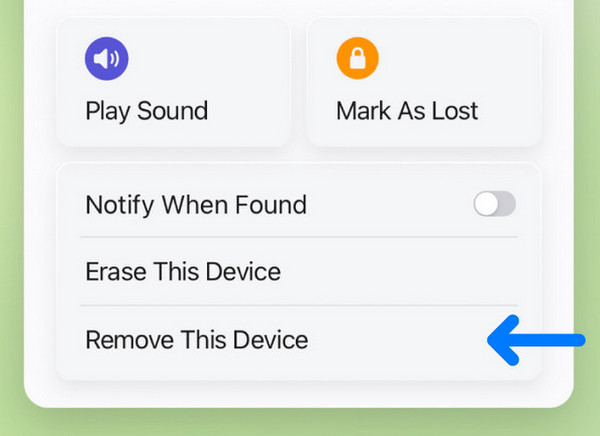
Step 2The digital map screen will show you the current location of the devices associated with the Apple ID. Then, go to the All Devices section at the top left of the screen. The list of devices associated with the Apple ID will appear. Select the iPhone, iPad, or Mac name from the list. Later, select the Remove This Device button. Authenticate the process and click the Continue button to confirm the process.
Part 4. iCloud Activation Lock Removal through FoneLab iOS Unlocker
FoneLab iOS Unlocker is different from the previous methods to unlock iCloud-locked iPhone and iPad. It does not need an internet connection for the unlocking process. A USB cable is enough. The bypass outcome of this tool for the iCloud Activation Lock is permanent. Also, the tool has a simple interface that will be beneficial for novices. Professionals can use the tool, too!

FoneLab Helps you unlock iPhone screen, Removes Apple ID or its password, Remove screen time or restriction passcode in seconds.
- Helps you unlock iPhone screen.
- Removes Apple ID or its password.
- Remove screen time or restriction passcode in seconds.
iCloud Activation Lock is not the only security feature that can be bypassed. Apple ID, Screen Time, MDM, iTunes backup encryption settings, screen lock, and SIM lock can also be bypassed using the tool. Use the steps below to know how to use it.
Step 1Download the tool. Then, click the Free Download button available on the screen. Locate the downloaded file of FoneLab iOS Unlocker. Later, install and open the tool on your computer to start the procedure.

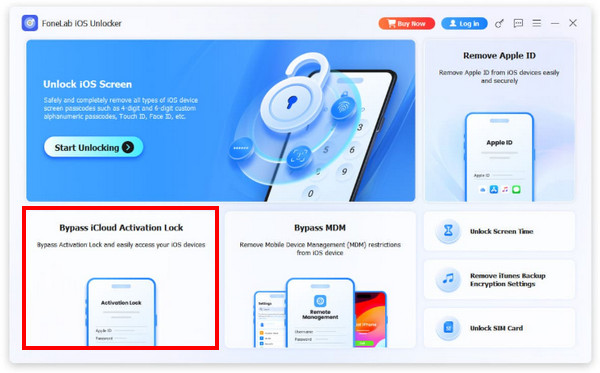
Step 2The features of the tool will appear on the first interface. Please select the Bypass iCloud Activation Lock feature at the bottom left of the screen. Then, plug your iPhone or iPad into your computer. Please utilize a working USB cable. Then, click the Start Now button at the bottom to proceed with the process.
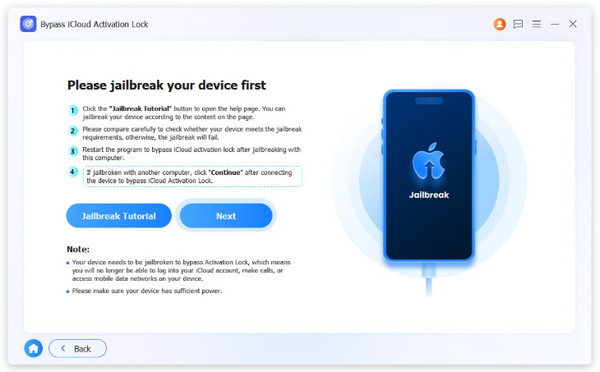
Step 3The tool will ask you to jailbreak your iPhone or iPad. Please click the Jailbreak Tutorial button. Then, click the Next button. The tool will begin bypassing your iPhone or iPad. Finally, please click the Finish button on the left before you unplug your iPhone or iPad from the computer.
Part 5. Comparison of iCloud Activation Lock Removal Methods
| Method | Connection Needed | Required Apple ID | Other Features |
| Use Associated Account | Internet Connection. | Yes. | None. |
| iCloud Find My | Internet Connection. | Yes. | Track Apple devices' real-time location. |
| FoneLab iOS Unlocker | USB Connection. | No. | Bypass MDM, remove Screen Time, unlock forgotten iPhone and iPad screen lock, and more. |
Part 6. FAQs about iCloud Activation Lock Removal
What happens when Apple removes the Activation Lock?
After unlocking the iCloud Activation Lock, you can now set up the iPhone again as new. You can add the new Apple ID account you prefer to use.
What do I do if I forgot my Apple ID and password for Activation Lock?
You need to reset the Apple ID password to regain access to your account. In this case, you can remove the iCloud Activation Lock. If not, bypassing the mentioned security feature is one of the best options. FoneLab iOS Unlocker is the best tool to use. Lastly, you can ask Apple to remove it for you. However, the proof of purchase must be presented.
The iCloud Activation Lock removal is indeed easy if you know the account credentials. If the account is unknown, you can use FoneLab iOS Unlocker. This third-party tool can permanently bypass the mentioned security feature. Also, it can be used to remove your forgotten Apple ID account on iPhone or iPad, including the MDM profile, Screen Time, and more. Download it if you want to know more about the tool!



