
 iPhone Data Recovery
 iOS System Recovery
 iOS Data Backup & Restore
 iOS Unlocker
 iPhone Password Manager
 Location Changer
 Android Data Recovery
 Broken Android Data Extraction
 Android Data Backup & Restore
 Android Unlocker
 FoneTrans for iOS
 iPhone Data Eraser
 iPhone Cleaner
 HEIC Converter
 HyperTrans
 WhatsApp Transfer for iOS
 Mac Sweep
 Data Retriever
 Mac Data Retriever
 Video Converter Ultimate
 Screen Recorder
 Phone Mirror
- Unlock Apple ID
- Bypass iCloud Activation Lock
- Doulci iCloud Unlocking Tool
- Factory Unlock iPhone
- Bypass iPhone Passcode
- Reset iPhone Passcode
- Unlock Apple ID
- Unlock iPhone 8/8Plus
- iCloud Lock Removal
- iCloud Unlock Deluxe
- iPhone Lock Screen
- Unlock iPad
- Unlock iPhone SE
- Unlock Tmobile iPhone
- Remove Apple ID Password
The Hard Truth About Free iCloud Unlock Tools
 Updated by
 You just scored a great deal on a used iPhone, or maybe you're trying to repurpose company devices after an employee departure. Then comes the dreaded screen: iPhone is locked to owner. An Apple ID and password that aren't yours. That's the iCloud Activation Lock—Apple's anti-theft feature that turns a perfect piece of hardware into an expensive brick when you don't have the original credentials.
I've been there twice: once with a second-hand iPad for my nephew, and again helping a small business recover phones after a messy employee exit. The promise of a free iCloud unlock tool is everywhere online. But after spending hours down that rabbit hole, here's the honest truth: a completely free, reliable, and safe method that works on modern iOS simply doesn't exist. Most so-called free tools are outdated, scams, or demos that quit halfway.
This isn't about selling you magic. It's a realistic walkthrough of the paths you actually have—based on actual experience. We'll cover the official routes you should try first, then look at software options, including why one specific tool stands apart from the unreliable crowd.

Guide List
Part 1: The Official Road (Try These Before Any Free iCloud Unlock Tool)
Before downloading any third-party software, exhaust the official options. They're the only truly free methods—but they come with major conditions.
1. Using Find My (If You Can Reach the Original Owner or You are the Owner)
This is the dream scenario. If you bought the device from someone still reachable, or it's a company device and you can track down the previous employee, ask them to:
Step 1Log into iCloud.com/find on any browser.
Step 2Select the device from All Devices.
Step 3Click Erase iPhone to wipe it remotely.
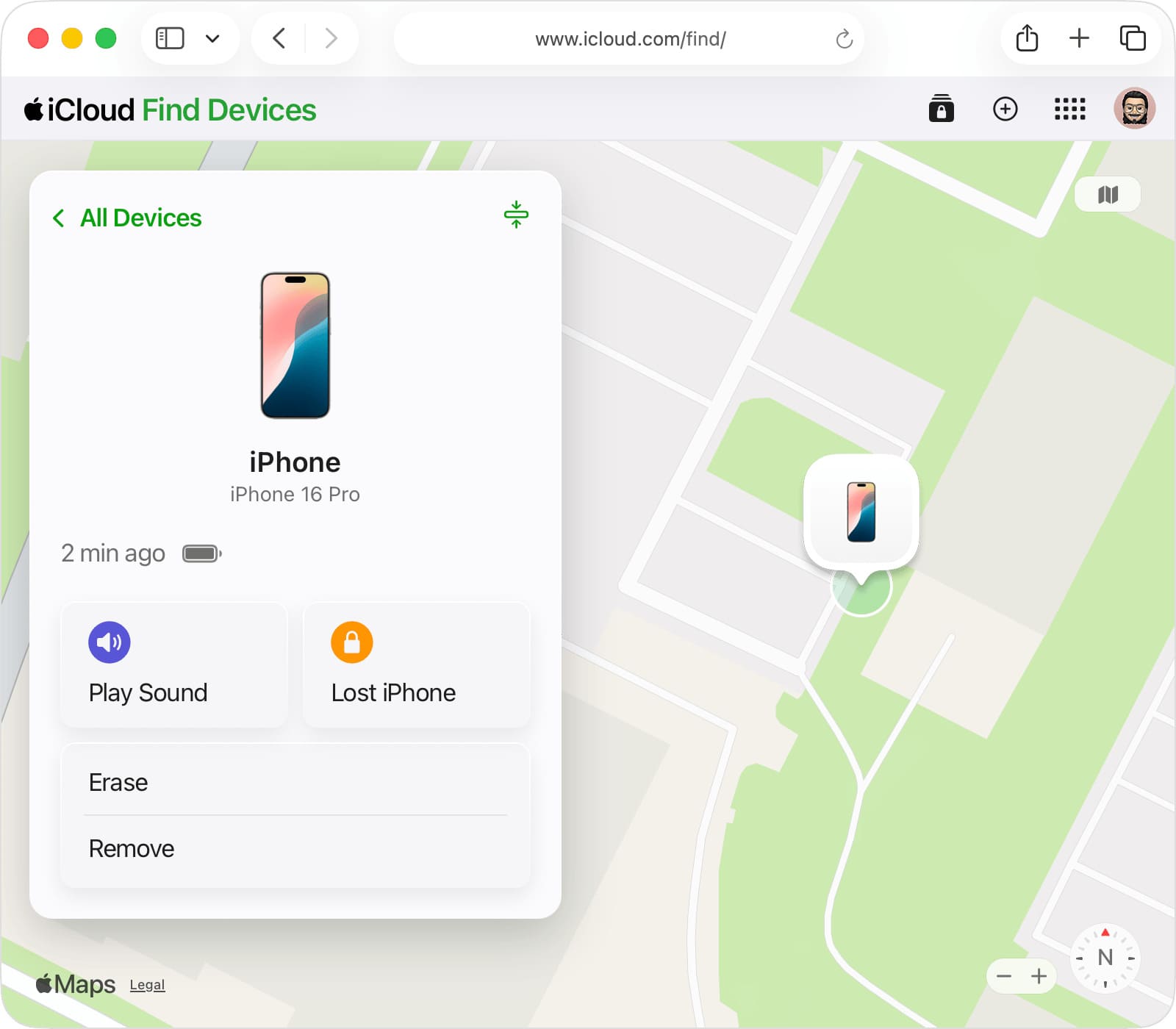
Step 4Most critically: click Remove from Account.
Once that's done, restart the device and set it up as new. This is the cleanest method by far.
2. Contacting Apple Support (Your Only Other Free Path)
This is legitimate but requires proof. Apple won't just unlock phones for anyone.
Step 1Gather your original proof of purchase—a receipt showing the device model and IMEI number. A handwritten note from a Craigslist seller won't work.
Step 2Schedule an Apple Store appointment or start a support call.
Step 3Explain the situation and provide your proof. If accepted, their engineering team can remove the lock. This takes several days.
My experience: I've only seen this work for people who bought directly from Apple or an authorized carrier with proper paperwork.
Part 2: FoneLab iOS Unlocker – The Tool That Actually Delivers
When official routes fail—which they often do with private-seller purchases—you're looking at software. After testing several so-called free iCloud unlock tools, FoneLab iOS Unlocker is the most reliable I've found. It's not free, but it does exactly what it claims without sketchy behavior.

FoneLab Helps you unlock iPhone screen, Removes Apple ID or its password, Remove screen time or restriction passcode in seconds.
- Helps you unlock iPhone screen.
- Removes Apple ID or its password.
- Remove screen time or restriction passcode in seconds.
What Makes It Different from "Free" Tools?
- No "brute force" guessing: Unlike free tools that attempt password guessing (which can permanently lock your device), FoneLab uses a vulnerability to bypass the lock, letting you set up the phone fresh.
- Clean interface: No maze of ads or surveys leading nowhere. Download, launch, and choose "Bypass iCloud Activation Lock."
- Focused purpose: It removes the lock so you can use the phone. No fake promises about recovering the previous owner's data.
- Actually works on current iOS: Most free iCloud unlock tools haven't been updated in years. FoneLab keeps pace with Apple's updates.
How It Worked for Me:
When I used it for that company iPad, the process was refreshingly straightforward:
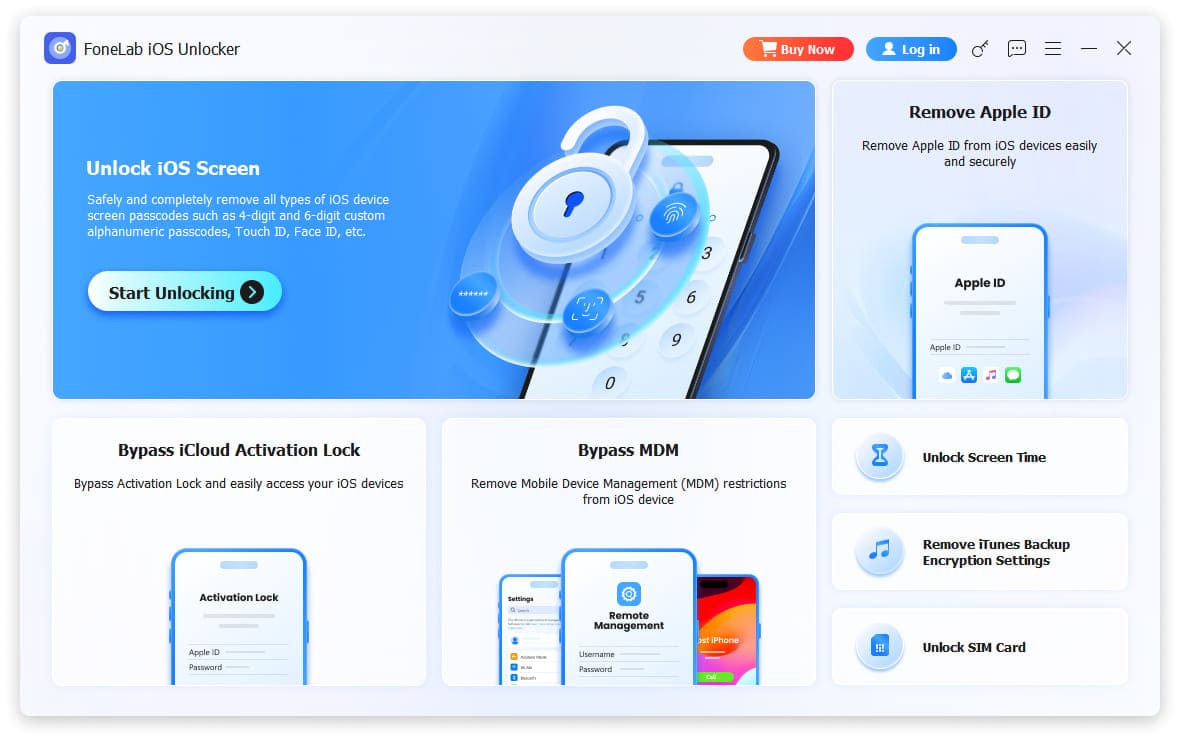
Step 1I downloaded and installed the software on my Windows laptop, then selected Bypass iCloud Activation Lock from the main menu. (Note: This is different from the Remove Apple ID option—make sure you pick the right one for Activation Lock.)
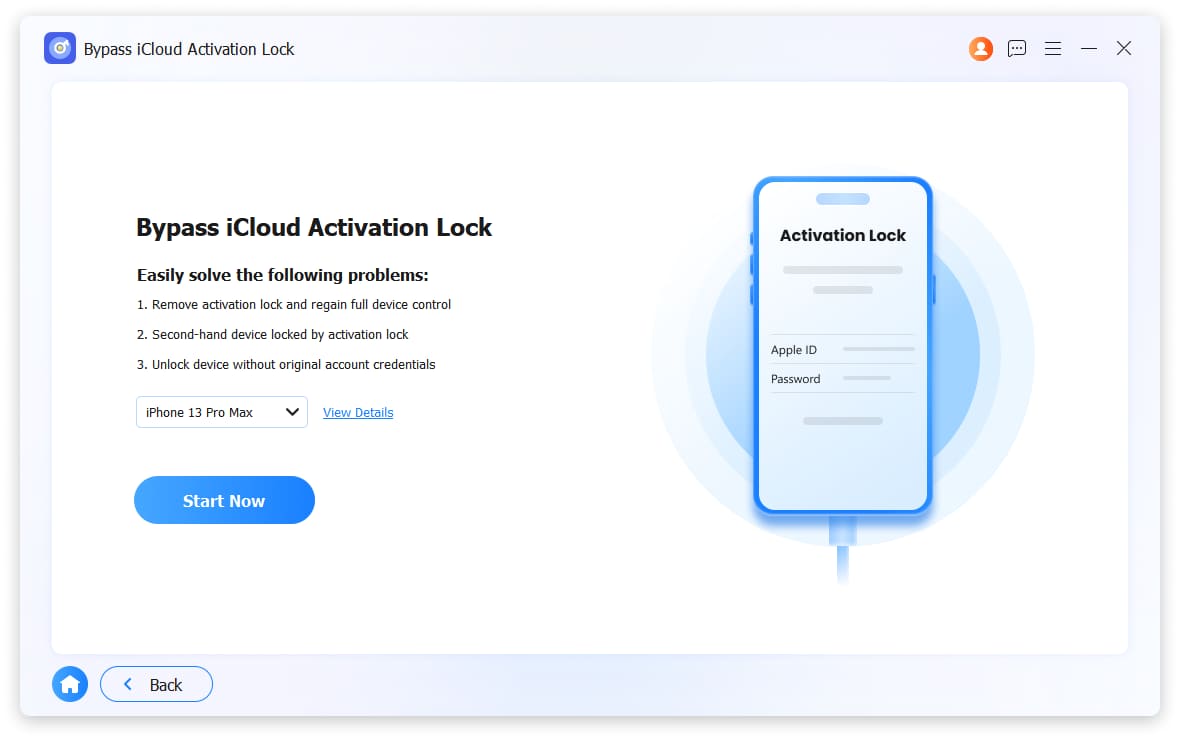
Step 2I connected the locked iPad via USB. The software recognized it immediately and displayed the device details—model, iOS version, and IMEI number—so I could confirm it was the right device. I clicked Start to begin the bypass process.
Step 3The software informed me it would need to jailbreak the iPad to complete the bypass. I clicked the Jailbreak Tutorial button and followed the steps carefully. After the jailbreak finished, I restarted the program, reconnected the iPad, and repeated the initial steps.
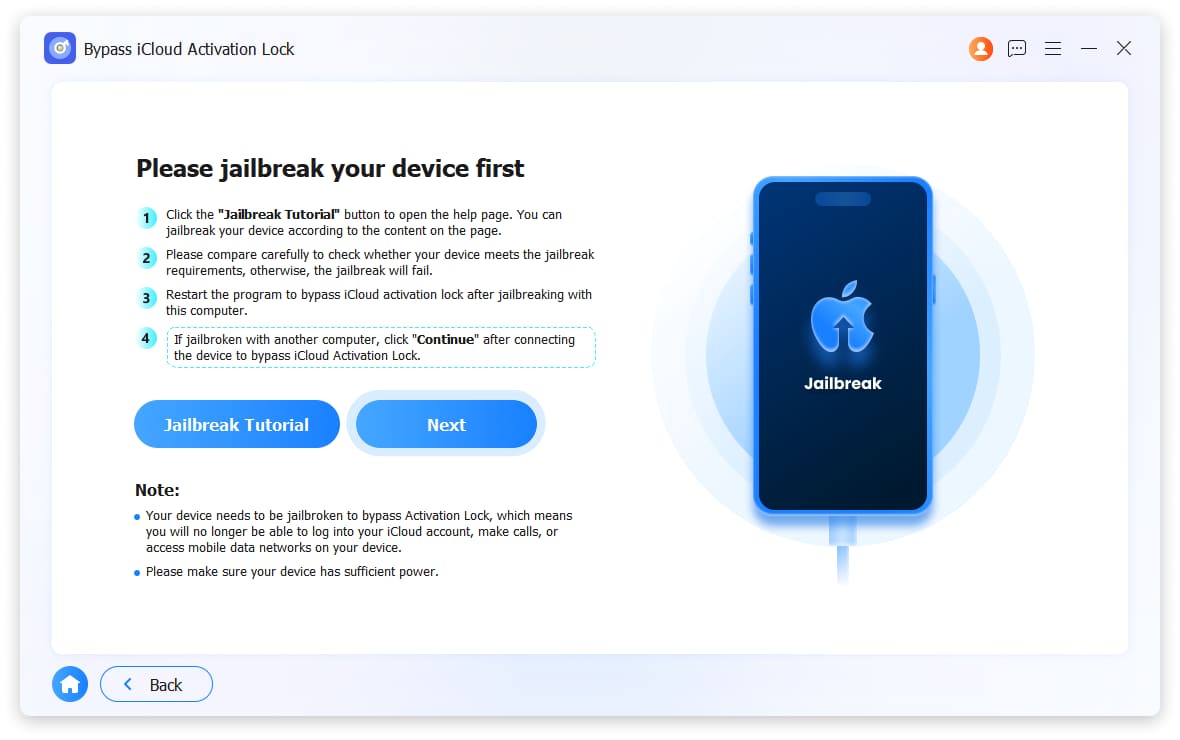
Step 4This time, with the device jailbroken, I clicked Next and the software began bypassing the iCloud Activation Lock. About 10-15 minutes later, the iPad restarted and I was greeted by the "Hello" setup screen—completely free from the previous owner's Apple ID. I could finally set it up for its new user with a fresh Apple ID.
FoneLab Helps you unlock iPhone screen, Removes Apple ID or its password, Remove screen time or restriction passcode in seconds.
- Helps you unlock iPhone screen.
- Removes Apple ID or its password.
- Remove screen time or restriction passcode in seconds.
Part 3: Doulci Activator - What You Should Know
Since we're surveying the landscape of free iCloud unlock tools, Doulci Activator deserves a look.
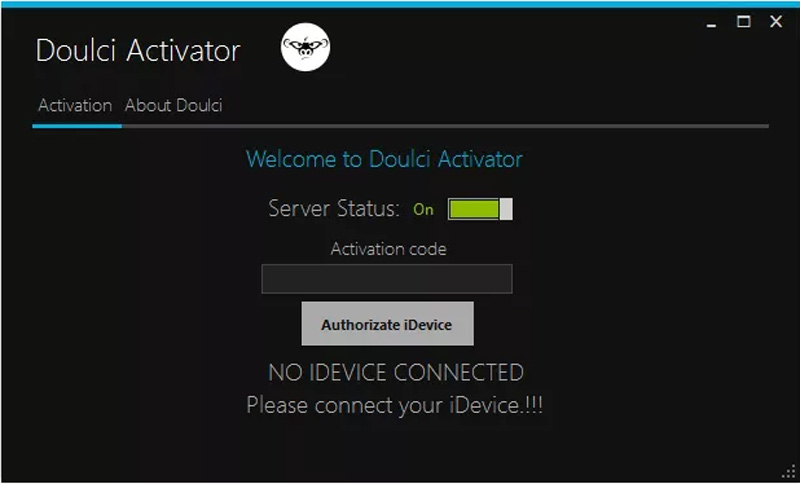
What Doulci Activator Claims:
- Bypasses iCloud activation lock on various iOS devices
- Supports a range of iOS versions
- Offers additional unlocking features beyond just iCloud
- Markets itself as a free iCloud unlock tool with advanced capabilities
The Reality Check:
- Update status: The tool shows irregular updates. Apple constantly patches security exploits—a free iCloud unlock tool that isn't regularly updated becomes useless against newer iOS versions.
- The ad experience: Users consistently report intrusive advertising during use. This isn't just annoying—it can lead to click-jacking or sketchy download sites.
- Mixed success rates: Forum discussions show wildly varying results. Some users report success on older devices; others report that the tool simply doesn't work on their newer iOS version.
- Support limitations: Getting help when something goes wrong appears difficult based on user complaints.
My take: Doulci Activator might work if you have an older device and patience for ads and uncertainty. But for a reliable solution that works with current iOS, it feels like a gamble—which is the problem with most free iCloud unlock tools.
FoneLab Helps you unlock iPhone screen, Removes Apple ID or its password, Remove screen time or restriction passcode in seconds.
- Helps you unlock iPhone screen.
- Removes Apple ID or its password.
- Remove screen time or restriction passcode in seconds.
Part 4: FAQs about Free iCloud Unlock Tool
Does a Jailbreak Remove iCloud Activation Lock?
No. Though jailbreak is also a way to bypass the iPhone restrictions, it does not remove the iCloud activation lock. You should also search for the related app or even use the above-mentioned free iCloud unlockers to bypass the iCloud activation lock.
Should I Use Free iCloud Unlock Tool to Remove SSN or ZIP?
No. If you have purchased a new AT&T iPhone off eBay, you might find the iPhone is stuck for Zip Code and the last 4-digit of SSN of the phone. Get the 15-digit IMEI of your iPhone and the phone number tied to the iPhone when it was purchased. The server of AT&T takes about 7 business days to remove the SSN or ZIP activation.
How to Identify iCloud-Locked iPhone?
The iCloud activation locked iPhone requires you to input user name, or Apple ID and password. If the original owner has used the Find My iPhone feature to wipe out the data within the iPhone remotely, it will show the status as lost or erased. If you have already purchased the iPhone, you can turn to the mentioned iCloud unlock tool or Apple team for help.
Dealing with an iCloud-locked device is genuinely frustrating. The free iCloud unlock tool fantasy is just that—a fantasy. Your real choices are:
- The "people" route: Track down the previous owner for a remote wipe
- The "paperwork" route: Prove ownership to Apple
- The "software" route: Use a reliable paid tool like FoneLab iOS Unlocker to bypass the lock cleanly
If you've exhausted options one and two, investing in a tool that's actively maintained, ad-free, and straightforward is—in my experience—the smartest way to turn your expensive brick back into a usable phone. The free iCloud unlock tools will waste your time; this one actually delivers.
FoneLab Helps you unlock iPhone screen, Removes Apple ID or its password, Remove screen time or restriction passcode in seconds.
- Helps you unlock iPhone screen.
- Removes Apple ID or its password.
- Remove screen time or restriction passcode in seconds.



