
 iPhone Data Recovery
 iOS System Recovery
 iOS Data Backup & Restore
 iOS Unlocker
 iPhone Password Manager
 Location Changer
 Android Data Recovery
 Broken Android Data Extraction
 Android Data Backup & Restore
 Android Unlocker
 FoneTrans for iOS
 iPhone Data Eraser
 iPhone Cleaner
 HEIC Converter
 HyperTrans
 WhatsApp Transfer for iOS
 Mac Sweep
 Data Retriever
 Mac Data Retriever
 Video Converter Ultimate
 Screen Recorder
 Phone Mirror
- Unlock Apple ID
- Bypass iCloud Activation Lock
- Doulci iCloud Unlocking Tool
- Factory Unlock iPhone
- Bypass iPhone Passcode
- Reset iPhone Passcode
- Unlock Apple ID
- Unlock iPhone 8/8Plus
- iCloud Lock Removal
- iCloud Unlock Deluxe
- iPhone Lock Screen
- Unlock iPad
- Unlock iPhone SE
- Unlock Tmobile iPhone
- Remove Apple ID Password
5 Best iPhone Password Cracker: Compare Risks & Choose Safely
 Updated by
 You're locked out of your iPhone. You've tried every passcode you can remember. Now you're searching for an "iPhone password cracker" — a tool that promises to get you back in.
But before you download anything, there are important things you need to know. Not all password crackers are created equal. Some come with serious risks, and in many cases, official Apple methods may already solve your problem.

Guide List
Part 1: What Is an iPhone Password Cracker
An "iPhone password cracker" is a tool designed to remove or bypass the screen lock on an iOS device. While these tools can be lifesavers when you're locked out, they come with important risks:
| Risk | What It Means |
|---|---|
| Data Loss | Most screen lock removal methods erase all data on the device. This is a security feature of iOS, not a tool limitation. |
| Temporary Bypass vs. Permanent Removal | Some tools "bypass" locks rather than removing them. The lock may reappear after a software update or factory reset. |
| Compatibility Issues | Not all tools work with the latest iOS versions or newer iPhone models. Success rates vary significantly. |
| Security & Privacy | Third-party tools require connecting your device to a computer. Choose reputable tools to avoid malware or data theft. |
| Warranty Impact | Using third-party unlocking tools may void any remaining warranty on your device. |
Best Practice: Always try official Apple methods first. If you must use a third-party tool, choose one with transparent success rates and clear data impact disclosures.

FoneLab Helps you unlock iPhone screen, Removes Apple ID or its password, Remove screen time or restriction passcode in seconds.
- Helps you unlock iPhone screen.
- Removes Apple ID or its password.
- Remove screen time or restriction passcode in seconds.
Part 2: Official Apple Methods – The Safe Baseline
Before using any third-party cracker, consider these official methods. They are free, Apple-supported, and carry no security risks.
Method 1: iCloud (Find My)
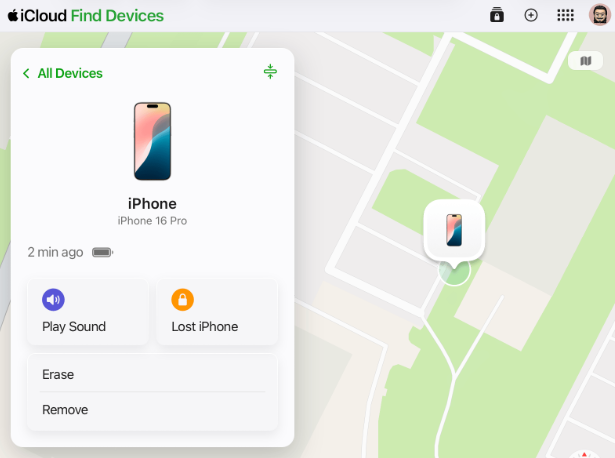
If your iPhone is linked to your Apple ID, you can erase iPhone using Find My iPhone:
- Go to https://icloud.com/find
- Sign in and select your locked iPhone
- Click Erase iPhone – this removes the passcode and erases all data
- Restore from backup after setup
Pros: Free, official, secure
Cons: Requires internet on the locked device; erases all data
Method 2: Recovery Mode (iTunes / Finder)
If you don't have iCloud access:
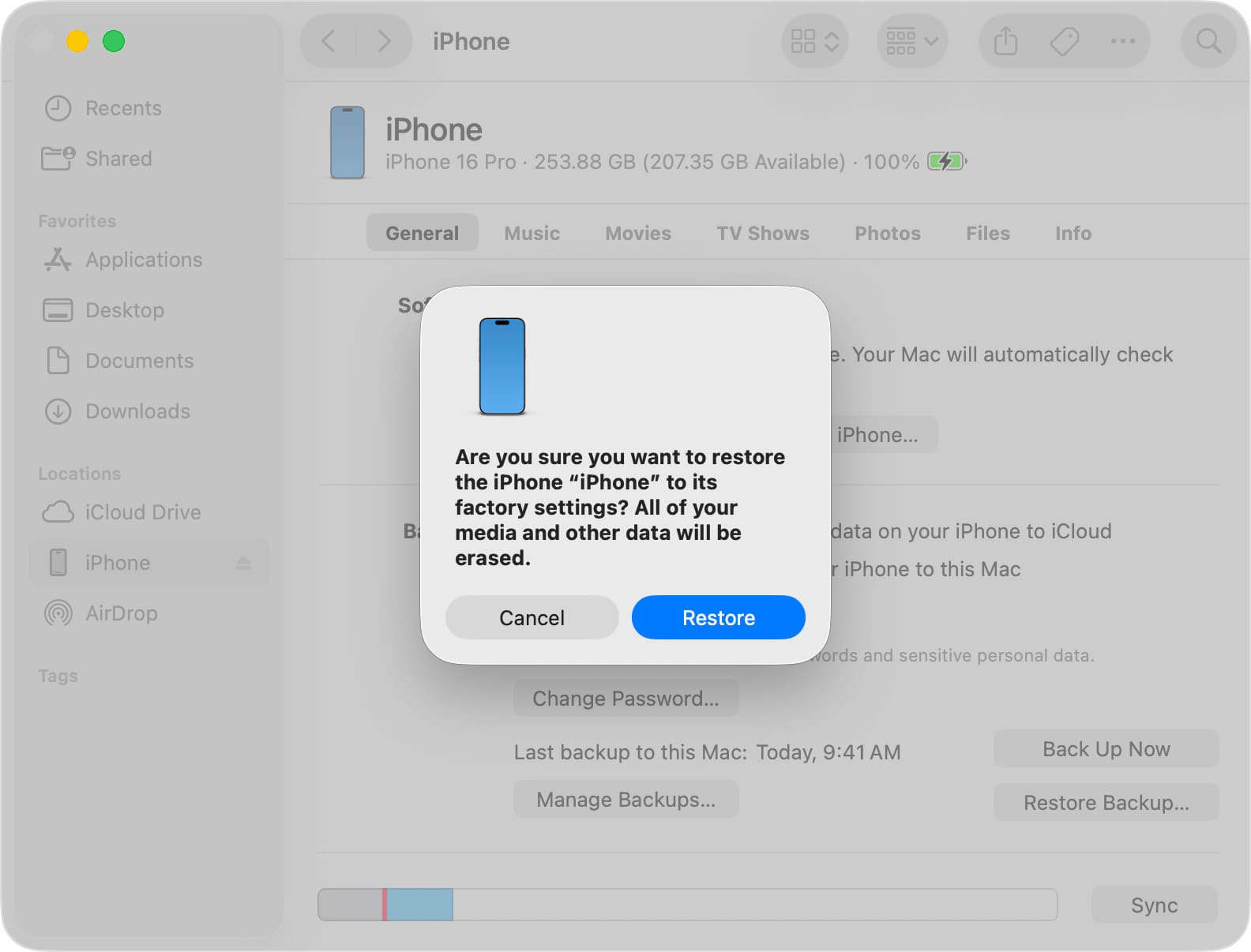
- Connect iPhone to a computer
- Put device into Recovery Mode (steps vary by model)
- Click Restore when prompted
Pros: Free, works without Apple ID, Apple-supported
Cons: Erases all data; may trigger Activation Lock if device was linked to someone else's Apple ID
Method 3: Apple Support
If you have proof of purchase:
- Contact Apple Support with your receipt
- They may assist with unlocking if you can verify ownership
Pros: Official, preserves data if device can be unlocked without erase
Cons: Requires proof of purchase; not guaranteed
Part 3: Comparison of iPhone Password Crackers
If official methods don't work for your situation, here's how the top tools compare.
FoneLab iOS Unlocker
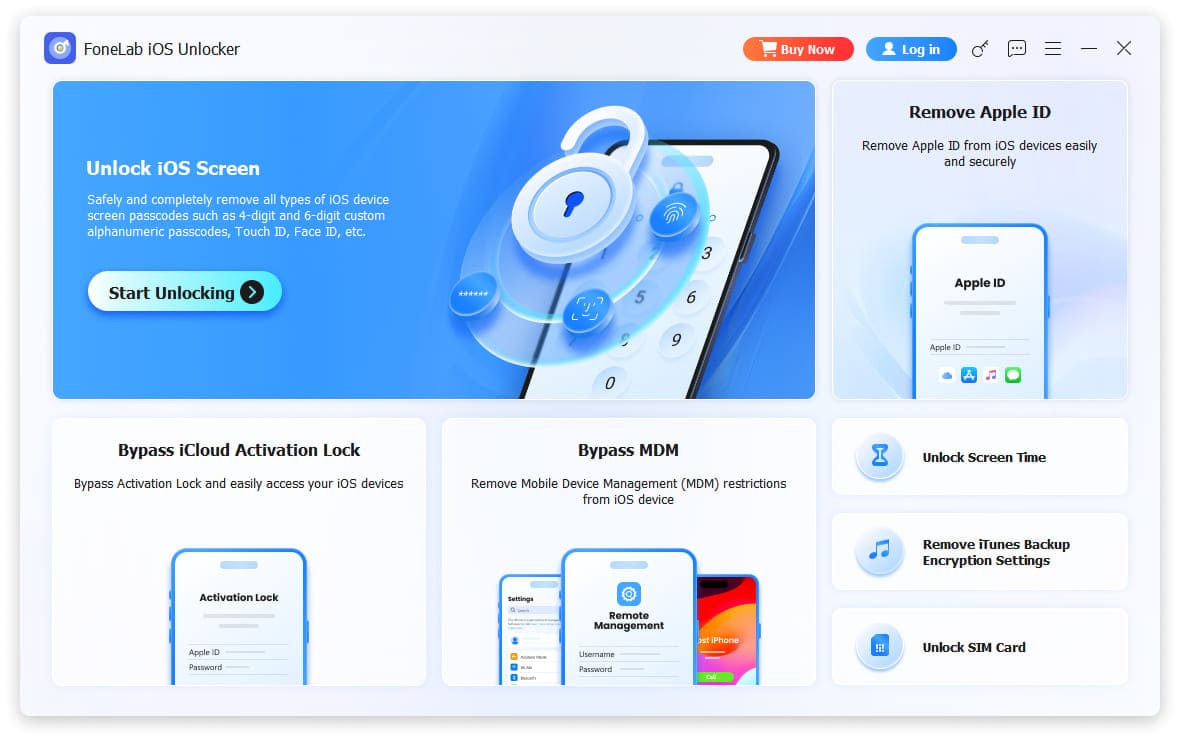
Overview: A comprehensive iOS unlocking tool that handles screen passcode, Apple ID, MDM, Screen Time, carrier lock, and iTunes backup passwords.
FoneLab Helps you unlock iPhone screen, Removes Apple ID or its password, Remove screen time or restriction passcode in seconds.
- Helps you unlock iPhone screen.
- Removes Apple ID or its password.
- Remove screen time or restriction passcode in seconds.
| Feature | Details |
|---|---|
| Supported Locks | Screen passcode, Apple ID, MDM, Screen Time, Carrier Lock, iTunes Backup |
| Data Impact | Screen unlock: erases data; Apple ID/MDM: bypass; Carrier lock: permanent; iTunes backup: recovery |
| iOS Compatibility | iOS 26, iOS 27 Beta and earlier; iPhone 4 through iPhone 17 |
| Ease of Use | Intuitive step-by-step guidance |
Pros:
- Handles multiple lock types in one tool
- Clear on-screen instructions
- Regular updates for new iOS versions
- Carrier lock removal is permanent
Cons:
- Screen passcode removal always erases data (same as Apple's official method)
- Activation lock bypass is temporary
Best For: Users who need a single, reliable tool for various lock scenarios
Mobistealth Passcode Cracker
Overview: A tool that combines passcode cracking with monitoring features.
| Feature | Details |
|---|---|
| Supported Locks | Screen passcode (limited) |
| Data Impact | Bypass – data retained |
| iOS Compatibility | Legacy iOS versions only |
| Ease of Use | Moderate |
Pros:
- Includes monitoring features beyond unlocking
Cons:
- Only works on older iOS versions (pre-iOS 12)
- Difficult to crack passcodes on modern iPhones
- No support for carrier lock, activation lock, or iTunes backup
Best For: Users with older devices on legacy iOS versions
Joyoshare iPasscode Unlocker
Overview: A dedicated screen passcode removal tool.
| Feature | Details |
|---|---|
| Supported Locks | Screen passcode only |
| Data Impact | Erases all data |
| iOS Compatibility | Latest iOS versions supported |
| Ease of Use | Simple 3-step process |
Pros:
- Simple, straightforward interface
- Supports 4-digit, 6-digit, Touch ID, and Face ID
Cons:
- Does not automatically detect devices – manual recovery mode entry required
- Installation can be complex on some computers
- Screen lock only – no Apple ID, MDM, carrier lock, or iTunes backup support
Best For: Users who only need screen passcode removal
Elcomsoft iOS Forensic Toolkit
Overview: A professional forensic tool used by law enforcement and digital forensics experts.
| Feature | Details |
|---|---|
| Supported Locks | Full file system extraction, password recovery |
| Data Impact | Extracts data without erasing |
| iOS Compatibility | Wide range of iOS versions |
| Ease of Use | Requires technical expertise |
Pros:
- Can extract passwords, encryption keys, and protected data
- Does not require jailbreak for many operations
- Can recover iTunes backup passwords
Cons:
- Very expensive – priced for institutional use
- Not designed for consumer passcode cracking
- Requires advanced technical knowledge
- No carrier lock removal or activation lock bypass
Best For: Forensic professionals, law enforcement – not for average users
Part 4: Comparison Summary – Which Tool Should You Choose
| Tool | Screen Passcode | Activation Lock | Carrier Lock | MDM Lock | iTunes Backup Password | Best For |
|---|---|---|---|---|---|---|
| Official Apple Methods | ✅ | ❌ | ❌ | ❌ | ❌ | Safe first attempt |
| FoneLab iOS Unlocker | ✅ | ✅ (bypass) | ✅ (permanent) | ✅ (bypass) | ✅ (recovery) | All-in-one solution |
| Mobistealth | ⚠️ (legacy only) | ❌ | ❌ | ❌ | ❌ | Older devices only |
| Joyoshare | ✅ | ❌ | ❌ | ❌ | ❌ | Screen lock only |
| Elcomsoft | ✅ (forensic) | ❌ | ❌ | ❌ | ✅ (extraction) | Professionals only |
Part 5: Why FoneLab iOS Unlocker Stands Out
After comparing the options, FoneLab iOS Unlocker offers the most balanced combination of compatibility, ease of use, and feature coverage for most users.
FoneLab Helps you unlock iPhone screen, Removes Apple ID or its password, Remove screen time or restriction passcode in seconds.
- Helps you unlock iPhone screen.
- Removes Apple ID or its password.
- Remove screen time or restriction passcode in seconds.
Key Advantages:
- One Tool for Multiple Locks
Unlike Joyoshare (screen only) or Mobistealth (legacy only), FoneLab handles screen passcode, Apple ID, MDM, Screen Time, carrier lock, and iTunes backup passwords in a single interface. - Permanent Carrier Lock Removal
While activation lock and MDM are bypassed, carrier lock removal is permanent – once unlocked, your iPhone can use any SIM card worldwide. - Clear User Experience
The interface guides you step-by-step with on-screen instructions – no need to guess whether your device is detected or which mode to use. - Regular Updates
FoneLab consistently updates for the latest iOS versions (including iOS 26, iOS 27 Beta) and new iPhone models. - Transparent About Data Impact
The tool clearly states when data will be erased versus when a bypass is temporary – no surprises. - Beginner-Friendly
Unlike Elcomsoft (which requires forensic expertise), FoneLab is designed for everyday users who just want to regain access to their own device.
When to Choose FoneLab:
- You've tried official Apple methods and they didn't work for your situation
- You need a tool that can handle more than just screen passcode (e.g., MDM from a used corporate device, carrier lock from a network-locked phone)
- You want to recover an iTunes backup password to access your old backups
- You want clear instructions and don't want to troubleshoot connection issues
- You're willing to accept that screen passcode removal will erase data (same as Apple's own method)
Part 6: FAQs of iPhone Password Cracker
1. Is it legal to use an iPhone password cracker?
In depends. It is legal to crack your own locked iPhone if forgot your password or lost your iPhone. But it is illegal to hack the iPhone passwords of others with the iPhone password cracker.
2. Can I crack an iPhone without a password via Recovery mode?
Yes. Different Apple models need to do different operations to enter into the Recovery mode. Then connect your iPhone to a computer via a lightning USB cable and a window will pop up. Just choose the Restore button to restore your iPhone, and then it will be rested to the factory settings with the disabled screen lock.
3. What happens when I enter the wrong password for my iPhone?
If you entered 6 wrong attempts in a series, it will lock an iPhone and be disabled for 1 minute. When you still enter a wrong screen lock password, your iPhone will be disabled for 5 minutes. Over 10 wrong attempts, iPhone will be disabled until it is connected to iTunes or use an iPhone password cracker.
FoneLab Helps you unlock iPhone screen, Removes Apple ID or its password, Remove screen time or restriction passcode in seconds.
- Helps you unlock iPhone screen.
- Removes Apple ID or its password.
- Remove screen time or restriction passcode in seconds.
Conclusion
When you're locked out of your iPhone, you have options. Start with Apple's official methods – they're free, safe, and often sufficient.
If official methods don't work for your situation, third-party password crackers can help. Among the options:
- FoneLab iOS Unlocker offers the most comprehensive feature set – handling screen passcode, activation lock, carrier lock, MDM lock, and iTunes backup passwords in one tool. It's the ideal choice for users who want an all-in-one solution.
- Joyoshare is a solid choice if you only need screen passcode removal.
- Mobistealth is only suitable for older devices on legacy iOS versions.
- Elcomsoft is for forensic professionals, not average consumers.
Remember: Screen passcode removal will erase all data – this is unavoidable and applies to both Apple's official method and all third-party tools. Regular backups are your best protection.



