
 iPhone Data Recovery
 iOS System Recovery
 iOS Data Backup & Restore
 iOS Unlocker
 iPhone Password Manager
 Location Changer
 Android Data Recovery
 Broken Android Data Extraction
 Android Data Backup & Restore
 Android Unlocker
 FoneTrans for iOS
 iPhone Data Eraser
 iPhone Cleaner
 HEIC Converter
 HyperTrans
 WhatsApp Transfer for iOS
 Mac Sweep
 Data Retriever
 Mac Data Retriever
 Video Converter Ultimate
 Screen Recorder
 Phone Mirror
- Unlock Apple ID
- Bypass iCloud Activation Lock
- Doulci iCloud Unlocking Tool
- Factory Unlock iPhone
- Bypass iPhone Passcode
- Reset iPhone Passcode
- Unlock Apple ID
- Unlock iPhone 8/8Plus
- iCloud Lock Removal
- iCloud Unlock Deluxe
- iPhone Lock Screen
- Unlock iPad
- Unlock iPhone SE
- Unlock Tmobile iPhone
- Remove Apple ID Password
How to Bypass iPhone Activation Lock without Jailbreak [Safe & Easy]
 Updated by
 Let me tell you about the time I almost threw an iPhone against the wall.
I’d just bought a used iPhone 12 from a guy on Facebook Marketplace. Great price, looked mint, everything seemed fine. I got home, wiped it to start fresh, and boom – Activation Lock. Someone else’s Apple ID staring back at me. The seller? Ghosted. Blocked me the second I messaged him.
I was stuck. A perfectly good phone, completely unusable.
I spent the next three days down a rabbit hole of Reddit threads, YouTube tutorials, and sketchy forum posts. Most of it was garbage. People selling “free bypass” services that were clearly scams. One site wanted my IMEI and $20 – yeah, right.
But I eventually figured out what actually works. Let me save you the headache.
A Few Things I Learned the Hard Way
Before I walk you through the methods, here’s what I wish someone had told me upfront:
Jailbreaking is a trap. I looked into it. Read forum threads. Almost tried it. Then I realized: jailbreaking iPhone doesn’t remove Activation Lock. It just opens up your device to security risks and voids your warranty. Not worth it.
Free bypass tools don’t exist. I tried a few. One tried to install malware on my laptop. Another wanted my credit card info for “verification.” If it sounds too good to be true, it is.
You’re not getting your data back. Every method that bypasses Activation Lock wipes the phone clean. If you have a backup, you’re fine. If you don’t… well, at least you get a working phone.
Alright, let’s get into what actually worked for me.
![How to Bypass iPhone Activation Lock without Jailbreak [Safe & Easy]](/images/ios-unlocker/iphone-activation-lock-bypass-jailbreak/iphone-activation-lock-bypass-jailbreak.jpg)

Guide List
Part 1: Contact Previous Owner to Remove iPhone Activation Lock
This sounds obvious, but it’s the cleanest solution – and the one most people skip because they’re embarrassed to reach out.
When I got locked out of that iPhone 12, I tried messaging the seller again. Nothing. Blocked. But here’s what I learned: sometimes the seller isn’t being shady – they just forgot.
Here’s what I should have done (and what I did on a later purchase):
Step 1Before wiping a used iPhone, check if Activation Lock is on. Go to Settings > [Their Name] > Find My. If you see an Apple ID there, ask the seller to sign out before you leave.
Step 2If you’re already locked out, track down the seller if you can. Ask them to:
- Go to icloud.com/find
- Sign in with their Apple ID
- Select the device from “All Devices”
- Click Remove from Account
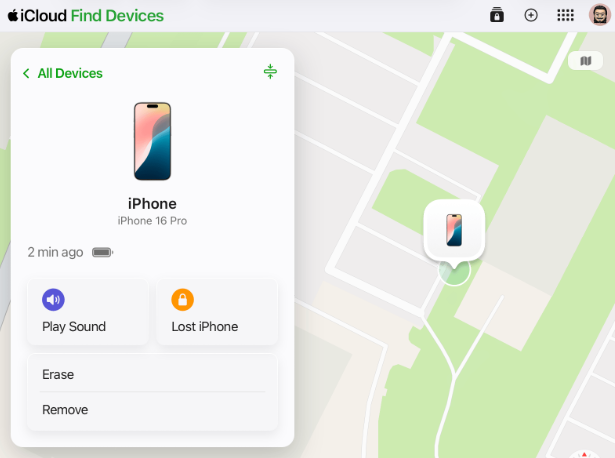
That’s it. Takes them two minutes. Once they do that, the lock is gone.

FoneLab Helps you unlock iPhone screen, Removes Apple ID or its password, Remove screen time or restriction passcode in seconds.
- Helps you unlock iPhone screen.
- Removes Apple ID or its password.
- Remove screen time or restriction passcode in seconds.
When this works:
- You can actually reach the previous owner
- They’re willing to help
When it fails:
- The seller ghosted you (like mine did)
- You bought it from a shop that doesn’t know the original owner
Part 2: Contact Apple Support to Remove iPhone Activation Lock
After the Facebook Marketplace seller blocked me, I thought I was out of luck. But a friend told me: if you have the receipt, Apple can help.
I didn’t have a receipt for that iPhone 12 – cash deal, no receipt – but I’ve since used this method for an iPhone I bought refurbished.
Apple offers two ways to request Activation Lock removal: by phone or online. I’ve used both – here’s how they work.
Option 1: Call Apple Support
Step 1Call Apple Support and explain you’re the legitimate owner but the device is locked to someone else’s Apple ID.
Step 2Provide the device’s serial number (found on the original box or in Settings if accessible).
Step 3Upload or email proof of purchase (receipt must show the serial number or IMEI).
Step 4After verification, Apple starts the removal process. It usually takes 24-48 hours.
Option 2: Submit an Online Request
Step 1Go to al-support.apple.com.
Step 2Fill out the request form with your name, email, and phone number.
Step 3Enter the device details – model, serial number or IMEI.
Step 4Upload proof of purchase – a photo of the receipt showing the serial number or IMEI.
Step 5Submit and wait. Apple usually responds within 3-5 days.
Important notes:
- Apple will only remove Activation Lock if you have valid proof of purchase
- The receipt must show the device’s serial number or IMEI
- If the device was reported lost or stolen, Apple won’t unlock it
Part 3: Use FoneLab iOS Unlocker to Remove iPhone Activation Lock
This is the method that actually saved me with that iPhone 12.
After the seller blocked me, I had no receipt, no way to contact them, and I was out $400. I spent two days scrolling through sketchy forums. Most of the “free bypass” tools were obvious scams – one asked for my credit card, another tried to install malware.
FoneLab Helps you unlock iPhone screen, Removes Apple ID or its password, Remove screen time or restriction passcode in seconds.
- Helps you unlock iPhone screen.
- Removes Apple ID or its password.
- Remove screen time or restriction passcode in seconds.
Then I came across FoneLab iOS Unlocker. Honestly, I was skeptical. I’d tried enough “magic tools” to know most don’t work. But at that point, I had nothing to lose.
What sold me:
- No Apple ID password required – this was the dealbreaker for me
- Works on locked iPhones even with Find My enabled
- No jailbreak – I didn’t want to compromise the device’s security
Here’s how it went:
Step 1I downloaded FoneLab iOS Unlocker on my Windows laptop. Installation was clean – no weird adware, no sneaky checkboxes.
Step 2Opened the program and selected Remove Apple ID. Choose Bypass Activation Lock if you stuck in the locked ID screen.
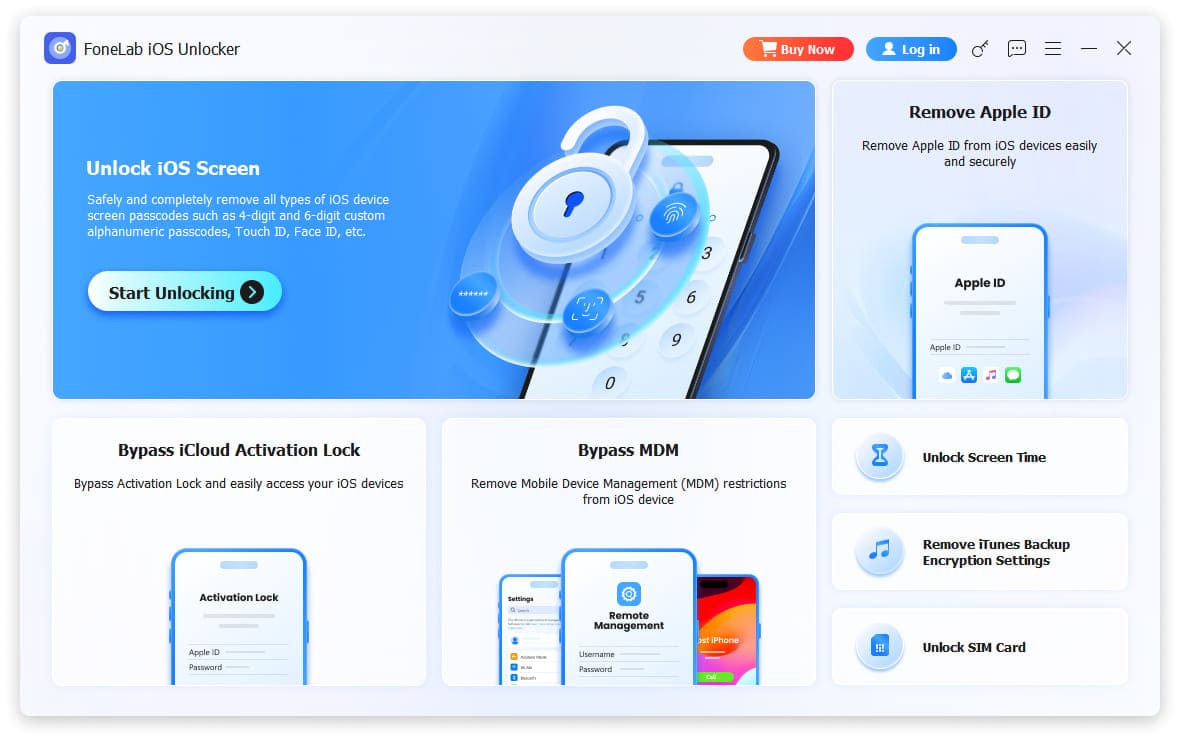
Step 3Plugged the locked iPhone into my computer with a USB cable. The software recognized it immediately.
Step 4Clicked Start Now. The program walked me through jailbreaking iPhone. It sounds technical, but the screen showed me exactly what to do.
Was it worth it? Absolutely. That iPhone 12 is now sitting in my pocket as my daily driver. I’ve been using it for over a year with zero issues.
FoneLab Helps you unlock iPhone screen, Removes Apple ID or its password, Remove screen time or restriction passcode in seconds.
- Helps you unlock iPhone screen.
- Removes Apple ID or its password.
- Remove screen time or restriction passcode in seconds.
What I Learned (So You Don’t Have To)
After going through this on that iPhone 12 – and helping a few friends with theirs – here’s what I’d tell my past self:
1. Always check Activation Lock before buying a used iPhone. Meet at a coffee shop with Wi-Fi. Wipe the phone in front of the seller and go through setup to make sure it’s clean. If the seller won’t let you do that, walk away.
2. Get a receipt. Even a handwritten one with the serial number and seller’s signature can help. I learned this the hard way.
3. Try the previous owner first. It’s free and takes two minutes if they respond. Don’t be shy – most people just forgot to sign out.
4. If you have a receipt, use Apple’s online form. Go to al-support.apple.com. It’s free, it’s official, and it takes a few days. I’ve seen it work twice.
5. If you don’t have a receipt and can’t reach the owner, go straight to FoneLab. Don’t waste time with free “bypass” websites. I almost got scammed twice. Trust me, it’s not worth the risk.
Part 4: FAQs of Jailbreaking iPhone and Bypass Activation Lock
Can you bypass the iCloud Activation Lock online?
Yes. You can get your best iCloud Activation Lock removal tool from iCloudBypassOnline, OfficialiPhoneUnlock, and more. The iCloud unlock price starts from &19.99 or so.
How to jailbreak iPhone?
Back up your iPhone files with iTunes, iCloud or other tools before jailbreaking. Update iPhone to the latest iOS version. Download iOS jailbreak apps on your iPhone, such as Zeon, Hexxa Plus, Apricot iOS, and more. Later, follow the on-screen wizard to jailbreak iOS 26, iOS 27 Beta and earlier versions without a computer
Is it possible to bypass Activation Lock for free?
No. Those free iCloud Activation Lock bypass tools contain tons of scams and malware. Your iPhone might be a brick due to those untrusted iCloud lock bypass tools.
How to disable Activation Lock on iPhone?
To remove the iOS Activation Lock, go to the iPhone Settings app. Choose your name or Apple ID on the display screen. Choose iCloud followed by Find My iPhone. Turn the iCloud Find My iPhone feature off. Enter your iCloud password to move on. After signing out of Find My iPhone, you can factory reset your iPhone to remove the Activation Lock on your iPhone completely.
Final Thoughts
Getting hit with Activation Lock on a phone you just bought is infuriating. You’re holding a device you paid for, and you can’t use it.
But after going through this myself – and watching friends go through the same thing – I can tell you that there’s always a way back in.
The right method depends on your situation:
- Can reach the previous owner? Ask them to remove the device from iCloud (Method 1). Takes two minutes.
- Have proof of purchase? Use Apple’s online support form (Method 2). Takes a few days, but it’s free.
- No receipt, no previous owner? FoneLab iOS Unlocker is what finally worked for me (Method 3).
I’m not here to sell you on any one method. I’m just telling you what actually worked when I was stuck, out $400, and ready to throw a perfectly good iPhone against the wall.
FoneLab Helps you unlock iPhone screen, Removes Apple ID or its password, Remove screen time or restriction passcode in seconds.
- Helps you unlock iPhone screen.
- Removes Apple ID or its password.
- Remove screen time or restriction passcode in seconds.



