
 iPhone Data Recovery
 iOS System Recovery
 iOS Data Backup & Restore
 iOS Unlocker
 iPhone Password Manager
 Location Changer
 Android Data Recovery
 Broken Android Data Extraction
 Android Data Backup & Restore
 Android Unlocker
 FoneTrans for iOS
 iPhone Data Eraser
 iPhone Cleaner
 HEIC Converter
 HyperTrans
 WhatsApp Transfer for iOS
 Mac Sweep
 Data Retriever
 Mac Data Retriever
 Video Converter Ultimate
 Screen Recorder
 Phone Mirror
- Part 1. How to Check for A Trash Folder on Phone App
- Part 2. How to Recover Deleted Voicemail from Carrier-specific App
- Part 3. How to Retrieve Deleted Voicemail via the Carrier's Voicemail System
- Part 4. How to Contact Your Carrier via Call or Webpage
- Part 5. How to Restore Android Voicemail from Google Backup
- Part 6. How to Restore Android Voicemail from Samsung Cloud
- Part 7. Bonus Tip - Recover Android Data with FoneLab Android Data Recovery
- Part 8. FAQs about Recovering Deleted Voicemail on Android
 Recover Android Data Now
Recover the lost/deleted iPhone data including photos, contacts, videos, files, call log and more data from your SD card or device.
Efficient Guide on How to Recover Deleted Voicemail on Android
 Updated by
 Do you need to retrieve deleted voicemail on Android? This concern is not new to many Android users, especially since unintentional deletion is also a common occurrence. So, don’t worry about losing your cherished voicemails, as multiple solutions have already been proven to help users retrieve this specific data. After all, it is a data type that might contain something you can’t easily let go of.
Whether the voicemail carries the voice of a loved one, a professional response from work, or critical information, learning to recover them on your Android device will significantly help. Hence, don’t hesitate to browse each portion below, as we provided efficient guides, including the methods’ essential details and procedures, to assist you in recovering the voicemails safely. Yes, that’s correct! You no longer have to wander around different platforms and try various solutions that might be unreliable. The information below is enough to achieve your goal.


Guide List
- Part 1. How to Check for A Trash Folder on Phone App
- Part 2. How to Recover Deleted Voicemail from Carrier-specific App
- Part 3. How to Retrieve Deleted Voicemail via the Carrier's Voicemail System
- Part 4. How to Contact Your Carrier via Call or Webpage
- Part 5. How to Restore Android Voicemail from Google Backup
- Part 6. How to Restore Android Voicemail from Samsung Cloud
- Part 7. Bonus Tip - Recover Android Data with FoneLab Android Data Recovery
- Part 8. FAQs about Recovering Deleted Voicemail on Android
Part 1. How to Check for A Trash Folder on Phone App
Are you familiar with the Trash or Recycle bin on your Android’s Gallery or Messages app? If so, try looking for a similar section on the Phone app, as it may contain the voicemails that have been recently deleted from your Android. It is the initial and easiest solution you can count on, so give it around a minute, and if a Trash folder is available, you can quickly return the voicemails to your device. Just keep in mind that the deleted items will only be stored in this folder for 30 days.
Stick to the task below to determine how to retrieve deleted voicemail on Android on the Phone app:
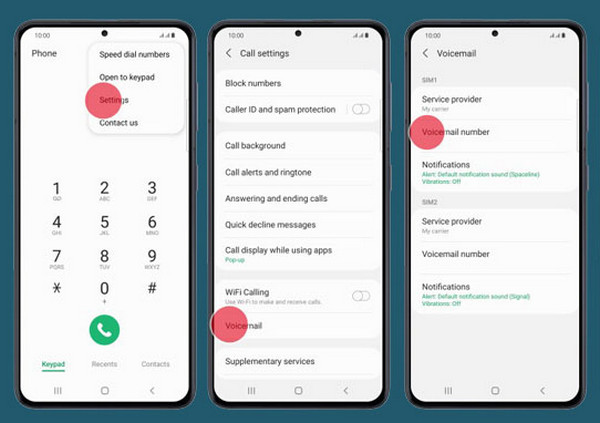
Step 1Head to your Android device’s Phone app and hit the three-dotted button > Settings.
Step 2Next, select Voicemail and find the Trash section to view your deleted voicemails. Then, mark the ones you intend to restore and pick the Recover option.
Part 2. How to Recover Deleted Voicemail from Carrier-specific App
Meanwhile, it will also be possible to recover your Android device’s deleted voicemails through a carrier-specific app. For instance, if your network is Verizon, the Visual Voicemail app will be accessible. For AT&T users, you can utilize AT&T Visual Voicemail, and T-Mobile Visual Voicemail is for T-Mobile. You must only access the designated app for your carrier, and it will provide you with the necessary option to retrieve your deleted Android voicemails.
Act under the directions below to learn how to recover deleted voicemail Android from a carrier-specific app:
Step 1Initialize the carrier-specific app to locate and open Trash or Recently Deleted.
Step 2Afterward, find and select your desired voicemail before picking the Recover option.
Part 3. How to Retrieve Deleted Voicemail via the Carrier's Voicemail System
When a deleted message isn't found in the apps mentioned above, or if you prefer a more universal method, the traditional dial-in voicemail system is an effective option. It is often overlooked, but once you rely on it by activating the system through the Phone app, it will access your voicemail directly from your carrier's central servers, sometimes revealing a different or more comprehensive set of messages, including recently deleted ones. However, you must ensure to listen to the other line carefully and in full. If not, you will quickly miss the opportunity to retrieve your message and might have to repeat the entire process.
Mind the process below to retrieve deleted voicemail Android via the carrier’s voicemail system:
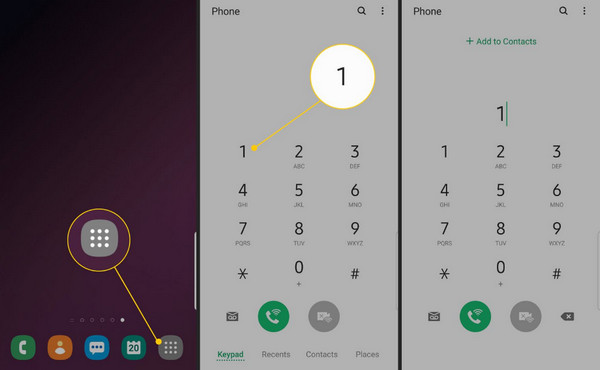
Step 1Long-press 1 on your Phone app’s dial pad, and when prompted, enter your voicemail PIN or password.
Step 2Shortly, you will be given options and instructions by the voice on the other end of the line. Follow the steps until you successfully recover your desired voicemail on the Android.
Part 4. How to Contact Your Carrier via Call or Webpage
You can also escalate your concern to a direct, human-assisted approach by contacting your carrier through a call or their webpage. Unlike the self-service options in apps or dial-in menus, this method will let the representative or customer service handle the retrieval, as they may have access to extensive logs, deeper archives, or specialist tools unavailable to users. As a result, they could potentially recover your deleted voicemails. However, success is never guaranteed, as there are factors like retention policies, the timing of your request, and the specific carrier's protocols.
Use the procedure below to recover deleted voicemail Android by contacting your carrier:
Via Call: Find your carrier’s contact information online and call them to reach customer service. After that, state your concern and abide by their instructions to recover your voicemails.
Via Webpage: Visit your carrier’s official webpage and navigate to its Contact or Customer Service section. Then, chat with a representative and let them help you with the recovery.
Part 5. How to Restore Android Voicemail from Google Backup
On the other hand, a backup from your Google account can also save your Android device’s deleted voicemails. As you know, a backup lets you restore data you have already erased from your phone. So, if the voicemail you want is included in your backup, this will be a good way to restore it.
Obey the instructions below to restore deleted voicemails Android from Google backup:
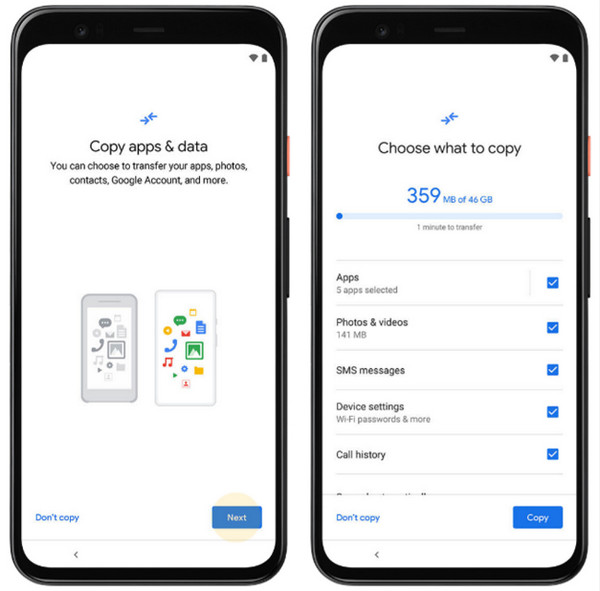
Step 1Since you already have a backup, start your brand new or newly formatted Android device. If it hasn’t been formatted yet, open Settings and tap General management > Reset. After that, choose Factory Data Reset.
Step 2Note that this will erase all your data. Meanwhile, set it up, and when you reach the Copy apps & data screen, select Next and abide by the following prompts and options until you recover your deleted voicemails.
Part 6. How to Restore Android Voicemail from Samsung Cloud
Another backup option is Samsung Cloud. It works the same way as the previous method; the only difference is that this cloud service is only available for Samsung users.
Understand the directions below to restore deleted voicemail on Android by learning how to use Samsung Cloud:
Step 1On your Android Settings, select Accounts and backup, and choose Restore data under the Samsung Cloud section.
Step 2Choose the backup containing your voicemails when the options appear. Then, select the data type before clicking Restore at the bottom.

Part 7. Bonus Tip - Recover Android Data with FoneLab Android Data Recovery
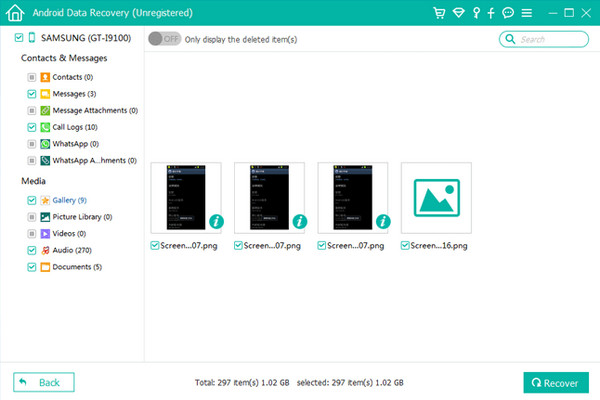
Besides voicemails, you may also need to perform an Android data recovery process for your other deleted files. In this case, FoneLab Android Data Recovery is strongly suggested. It will help you recover different deleted data, whether you have lost it because of accidental deletion, a virus attack, or other scenarios. Another great news is that it allows you to preview the files before recovery, ensuring you will be able to retrieve the correct data.
With FoneLab for Android, you will recover the lost/deleted iPhone data including photos, contacts, videos, files, call log and more data from your SD card or device.
- Recover photos, videos, contacts, WhatsApp, and more data with ease.
- Preview data before recovery.
- Android phone and SD card data are available.
Perceive the secure operation below as a model to recover deleted Android data with FoneLab Android Data Recovery:
Step 1On the FoneLab Android Data Recovery webpage, tick Free Download to obtain its installer. Next, set up the file to install the tool and launch the interface, presenting various features. Pick Android Data Recovery from there, then link your device via a USB cable.
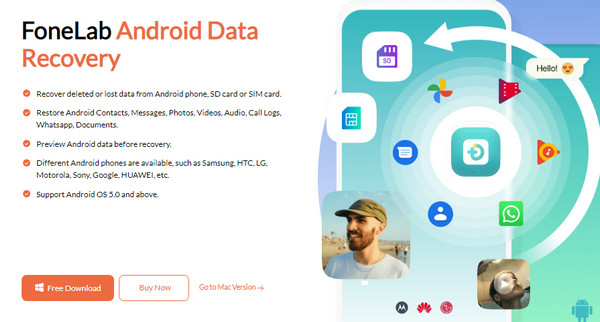
Step 2Let the program scan your device’s content afterward, and when your data is presented, open the section of the data type you wish to recover. From there, mark your desired files until everything you plan to recover is selected. Finally, choose Recover below.
Part 8. FAQs about Recovering Deleted Voicemail on Android
Is it possible to recover permanently deleted voicemails?
Yes, it is possible. Although the deleted voicemails have already disappeared from your device, you can still try the strategies in this post to retrieve them.
How long are Android voicemails saved?
Voicemails are automatically saved in the Trash section for 30 days after deletion.
Retrieve your Android device’s voicemails with ease with the professional recovery techniques above. Afterward, install and let FoneLab Android Data Recovery help you with future recovery processes.



