
 iPhone Data Recovery
 iOS System Recovery
 iOS Data Backup & Restore
 iOS Unlocker
 iPhone Password Manager
 Location Changer
 Android Data Recovery
 Broken Android Data Extraction
 Android Data Backup & Restore
 Android Unlocker
 FoneTrans for iOS
 iPhone Data Eraser
 iPhone Cleaner
 HEIC Converter
 HyperTrans
 WhatsApp Transfer for iOS
 Mac Sweep
 Data Retriever
 Mac Data Retriever
 Video Converter Ultimate
 Screen Recorder
 Phone Mirror
- Part 1. How to Track an iPhone Location from Another iPhone with Find My App
- Part 2. How to Track Another iPhone with a Browser
- Part 3. How to Track an iPhone Location from Another iPhone with Friends
- Part 4. Fake iPhone Location with FoneLab Location Changer
- Part 5. FAQs about How to Track an iPhone Location from Another iPhone
How to Track an iPhone Location from Another iPhone Easily
 Updated by
 Due to the small size of the iPhone, some users tend to misplace it at home. In some worst-case scenarios, the iPhone of some users tends to be lost or stolen. This issue is the most stressful you could ever experience.
Here is the good news! Do you know that you can track your iPhone with another iPhone? That’s right! This article will guide you on how to track an iPhone location from another iPhone. The 3 easy ways about the process are posted below.

Guide List
- Part 1. How to Track an iPhone Location from Another iPhone with Find My App
- Part 2. How to Track Another iPhone with a Browser
- Part 3. How to Track an iPhone Location from Another iPhone with Friends
- Part 4. Fake iPhone Location with FoneLab Location Changer
- Part 5. FAQs about How to Track an iPhone Location from Another iPhone
Part 1. How to Track an iPhone Location from Another iPhone with Find My App
Apple cares for the safety of your iPhone and its data. Find My is a free service, app, or feature that allows iPhone users to track their devices when misplaced, lost, or stolen. Besides the iPhone, Find My will also enable you to track your Mac, iPad, and Apple Watch. Find My can track your iPhone to another iPhone even when powered off, offline, or when reset attempts are made.
This service uses the GPS and internet connection to update the iPhone's location. It has different modes that can help you track the iPhone.
- ● Play a Sound - This feature will play a tone from your iPhone to know its location. It is commonly used when the iPhone is misplaced.
- ● Erase Device - The feature allows you to erase the iPhone remotely. This procedure is commonly performed to safeguard your data and secure it when stolen.
- ● Lost Mode - It allows you to display a custom message on the iPhone screen. It disables Apple Pay on the iPhone.
How to track an iPhone location from another iPhone? The steps of the Find My iPhone app to do this are posted below.
Step 1Step 1. Please open the Find My app on your iPhone. After that, sign in with the Apple ID from another iPhone when the Apple ID and password are asked. Then, please tap the Devices button at the bottom center of the screen. The associated devices will appear in the list. Please select the iPhone that is lost, misplaced, or stolen.
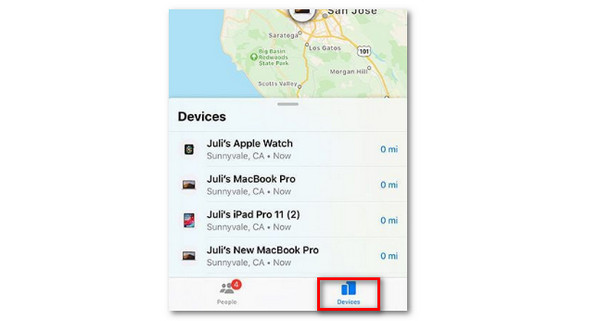
Step 2Step 2. The features that can be used for the iPhone will be shown. You can use the Play Sound and Directions button at the top. The iPhone location will be revealed afterward.

Part 2. How to Track Another iPhone with a Browser
Find My has a website that iCloud offers, which can also be used to track your iPhone with another iPhone. The Find My website has almost the same function as the app. However, ensure that the iPhone used for tracking another iPhone is yours, your family's, or your friends’. The reason is that someone might use the account if the iPhone is not yours.
However, there are some limitations to the Find My website. This website cannot track the AirTag’s precision finding. Also, it cannot be used for offline finding map features. Please use the steps below to use the iCloud Find My website to track your iPhone with another iPhone.
Step 1Step 1. Search for the iCloud Find My website. After that, tap the Sign In button in the center. Later, enter your Apple ID and password. Then, the map screen will be shown. Please choose the All Devices section and select the iPhone you want to track.
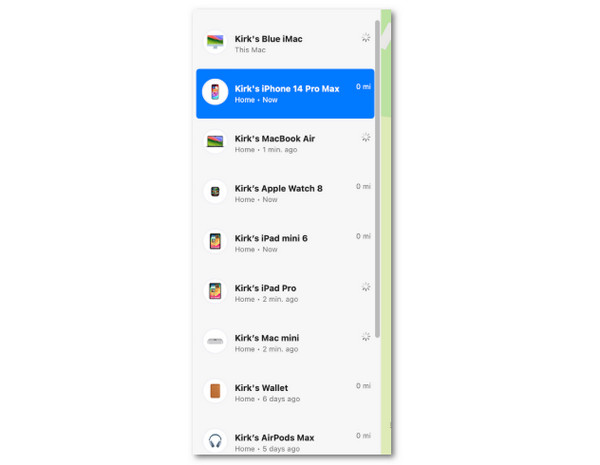
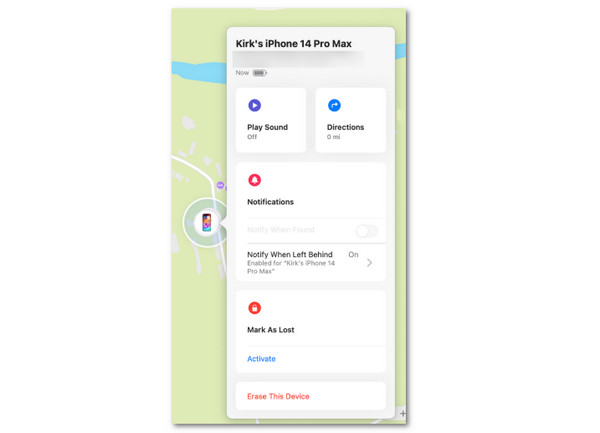
Step 2Step 2. The associated feature will appear. Please select the Directions or Play Sound button from the list to track your iPhone.
Part 3. How to Track an iPhone Location from Another iPhone with Friends
Find My allows you to share your iPhone location to your friend’s. This feature allows you to share your real-time location with your friends and family. However, this feature can only work when the iPhone is linked before it is lost or misplaced. Please follow the procedure below to use your friend’s iPhone to locate yours.
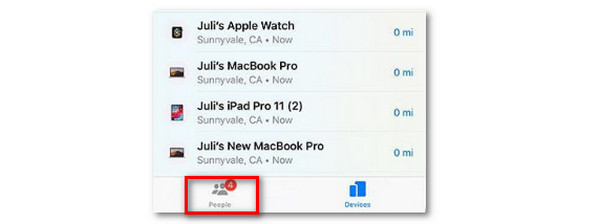
Open the Find My app on your friend's iPhone. After that, please ensure that the Apple ID is signed in. Then, the map screen will appear. Please tap the People button at the bottom left. Locate your name from the list and tap the iPhone name. Later, tap the Play Sound or Directions button. Now, you can finally track your iPhone with your friend’s iPhone.
Part 4. Fake iPhone Location with FoneLab Location Changer

FoneLab Location Changer enables you to modify locations on iPhone, iPad or iPod Touch easily.
- Set your location on iOS devices to anywhere accordingly.
- Move your iPhone with your desired routes with or without starting and ending spots.
- Various iOS devices are supported.
Sometimes, you might not want someone to track your iPhone location. It commonly happens when you want to hide your area from your friends or family. FoneLab Location Changer is the best! This tool can modify your iPhone's location in a few clicks. It also has 3 movement modes for options. It includes One-stop Mode, Multi-stop Mode, and Joystick Mode. Know how to change location on iPhone with the steps below.
Step 1Step 1. Visit the official website of FoneLab Location Changer. After that, choose the Free Download button from the screen. Later, set up, install, and open the tool on your computer.

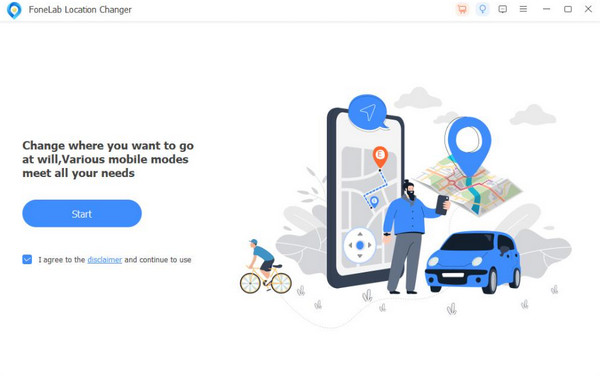
Step 2Step 2. Please plug the iPhone into the computer and click the Start button on the left. After that, the map screen will appear.
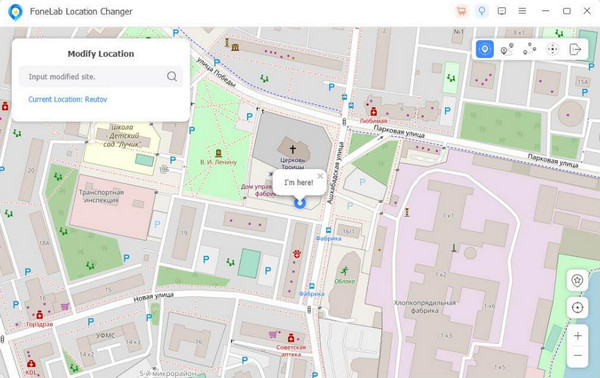
Step 3Step 3. Go to the Modify Location window at the top left. Then, search for your preferred location and click the Modify button to change the iPhone location using the tool.
Part 5. FAQs about How to Track an iPhone Location from Another iPhone
How do I check someone else's iPhone location?
You can only check someone’s iPhone location if they shared it with you. You can open the iPhone Find My app as the start of the process and perform the same steps in Part 3. You can check the account if you have the correct password and account.
Can someone track your iPhone location without you knowing?
By default, someone cannot track your iPhone without you knowing. It is due to the security features of the mentioned device. However, this issue can still occur, especially when the tracker is a professional who possesses advanced skills.
Can you track an iPhone location by phone number?
Tracking the iPhone location using a phone number is not ideal. Some online tools or applications allow this process, but their success rate is low. The reason is that phone numbers are not registered in some countries.
This article is all about how to track an iPhone location from another iPhone. The 3 most recommended processes are here. FoneLab Location Changer can be used to change the iPhone's location quickly. You can also simulate routes using it. Download the tool on your computer to change your iPhone location conveniently.



