If You Have a Registration Code
If you have received a registration code in your FoneLab order confirmation email, please follow the relevant guide below.
Scenario 1: You purchased from fonelab.com or non-official third-party website, and your software’s registration window shows a registration code in the field.
Step 1. Click the Key button in the program interface.
Step 2. Enter the email address used for purchase and the registration code from your confirmation email.
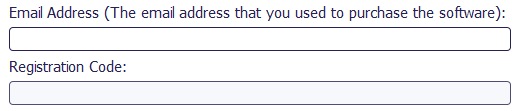
Step 3. Click Register to unlock your purchased features.
Scenario 2: You purchased from fonelab.com, but the registration window does not show a registration code field.
Step 1. After launching the software, click Register or a Key.
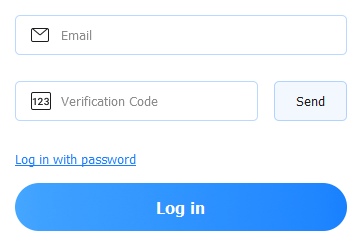
Step 2. Enter your purchase email address, then click Send Code to receive a verification code by email. Enter that code.
Step 3. Click Log In to activate your license automatically.
Scenario 3: You purchased from a non-official third-party website, and the registration window does not show a registration code field.
Step 1. Click the Key button in the program.
Step 2. Log in using your purchase email address and the verification code sent to that email.
Step 3. After logging in, click the Key button next to your profile icon (top corner), and click the blurred Activate link to proceed to the registration code activation screen.
Step 4. Enter your email address and registration code, then click Activate to enable your VIP benefits.
If You Do NOT Have a Registration Code
Scenario 4: You purchased from fonelab.com, did not receive a code, but the program shows a registration code field.
Step 1. Ensure you have the latest version of the software from our official website.
Step 2. Open the program and click the Key button.
Step 3. Log in with your purchase email and the verification code sent to that email. Your license will be activated automatically.
Scenario 5: You purchased from fonelab.com, did not receive a code, and the program does not show a registration code field.
Step 1. Click Key button in the software interface.
Step 2. Enter your purchase email address and the verification code sent to that email.
Step 3. Click Log In to activate your full version immediately.
Need Help?
If you encounter any issues during activation, please contact our Support Team at support@fonelab.com or visit our Contact Center for further assistance.

 iPhone Data Recovery
 iOS System Recovery
 iOS Data Backup & Restore
 iOS Unlocker
 iPhone Password Manager
 Location Changer
 Android Data Recovery
 Broken Android Data Extraction
 Android Data Backup & Restore
 Android Unlocker
 FoneTrans for iOS
 iPhone Data Eraser
 iPhone Cleaner
 HEIC Converter
 HyperTrans
 WhatsApp Transfer for iOS
 Mac Sweep
 Data Retriever
 Mac Data Retriever
 Video Converter Ultimate
 Screen Recorder
 Phone Mirror


